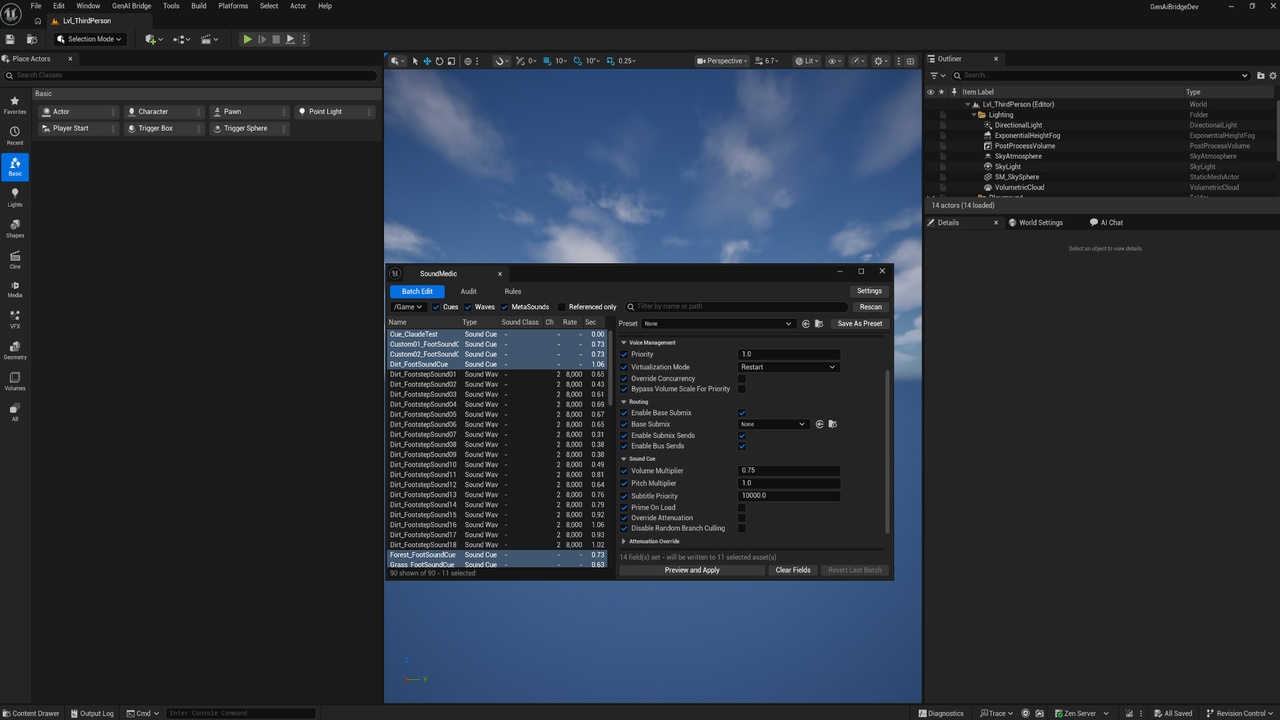
Description
SoundMedic is audio settings management for a whole project, not one asset at a time. Select
any number of Sound Cues, Sound Waves and MetaSound Sources, fill in only the fields you care
about, and write them all in a single move. Mixed values show as a dash. Fields you never touch
are never written.
If you have ever opened forty cues in a row to tick Enable Spatialization, or gone looking for
which waves somebody left on Force Inline, this is that afternoon reduced to about a minute.
### Reaches the settings that are hardest to change in bulk
Enable Spatialization lives inside a Sound Cue's inline Attenuation Override — a nested struct,
which is exactly the shape of property that generic bulk-editing tools handle worst. SoundMedic
addresses every field by property path, so all 25 attenuation settings edit like any other field:
spatialization method, attenuation function and shape, falloff distance, occlusion and its trace
channel, reverb send, air absorption, listener focus, 3D stereo spread, non-spatialized distance,
priority attenuation, AudioLink.
53 fields across seven groups — Sound, Voice Management, Routing, Sound Cue, Attenuation
Override, Wave Memory and Wave Sound. Sound class, attenuation asset, source effect chain,
priority, virtualization mode, concurrency override, submix and bus routing, volume and pitch
multipliers, prime on load, loading behaviour, compression type and quality, sample rate quality,
sound group, looping, ambisonics.
### Nothing is written until you have seen it
Press Preview and Apply and SoundMedic reads the current value off every selected asset and builds
the exact change list: one row per property that would actually move, showing the asset, the
field, and the value before and after. Assets that already hold what you set are counted as
already correct. Assets none of your fields can reach are counted as not applicable, so a batch
that does less than you expected always has a visible reason. Export the whole list to CSV.
The entire batch is written inside one undo transaction, so Ctrl+Z puts every asset back in a
single step — and a Revert Last Batch button does the same thing explicitly.
### Decide it once, keep it
Presets are assets that store only the fields that were set when you saved them. A preset
called 3D World SFX carrying spatialization, a falloff distance and a sound class will not touch
compression, looping or routing on the way past — which is what makes it safe to run over a folder
that also holds things somebody tuned by hand.
Rules bind a preset to a slice of the content tree — a path prefix, a name substring, or both.
Anything under /Game/Audio/UI gets the UI preset. Then one Re-apply Rules button puts the whole
project back in line after three months of imports by people who did not know what had been
decided. That is the difference between a tool you use once and a tool you use every week.
### An audit that finds what nothing else reports
Nine checks over every sound in scope, sorted worst-first:
- Silent cue — no nodes connected, so it plays nothing at all. Nothing else in the editor tells you.
- Spatialized multichannel source — a 3D cue playing a stereo wave, which cannot be placed at a point
- Wave Player with no wave — a dead branch that, behind a Random node, is an intermittent silence almost impossible to catch by ear
- Missing Sound Class — no mix can duck, mute or scale it, so it stays loud when everything else gets out of the way
- Oversized Force Inline and Oversized Retain On Load — long waves held resident that never leave memory
- No attenuation — a cue that plays 2D at full volume everywhere
- High sample rate and Loudness outliers against your project's own median
Only the two loading-behaviour findings auto-fix, because only they have a single correct answer.
The rest hand you every affected asset already selected in the batch editor, which is the honest
version of a fix-all — there is no way to guess which sound class a cue was meant to be in.
The audit also runs headless as a commandlet for a build step, and exits non-zero only on a
Critical finding, so CI can fail on a silent cue without a human reading the log.
### Built to be fast and to be trusted
The asset list is read straight from the asset registry, so a project with twelve thousand sounds
opens instantly and nothing is loaded until you select it. Sort by channels, sample rate,
duration, loudness or sound class. Filter by name, path, or Referenced only. MetaSound Sources
appear alongside cues and waves without the plugin taking any dependency on the MetaSound plugin —
so a half-converted project is exactly the project this helps most.
SoundMedic refuses to write a package that source control says somebody else has checked out, and
a missing asset registry tag is shown as a dash rather than as a zero, because "not known without
loading" and "genuinely zero" are different answers.
### Ideal for
Any project past the first hundred audio assets. Especially VR and open-world games, where
spatialization and attenuation have to be consistent across everything in the world; and any team
with an audio pass scheduled late, where the whole job is making a folder of imports match a
decision somebody already made.