


描述
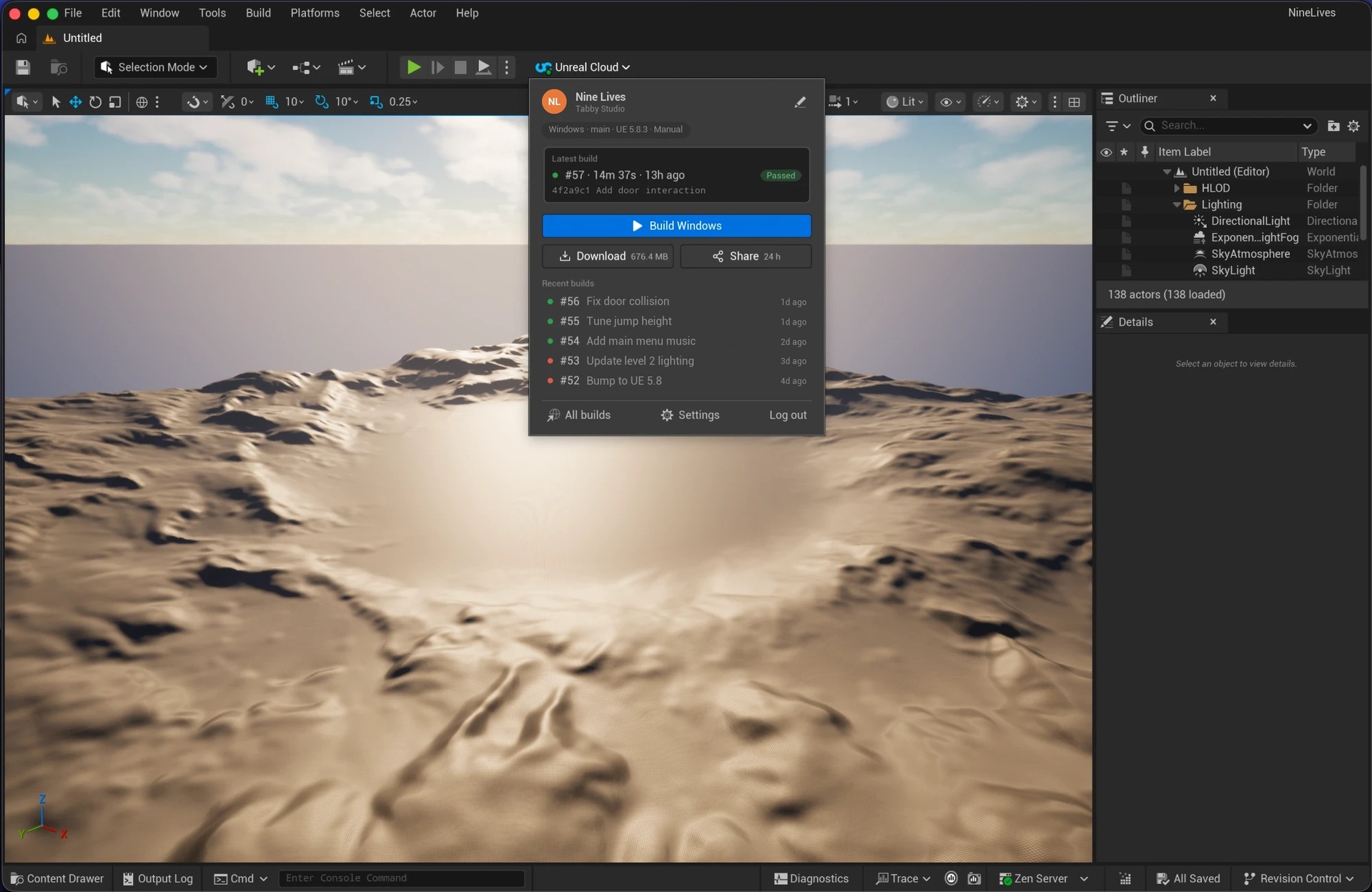
Unreal Cloud builds your game in the cloud: connect a GitHub repo or a Perforce server, and it compiles, cooks and packages your project on the Unreal Engine version you pick, then runs your automation tests. This free plugin brings it into the editor.
From the Level Editor toolbar you can:
See your latest build at a glance: the Unreal Cloud button shows its status with a coloured dot, and "Running #57…" while a build runs.
Start a build of your preset with one click, and get a notification when it passes or fails.
Download the latest passed build, with progress, Cancel, and Retry that continues where it stopped. Then open it with Show in folder.
Share a build with a link anyone can download for 24 hours, no account needed.
See your recent builds, and open any of them in the dashboard.
Set up once for the whole team: log in through your browser, then pick your studio, project and preset. The choice is saved to Config/DefaultUnrealCloud.ini, so teammates only need to log in.
Requires an Unreal Cloud account: sign up at unrealcloud.io. Starting builds needs an active subscription for your studio. Documentation: https://docs.unrealcloud.io/editor-plugin
Technical information:
Code modules: UnrealCloud (Editor)
Number of Blueprints: 0
Number of C++ classes: 2 (project settings and per-user settings)
Network replicated: No
Supported development platforms: Windows, macOS
Supported target build platforms: editor only, not included in packaged games
Supported engine versions: 5.4, 5.5, 5.6, 5.7, 5.8
Privacy: the plugin connects over HTTPS to Unreal Cloud (api.unrealcloud.io) and to WorkOS (api.workos.com) for login, and downloads builds from the links Unreal Cloud provides. It sends no analytics or telemetry. Your login is stored only on your computer: in the Keychain on macOS, and encrypted for your Windows user on Windows. Privacy policy: https://docs.unrealcloud.io/site-policy/privacy-policy