
Description
Runtime FBX Animation Importer lets you load any FBX animation file from disk directly into Unreal Engine skeletal meshes at runtime — no editor tools, no pre-importing. Whether you're building a character customization system, a modding platform, or a tool that lets players bring their own animations, this plugin handles it all out of the box.
Thread-safe with automatic bone name matching — FBX files exported from Blender, Maya, 3ds Max, Mixamo, and any major 3D software are supported. Concurrent imports from multiple instances are automatically queued.
Works with any Skeletal Mesh — humanoids, creatures, mechanical rigs, vehicles, props, or any custom skeleton.
Features:
Import any FBX animation file from disk at runtime
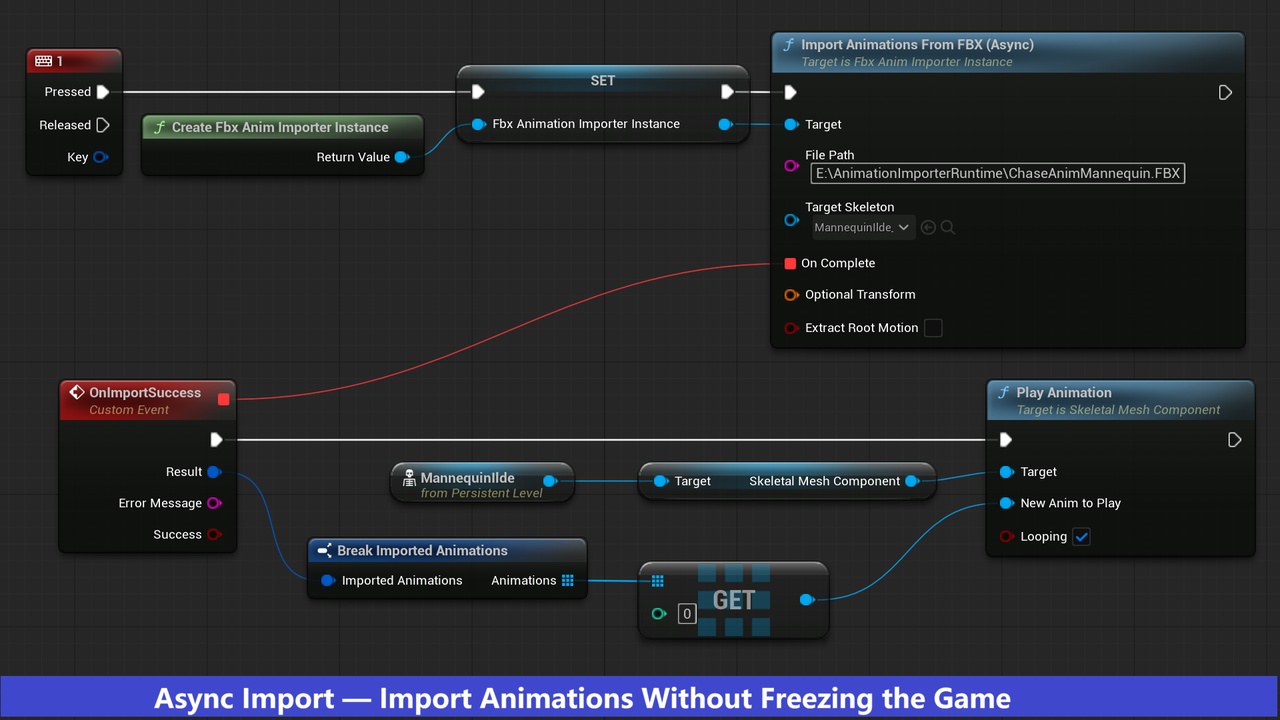
Async import — non-blocking, calls delegate on game thread when done
Sync import — blocking, returns result directly for sequential workflows
Thread-safe — all import operations run on a single dedicated worker thread
Concurrent imports from multiple instances automatically queued
Supports FBX files with and without skin/mesh data
Multiple animation stacks per FBX file all imported and returned
Built-in helper functions — find animations by name and check import status
Optional Transform parameter to correct axis and scale per-import
Root motion support
Works in Editor, PIE, and packaged builds
Demo build and sample project included
Important: This plugin imports animation data only. It works with any FBX file — animation only, or mesh with animation combined. The target Skeletal Mesh and its Skeleton must exist in your Unreal Engine project before packaging. The plugin applies the imported animation directly onto your existing Skeletal Mesh at runtime.