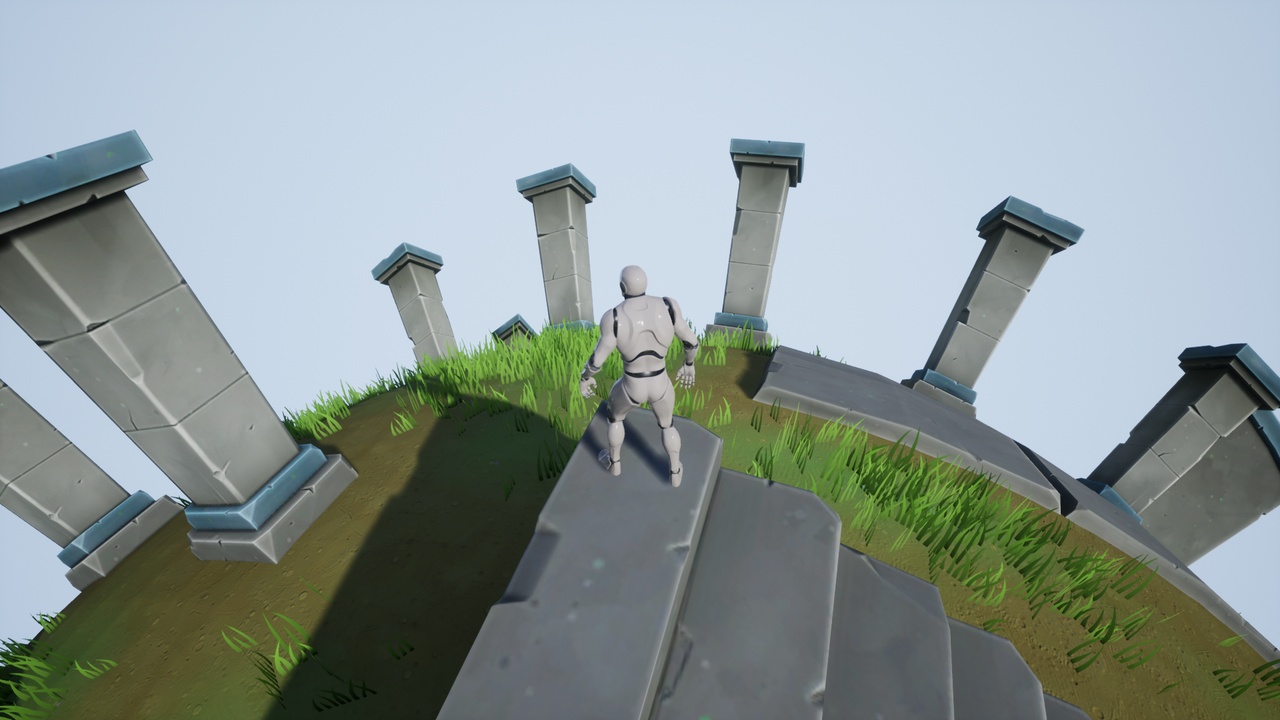


説明
Preview: https://youtu.be/HVSlC3Dm624
User Guide: Spherical Shader User Guide
UPDATE: This shader affects the rendering of standard polygonal mesh and is fully compatible with UE4. However, it has known issues with Nanite and is NOT fully compatible with UE5.
Description:
Spherical Shader is a vertex shader that allows you to create the illusion of a spherical world by simply using a Material Function and a Blueprint Component. The curvature is controlled by a Material Parameter Collection, but its parameters do not need to be directly set. They are controlled by the Blueprint Component. (Note: This is a vertex shader which affects the way vertices are rendered and does not affect collision or physics.)
Please note:
The spherical effect only calculates a hemisphere, the top half of the sphere based on where the player is standing. This is a limitation of the math used and prevents things far away on the horizon from wrapping under and back around behind the player.
Keep in mind that the actual world, gameplay space and collision, remains flat. This shader simply offsets the vertices at render time to make them appear as if spherical from the player's perspective.
This material function affects vertices only and not collision or physics. As such, certain gameplay mechanics, such as those using line traces from the camera, might not appear to match up with geometry when this shader is used.