









描述
Build Unreal Engine menus, HUDs, inventories and in-world UI with HTML, CSS and JavaScript, then change them by clicking on the screen. OrionBrowser renders Chromium-quality interfaces inside UMG, connects them to Blueprints or C++, and ships with WebUIStudio: a desktop studio that previews every screen without starting the game and sends your marked-up changes to Codex or Claude in one click.
Try it before you buy: Playable demo for Windows (Google Drive) · 百度网盘
Documentation · Discord community · Example project
Unreal Engine 5.8 · Windows 64-bit · Blueprint and C++ · full C++ source included
Web-grade motion, effects and 3D
CSS animations, spring motion, gradients, masks, SVG, Canvas and WebGL 2: anything Chromium 149 draws, made quickly with ordinary web code
Transparent pages blended over the game, for glass panels and HUDs over a live level
three.js scenes on a transparent canvas. The sample includes a procedural pavilion with shadows and bloom, a 340,000-star galaxy and a ray-marched black hole
Effects with full source: holographic foil, lens flare, flowing borders, laser and neon
Local video with sound (WebM with VP9 and Opus)
Vue 3, TypeScript and Vite template with live updates while you edit
WebUIStudio: see it, click it, change it
A desktop app that opens from the editor toolbar and runs your real UI source without starting the game.
Live preview of every page, state and language, from 1280 × 720 to 3440 × 1440
Inspect any control: id, size, source file and line, matched styles
A log of every message between the page and Unreal
Adjust text, color, font, size and spacing live, with a screenshot of your game behind the UI
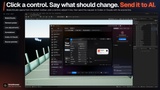
One-click AI editing with Codex or Claude
Annotate and send. Mark a control or an area, write what should change, and click Send. A screenshot and the exact source line travel with it.
New interface from a description. The agent writes and builds the page, and writes the C++ host or lists the Blueprint steps.
Isolated drafts. The agent works on a copy. Studio runs the type check, tests and build, shows the diff beside a live preview, then applies or undoes it.
Creation Skill included. A rule set that teaches any coding agent the bridge, lifecycle, controls and build checks.
AI is optional and uses your own Codex or Claude account. A packaged game never depends on it.
Connected to your game with Blueprint or C++
Orion WebUI widget for UMG, with a Designer preview
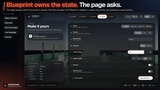
The page sends events and requests that you accept, reject or defer. Unreal publishes state with revisions that the page acknowledges
Blueprint only, C++, or both, with more than 190 Blueprint-callable functions
Native Surface: Render Targets, scene captures and UI materials drawn by Unreal inside the web layout
Runtime images for avatars and generated icons, and a separate browser widget for remote websites
Packaged UI runs offline, with no web server
Fonts, localization and sound from Unreal
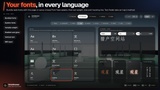
Fonts. Bundle web fonts with the page, or serve Unreal Font Face assets through a Font Manifest, with separate body and heading fonts.
Localization. A Text Catalog sends UI strings through Unreal's localization pipeline, and the page switches language live, without a reload. IME text entry works.
Sound. Hover and click sounds are played by Unreal from a per-control policy, with no audio code in the page.
CommonUI, gamepad, keyboard and mouse
Orion WebUI Activatable Widget: push a web screen onto your CommonUI stack with its input mode, back handling and named actions
Gamepad navigation inside the page: the D-pad or left stick moves focus, accept clicks, back goes back
Input prompts switch between keyboard hints and gamepad glyphs when the player changes device
WorldUI: interface that follows the world
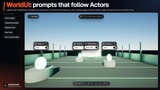
Labels, health bars and interaction prompts anchored to Actors and projected onto the screen
One overlay page per player draws every element, with no browser per Actor
Distance culling, occlusion checks, screen-edge clamping and distance scaling
Interactions are checked for visibility and range before your Blueprint decides
Engineered for performance
InstantScreen. Screens share one resident browser and are revealed only when their state, resources and first frame are ready.
Lifecycle-aware pages. Animation, WebGL and video pause when a screen is covered, and hidden browsers stop rendering.
Adaptive frame rate that follows the game, with a render scale per interface.
Measure it yourself with the diagnostics overlay, Chrome DevTools and the benchmark scene in the sample.
Orion Station sample
A Blueprint-only sample game with a menu, inventory, saved settings, a collection mission and WorldUI, plus ten showcase rooms, four themes and two languages. All Blueprints and the full frontend source are included. The playable demo above is this sample, packaged.
Requirements
Unreal Engine 5.8 on Windows 64-bit, for development and packaged games.
First use: click the WebUIStudio toolbar button to download two companion programs (about 160 MB) from the publisher's GitHub release: the runtime browser helper and WebUIStudio. Files are verified by SHA-256, nothing downloads automatically, and an offline import is documented.
Packaging needs the Visual Studio C++ toolchain and the Windows SDK. Building web pages needs Node.js 22 LTS or newer.
AI features need your own Codex or Claude desktop app and account.
InstantScreen needs a small C++ host. A web page cannot blur or read the game image behind it.
What you get
Full C++ source for every module, the WebUIStudio app, the AI Creation Skill, the web project template, and a manual in English and Simplified Chinese with four tutorials.
Start with Orion Station, restyle it, and wire it to your own game.