


Descrizione
Scan Smarter. Remove Clutter. Keep Only What Your Game Actually Needs.
Stop wasting hours manually searching through thousands of assets, abandoned prototypes, imported packs, demo content, and forgotten Blueprint logic.
Advanced Project Cleaner Pro is a powerful Unreal Engine editor tool that analyzes your entire project, explains how content is used, and identifies verified cleanup candidates through a safety-focused workflow.
Instead of relying only on simple reference counts, the plugin starts from real runtime entry points and follows complete dependency chains throughout your project.
The result:
Less project clutter.
Cleaner Blueprints.
Smaller backups and source-control repositories.
More confidence before removing unused content.
Why Advanced Project Cleaner Pro?
Large Unreal Engine projects accumulate unused content quickly.
Imported asset packs can contain hundreds or thousands of meshes, materials, textures, animations, demo maps, Blueprints, audio files, effects, and supporting assets. Old prototypes remain forgotten, while unused variables, functions, and disconnected node chains survive long after their original features have been removed.
Finding all of this manually is slow, repetitive, and risky.
Advanced Project Cleaner Pro analyzes what your game can actually reach at runtime and separates every result into clear categories:
• Used
• Protected
• Review Required
• Safe to Clean
Every classification includes detailed evidence, so you can understand exactly why an item was kept, blocked, or approved for cleanup.
More Than a Basic Reference Checker
Traditional reference tools can make an entire unused asset pack appear active simply because its files reference one another.
Advanced Project Cleaner Pro goes further.
The analysis begins from authoritative runtime roots, including Project Settings, runtime maps, GameModes, World Settings, framework classes, placed Actors, spawned classes, components, widgets, Blueprint references, and runtime asset dependencies.
This allows the plugin to distinguish between content that is genuinely reachable during gameplay and content that only exists inside an otherwise unused feature pack.
An unused Character Blueprint, Skeletal Mesh, Animation Blueprint, animation set, materials, and textures can therefore remain together as one complete cleanup group instead of being incorrectly classified as used.
Key Features
Runtime-Root Reachability Analysis
Traces project usage from real gameplay entry points instead of treating every internal reference as proof of runtime use.
Complete Asset Dependency Tracking
Analyzes connected Unreal Engine content, including:
• Actor Blueprints
• Other Blueprint assets
• Maps and Worlds
• Static and Skeletal Meshes
• Materials and Textures
• Animations and Rigs
• Animation Blueprints
• Audio and MetaSounds
• Niagara and VFX assets
• UI, Fonts, and Media
• Data Assets
• Data Tables and Curves
• Cinematics
• AI and State Trees
• Input Assets
• Physics, Foliage, and Landscape content
• Redirectors
• Components
• Related dependencies
Unused Blueprint Content Detection
Finds Blueprint content that is no longer used, including:
• Member Variables
• Local Variables
• Functions
• Macros
• Event Dispatchers
• Timelines
• Components
• Empty Private Functions
• Disconnected Node Islands
Double-click a finding to open the owning Blueprint and focus the affected graph or nodes.
Atomic Cleanup Groups
Internally connected unused assets remain grouped together.
This helps prevent incomplete cleanup operations where only part of an unused feature pack is removed while dependent files are left behind.
Detailed Classification Evidence
Every finding can explain its status through information such as Reason, Runtime Root Path, Dependency Chain, Evidence, Risk, Confidence, Review Blockers, Group Boundaries, Verification Results, and Recommended Cleanup Action.
You always know why an asset is Used, Protected, Review Required, or Safe to Clean.
Quarantine and Recovery
Move verified cleanup groups into recoverable quarantine sessions before deleting them permanently.
Quarantine sessions store recovery information so affected content can be restored to its original location when necessary.
Verified Permanent Deletion
Permanent cleanup is protected by additional validation, including:
• Fresh preflight checks
• Blueprint compilation
• Save validation
• Reference verification
• Group revalidation
• Final live safety checks
Only the exact verified set is processed.
Automatic Blueprint Protection
Blueprint cleanup operations use safeguards such as backups, compile comparison, transaction journaling, diagnostic checks, and rollback when new problems are detected.
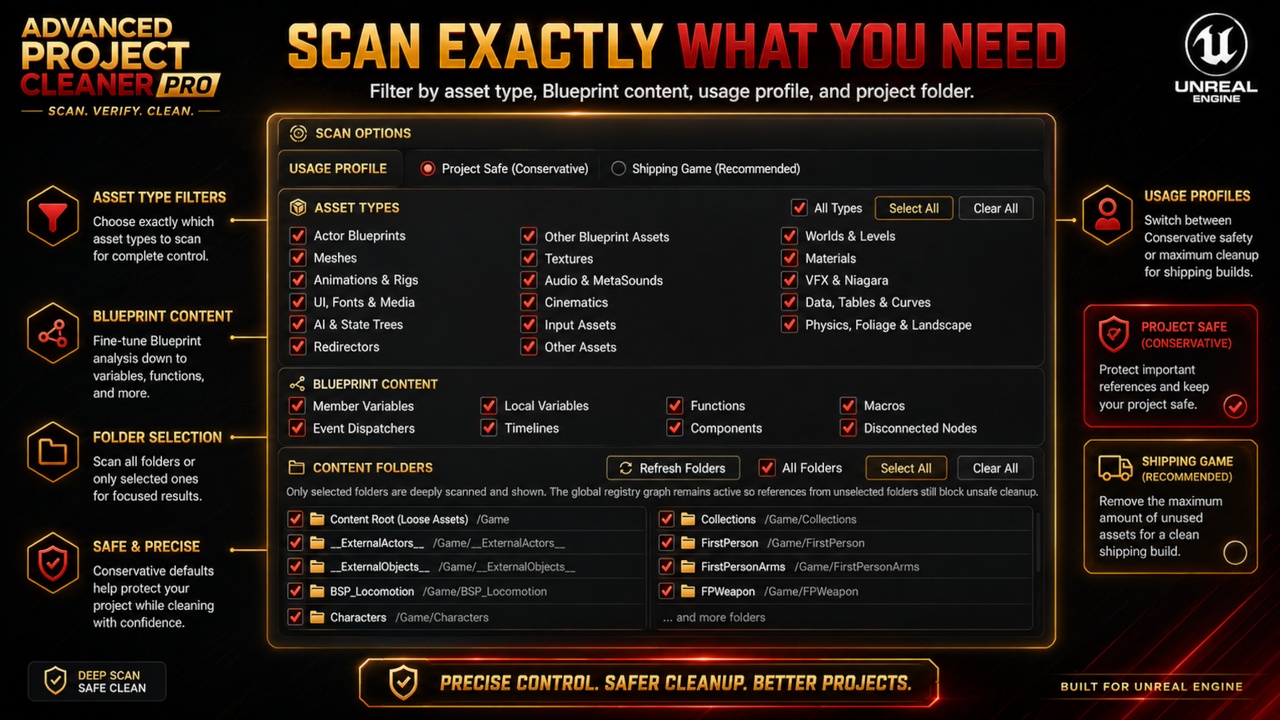
Flexible Scan Configuration
Choose exactly what should be analyzed.
Filter by:
• Usage Profile
• Asset Type
• Blueprint Content Type
• Content Folder
Scan the complete project or focus only on selected areas.
Live, Cancellable Progress
Follow the active scan while it runs.
The progress window displays the current scan phase, currently analyzed package, completed and total files, overall progress, and safe cancellation controls.
Quick Preview and Deep Scan
Use Quick Preview for a fast, non-authorizing overview, or run Find Assets to Clean for the complete verification workflow required for cleanup decisions.
JSON and CSV Reports
Export structured scan results for review, auditing, documentation, team communication, and project handoff.
Built-In Documentation
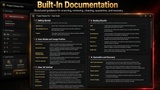
An integrated User Guide explains scan modes, usage profiles, result classifications, cleanup decisions, quarantine, recovery, safety rules, and recommended workflows directly inside the Unreal Editor.
Cook-Free Workflow
Project analysis does not require a Cook operation before scanning.
Editor-Only Plugin
Advanced Project Cleaner Pro adds no runtime dependency or gameplay overhead to packaged builds.
Understand Every Decision
Advanced Project Cleaner Pro does not simply present a list of files to delete.
It shows the evidence behind every result.
For example, a used material may display a complete chain such as:
Project Settings → GameMode → Default Pawn → Character Mesh → Material
An unused feature pack may show:
• No runtime root path
• No retained incoming boundary
• Complete atomic group
• All mandatory checks passed
Ambiguous, dynamic, incomplete, or protected findings remain outside automatic cleanup.
The plugin follows a fail-closed safety policy:
If the required evidence is incomplete, the content is not automatically marked Safe to Clean.
Ideal For
• Removing unused Fab or Marketplace asset packs
• Cleaning large production projects
• Finding abandoned prototype content
• Reducing project, backup, and source-control size
• Auditing migrated content
• Cleaning unused Blueprint logic
• Removing disconnected node chains
• Finding unused Blueprint variables and functions
• Preparing projects for release or client handoff
• Reviewing inherited or unfamiliar projects
• Keeping long-term projects organized
Recommended Safety Workflow
For important projects, the recommended process is:
Run a complete Deep Scan.
Review the classification evidence.
Move verified cleanup groups to quarantine.
Test the project.
Restore anything still required.
Permanently delete the validated quarantine session afterward.
This provides a controlled validation period before irreversible deletion.
As with every destructive development tool, source control or an external backup is strongly recommended.
Keep Your Project Clean
Spend less time searching through Content folders.
Stop manually opening thousands of assets.
Remove forgotten content with clear evidence and a recoverable workflow.
Advanced Project Cleaner Pro gives you the tools to scan, understand, verify, quarantine, recover, and clean your Unreal Engine project with confidence.
Scan. Verify. Clean.
If you have any questions, suggestions for improvements, or would like to report a bug, please send me an email at:
PLEASE leave a Review!!! Thanks!