Description
Gravity & Ballistics Toolkit — a custom gravity plugin for Unreal Engine 5: planets, zero-G zones and gravity volumes, bodies and characters that follow them, and trajectory prediction and launch solving that use the same gravity field. Blueprint-first, zero C++.
Unreal gives you one gravity: straight down. Walking around a planet, floating through a zero-G room, or lobbing a shell across a low-gravity moon means fighting the engine. This toolkit gives you a gravity field you can place in the level: point wells for planets, box and sphere volumes for zones, strength and falloff per source, and a receiver you drop on any actor so it follows the field. The prediction and launch nodes read the same field, so the arc you preview is the arc the projectile flies.
Key Features
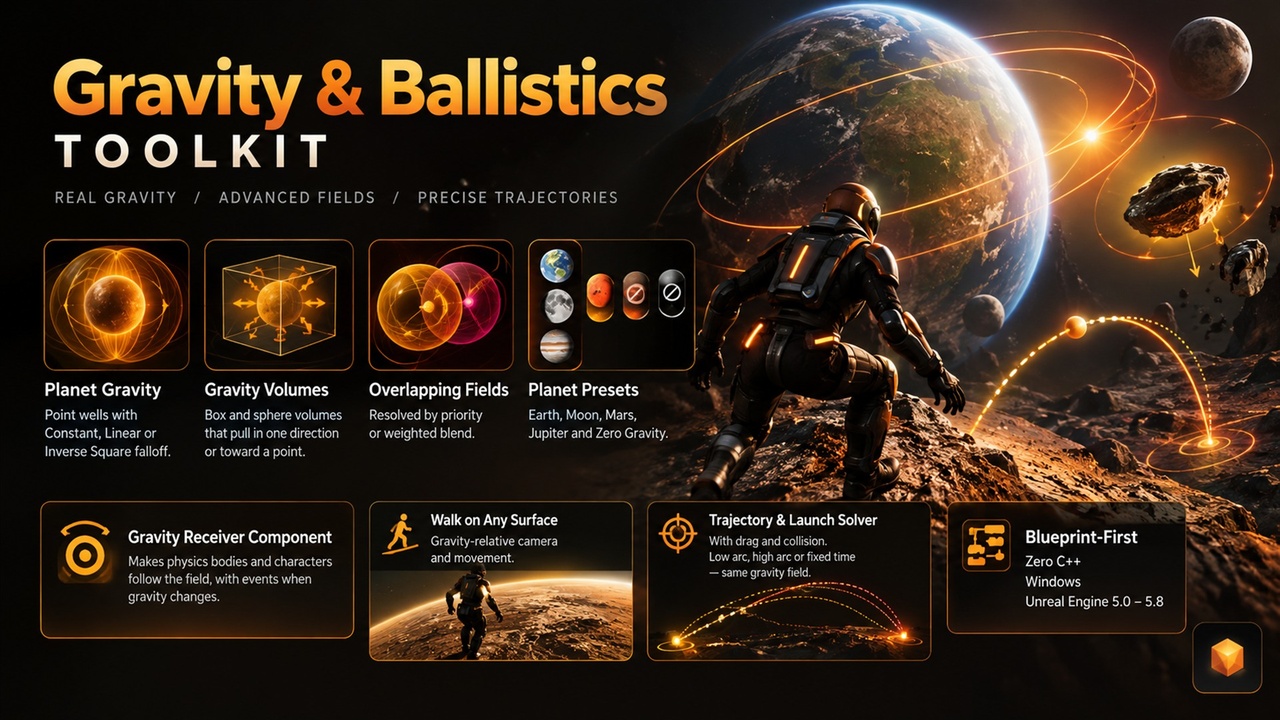
- Planet gravity — point wells with surface, inner and outer radius and Constant, Linear or Inverse Square falloff
- Gravity volumes — box and sphere zones that pull in one direction or toward a point, with a smooth blend at the edge
- Overlapping fields — resolve by Highest Priority or Weighted Blend; query the combined gravity and the dominant source at any position
- Presets — Earth, Moon, Mars, Jupiter and Zero Gravity, or your own Gravity Preset data assets
- Gravity Receiver — add one component and a physics body, a character or a plain actor follows the field; events for On Gravity Changed, Entered and Left Gravity Source
- Characters on any surface — custom character gravity with alignment to the new up direction (Unreal Engine 5.4 and newer; older versions still get gravity queries and events)
- Gravity-relative controls — a Gravity Player Controller and nodes for look input and movement vectors in gravity space, so camera and walking feel right on a wall or a planet
- Trajectory prediction — predict a path under the real field with optional drag and collision, draw it, or turn it into a spline
- Launch solver — find the low arc, the high arc or the velocity for a fixed flight time that reaches a target, and get a Blocked result when something is in the way
- Debug tools — draw source shapes and predicted paths in the editor
Use Cases
- Space and planet games — walk around a sphere, switch gravity at a portal, float in a station
- Artillery, golf and aiming games — preview the shot and solve the launch velocity on any world
- Physics puzzles — gravity zones that move crates and balls sideways or up
- Simulators and training — low-gravity and zero-G scenarios with real numbers
Why This Plugin?
Custom gravity, prediction and launch solving are usually three separate hacks. Here they share one field, so changing a planet's strength changes the character, the physics bodies, the preview arc and the solved launch together. Everything is a Blueprint node or a component, with safe defaults: with no sources placed, your game keeps the engine's normal gravity.
Get Started in 60 Seconds
Step 1: Install the plugin for your engine version and enable it
Step 2: Add a Gravity Point Source component to an actor (a planet mesh) and set Strength and Surface Radius
Step 3: Add a Gravity Receiver component to a character or a simulating physics actor
Step 4: Optional: call Predict Trajectory or Solve Launch Velocity from the Gravity category
Support
Questions or issues? Contact us via the seller page: https://www.facebook.com/HashemGameDev or https://www.fab.com/sellers/HashemGameDevStore
Include your engine version and what you placed in the level.
Documentation: https://docs.google.com/document/d/e/2PACX-1vQSQBXZvMZbZ2kl1_LdeTGVkHqGJ3rEgnJusRee5SZih5pLaXvEAweO0KgDCB6-Hnn_QraliqMLJ3-U/pub