
설명
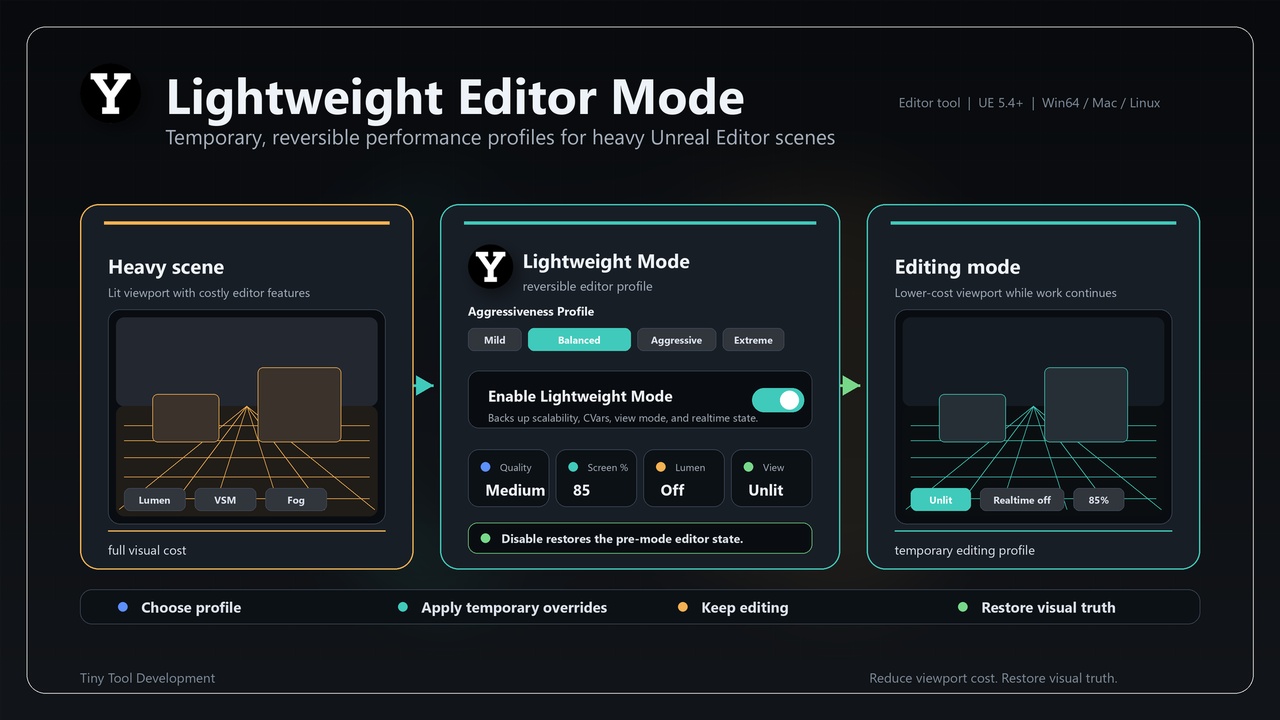
LightweightEditorMode is a C++ Unreal Engine code plugin. Its current implementation is centered on this implementation scope: Toggle a reversible lightweight editor performance mode with editable profiles for scalability, viewport resolution, Lumen, shadows, fog, Unlit viewports, and realtime rendering.
The plugin is implemented through 1 module: LightweightEditorMode. The source surface includes implementation concepts such as MCP Job Record, Editor Lightweight Mode, C Var Backup Value, Lightweight Editor Mode Module, Lightweight Editor Mode MCP Interface, Lightweight Editor Mode Settings, Lightweight Profile Settings, S Lightweight Editor Mode Widget.
⭐ What You Get
🔹 Toggle a reversible lightweight editor performance mode with editable profiles for scalability, viewport resolution, Lumen, shadows, fog, Unlit viewports, and realtime rendering.
🔹 Module layout: LightweightEditorMode (Runtime, Default, platforms: Win64, Linux, Mac).
🔹 Implementation footprint: 10 C++/Build.cs files inspected under Source.
🔹 Version: 1.0.3
⭐ Key Features
🔹 Implementation-derived scope: Toggle a reversible lightweight editor performance mode with editable profiles for scalability, viewport resolution, Lumen, shadows, fog, Unlit viewports, and realtime rendering.
🔹 Module layout: LightweightEditorMode (Runtime, Default, platforms: Win64, Linux, Mac).
🔹 Implementation footprint: 10 C++/Build.cs files inspected under Source.
🔹 Source-backed concepts include: MCP Job Record, Editor Lightweight Mode, C Var Backup Value, Lightweight Editor Mode Module, Lightweight Editor Mode MCP Interface, Lightweight Editor Mode Settings, Lightweight Profile Settings, S Lightweight Editor Mode Widget.
🔹 Configurable data/settings fields include: OverallQuality, ScreenPercentage, bDisableLumen, bDisableVirtualShadows, bDisableVolumetricFog, bForceUnlitViewports, bDisableViewportRealtime, bEnableOnStartup, bShowEditorConfigurationsShortcut, AggressivenessLevel, bWasLightweightModeActiveLastSession, MildProfile, Balanced
⭐ Typical Use Cases
🔹 Toggle reversible editor performance profiles for heavy Unreal scenes.
🔹 Adjust scalability, viewport resolution, Lumen, shadows, fog, unlit viewport and realtime rendering settings.
🔹 Restore editor visual state after performance-focused review or authoring sessions.
⭐ Included Content
🔹 Version: 1.0.3
🔹 Category: Editor Tools
🔹 Can contain content: Yes
🔹 Module: LightweightEditorMode (Runtime, Default, platforms: Win64, Linux, Mac)
🔹 Representative source types: FMcpJobRecord, FEditorLightweightMode, FCVarBackupValue, FLightweightEditorModeModule, ULightweightEditorModeMcpInterface, ULightweightEditorModeSettings, FLightweightProfileSettings, SLightweightEditorModeWidget
🔹 Build.cs dependencies: Core, CoreUObject, DeveloperSettings, EditorStyle, Engine, InputCore, Json, JsonUtilities, LevelEditor, LightweightEditorMode, Settings, Slate, SlateCore, ToolMenus, UnrealEd
⭐ Requirements & Compatibility
🔹 Distribution method: Unreal Engine code plugin
🔹 Engine target from descriptor: 5.4.0
🔹 Platform allow list from descriptor: Win64, Linux, Mac
🔹 Network replication: no explicit replication surface was detected in the inspected source
🔹 Third-party source folder: none detected under Source/ThirdParty
⭐ Notes
🔹 Network replication: no explicit replication surface was detected in the inspected source
🔹 Third-party source folder: none detected under Source/ThirdParty
🔹 Binaries folder in current package tree: not present
⭐ Support
🔹 Support URL from descriptor: mailto:[email protected]
🔹 Discord Support Channel