الوصف
Add proximity voice chat to your multiplayer game in about a minute.
AcoustX Voice gives every player a voice that comes from where their character
actually stands. Walk closer and they get louder. Walk away and they fade out.
Add one component to your player character and it works — there is no
configuration step, no service to sign up for, and no account to create.
WHY THIS PLUGIN IS DIFFERENT
Most voice solutions for Unreal either lean on the engine's Voice module and an
Online Subsystem, or route your players' audio through someone else's servers
with per-minute billing attached.
AcoustX Voice does neither. Microphone capture goes straight to the Windows
audio API on its own thread. Audio is compressed with Opus, relayed through the
game server connection you already have, and played back positionally in the
world. No Online Subsystem. No [Voice] configuration. No external service, no
API key, no usage fees, and no audio ever leaving your own infrastructure.
BUILT FOR REAL NETWORK CONDITIONS
Voice chat is easy to make work on localhost and hard to keep intelligible on a
loaded server. This plugin is built for the second case.
Encoded frames are bundled several at a time into a single RPC, cutting the
network call rate by five times. That matters more than raw bandwidth, because
unreliable RPCs are the first thing discarded when a busy server's outgoing
packet fills up — fewer, larger calls survive server load far better than many
small ones.
On the receiving end, a proper jitter buffer absorbs reordering and late
arrivals, and genuine packet loss is filled using Opus packet-loss concealment
rather than an audible gap. Playback keeps a configurable reserve so a server
that hitches does not turn speech into stuttering.
TUNE IT FOR YOUR GAME
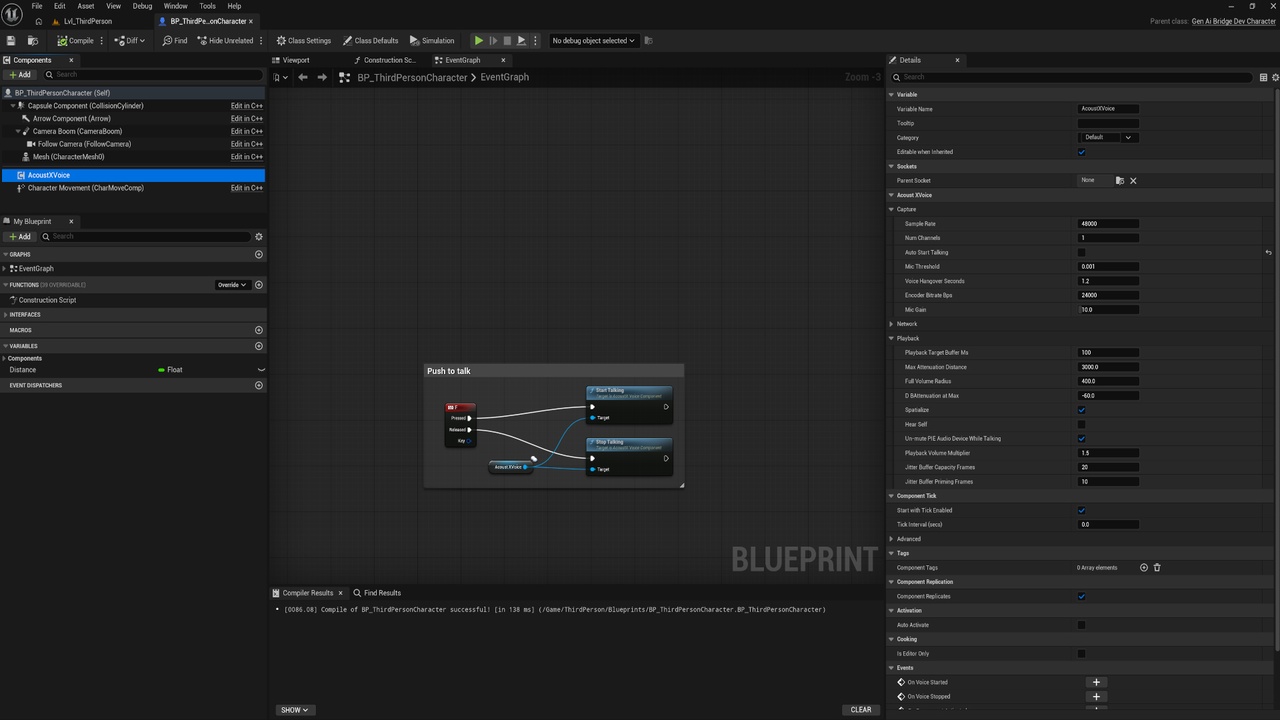
Nineteen properties are exposed in the Details panel and to Blueprint, grouped
into Capture, Network and Playback. Trade latency against robustness, dial
bitrate against bandwidth, and set your own proximity falloff. The included
documentation gives you four tested presets — balanced, low-latency,
loaded-server and bandwidth-constrained — so you can start from a known-good
configuration instead of guessing.
BLUEPRINT FIRST, SOURCE INCLUDED
Every setting and every function is available to Blueprint. Push-to-talk is two
nodes. A live microphone level for a speaking indicator is one node. You never
need to touch C++.
If you want to, the complete source is there: capture, codec wrappers, jitter
buffer and replication are all readable and modifiable, with the networking
model documented so you can extend it — adding a relevancy check to skip
distant listeners is a few lines in one function.
WHAT YOU GET
A 15-page PDF covering installation, a full property reference, the Blueprint
API, a networking overview, a tuning guide, performance and bandwidth figures,
and a troubleshooting section written from real debugging rather than
guesswork.
PLEASE NOTE — PLATFORM SUPPORT
Microphone capture is Windows-only. The capture layer is built on WASAPI, so
players on Windows can both speak and listen. On other platforms the plugin
still compiles, packages and plays other players' voices correctly, but a user
on that platform cannot transmit. A Blueprint node is provided so you can check
support at runtime and hide your microphone UI accordingly.
If your game is Windows-only or Windows-first, this is a non-issue. If you need
capture on Mac, Linux, Android or iOS, this plugin is not the right fit today
and I would rather tell you that here than after you have bought it.