
الوصف
=======================================================================
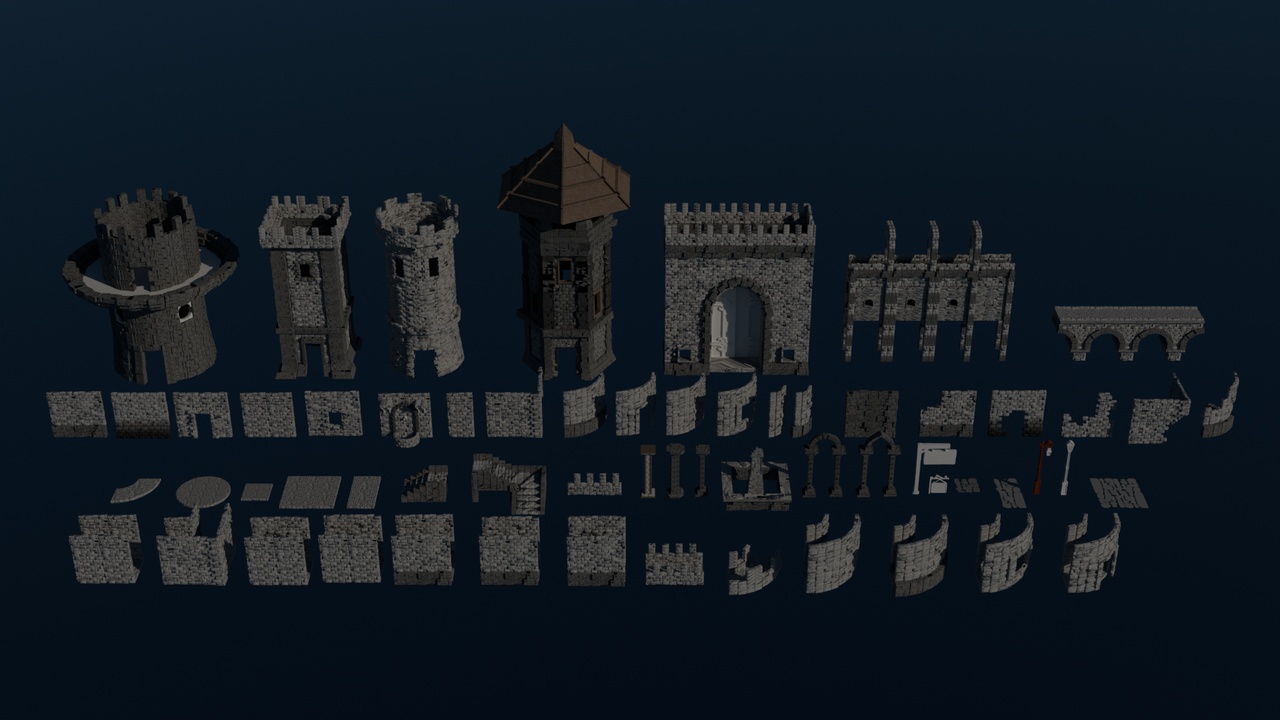
MODULAR CASTLE / MEDIEVAL KIT
=======================================================================
Thank you for purchasing the Modular Castle / Medieval Kit!
This package contains everything you need to build stunning, realistic castles, fortresses, and medieval architecture directly in Unreal Engine.
-----------------------------------------------------------------------
1. OVERVIEW
-----------------------------------------------------------------------
- Asset Type: 3D Modular Environment Assets
- Number of Unique Meshes: 74
- Theme: Medieval, Castle, Fantasy Architecture
- File Formats Included: .blend (Source), .fbx, Unreal Engine Project files
-----------------------------------------------------------------------
2. TECHNICAL DETAILS
-----------------------------------------------------------------------
Total Scene Statistics (All objects combined):
- Vertices: ~1,107,251
- Triangles: ~2,142,454
- Faces/Polygons: ~1,063,420
Model Scale:
- Modeled to real-world scale (Metric). Perfectly scaled for the standard Unreal Engine mannequin.
Collections / Categories Included:
- Brick Collection (Walls, archways, and pillars)
- Small Brick Collection (Detailed architectural elements)
- Double Wall Collection (Fortified castle walls, towers)
- Stairs & Pathways
- Battlements & Defenses
-----------------------------------------------------------------------
3. UNREAL ENGINE SPECIFIC FEATURES
-----------------------------------------------------------------------
- Modular Design: All pieces are designed to snap together seamlessly using Unreal Engine's standard grid.
- Nanite Ready: The high-quality geometry (2.1M triangles combined) is perfect for Unreal Engine 5's Nanite system, offering massive detail with excellent performance.
- Collisions: Meshes are optimized for easy collision generation within the Engine.
- Clean Topology: Ensures smooth lighting and accurate Lumen calculations in UE5.
-----------------------------------------------------------------------
4. HOW TO USE IN UNREAL ENGINE (MODULAR WORKFLOW)
-----------------------------------------------------------------------
- Grid Snapping: When building your environment, ensure you turn on Grid Snapping in the viewport (typically 10, 50, or 100 units).
- Pivot Points: The pivot points for all meshes are placed at the bottom or corners to make snapping and alignment as easy as possible within the editor.
- Texturing: Simply drag and drop your tileable PBR materials onto the material slots. The UVs are laid out to seamlessly support tiling textures across all modular boundaries.
-----------------------------------------------------------------------
5. SUPPORT & CONTACT
-----------------------------------------------------------------------
If you have any questions, encounter issues, or need help integrating these assets into your Unreal Engine project, please feel free to reach out via the marketplace support page.
Enjoy building your kingdom!
=======================================================================