Описание
Component Sorter & Component Utilities
Automatically sorts the component hierarchy in the Actor and Blueprint editors alphabetically, bringing order to the chaos of randomly arranged components. Born appositely to solve this Issue after years of struggle.
The Problem
Every time you add components to an Actor or Blueprint in Unreal Engine, they appear in an unpredictable order in the Components panel. This happens because the engine gathers components from internal data structures that don't preserve insertion order, resulting in a seemingly random arrangement that gets worse as your Actor grows in complexity. Finding a specific component in a list of dozens becomes a frustrating needle-in-a-haystack experience.
The Solution
Component Sorter is a lightweight, zero-configuration editor plugin that automatically sorts your component hierarchy alphabetically using natural sort order. Just install it and your components are sorted — no buttons to click, no settings to configure.
Natural Sort Order
Unlike basic alphabetical sorting where "StaticMesh10" would appear before "StaticMesh2", Component Sorter uses natural sorting that understands embedded numbers:
Unreal Logic:
StaticMesh1
StaticMesh10
StaticMesh11
StaticMesh2
Component Sorter Logic:
StaticMesh1
StaticMesh2
StaticMesh10
StaticMesh11
Features
Automatic sorting — Components are sorted the moment you select an Actor or open a Blueprint, with no manual intervention required
Natural sort order — Numbers in component names are compared numerically, not character-by-character
Respects hierarchy — Parent-child attachment relationships are fully preserved; only sibling components at each level are reordered
Respects scene/non-scene separation — The engine's separator between Scene Components and Non-Scene Components is maintained
Works everywhere — Sorts in both the Level Editor Details panel and the Blueprint Editor component tree
Event-driven — Only runs when something changes (selection, component added/removed, Blueprint compiled, map change), not every frame
Non-destructive — Only affects the visual display order in the editor panel; does not modify your Actors, Blueprints, or any saved data
Zero configuration — No settings, no menus, no UI. Install and forget
Case-insensitive — "audioComponent" and "AudioComponent" sort next to each other
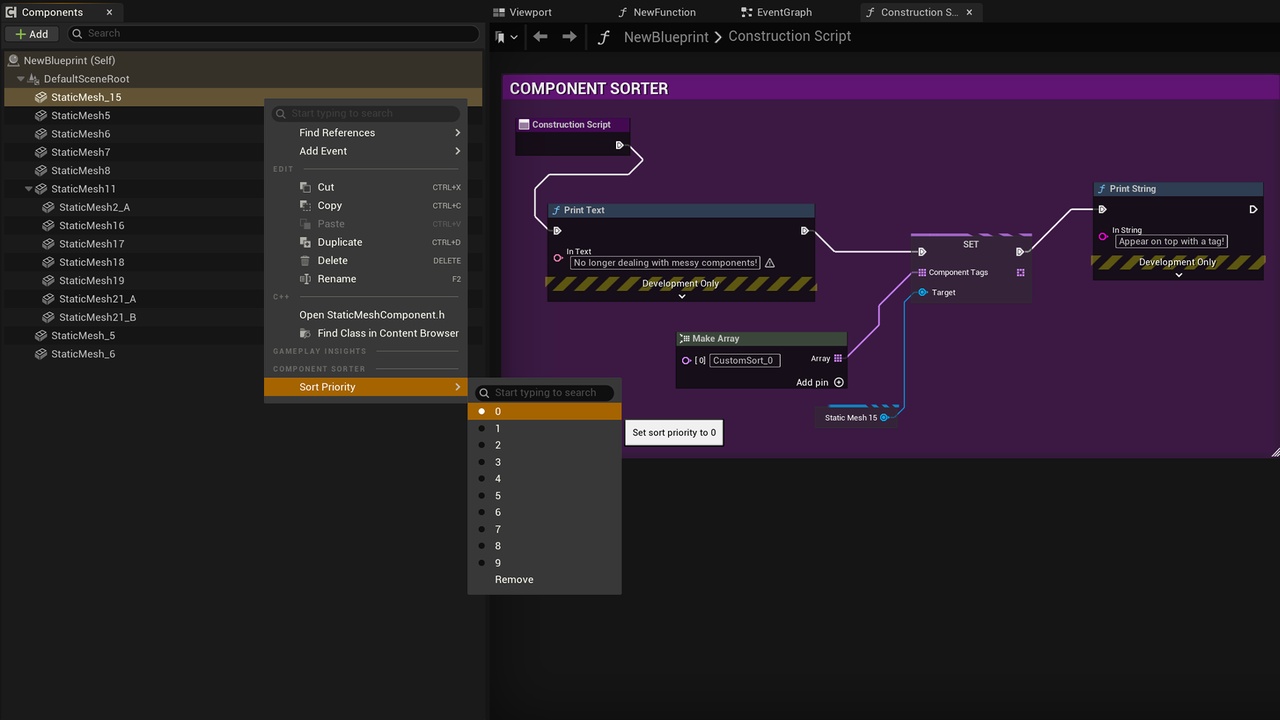
Custom sorting — If the component has a "CustomSort_Number" tag, it is displayed before others (Useful to prioritize certain components)
NEW: Replace Component Class --- Right-click any component and select "Replace Component Class..." to swap it with a different type while preserving shared properties (transform, tags, etc.). A full class picker lets you browse all compatible classes, with a data loss warning when switching to a non-subclass
NEW: Alt+Drag Duplicate --- Hold Alt and drag a component's transform gizmo in the Blueprint editor viewport to duplicate it, just like Alt+Drag works for Actors in the Level Editor
How It Works
Component Sorter hooks into key editor events:
Actor selection changed — Re-sorts when you click on a different Actor
Component added/removed/modified — Re-sorts when the component list changes
Blueprint compiled — Re-sorts after Blueprint compilation rebuilds the component tree
Map changed — Re-sorts when switching levels
When an event fires, the plugin waits a few frames for the engine to finish rebuilding its internal component tree, then traverses the editor's Slate widget hierarchy to find all component editor panels. It reorders the tree nodes alphabetically at each hierarchy level using the engine's own public API (`AddChild`/`RemoveChild`), then refreshes the tree display. A hash-based change detection system ensures the sort only runs when the tree order has actually changed. A bit of lag could occur, you can see an example here.
Technical Details
- Module Type: Editor only — not included in packaged builds
- Loading Phase: PostEngineInit
- Engine Compatibility: Unreal Engine 5.5+
- Supported Platforms: Win64, Mac, Linux (Editor only)
Installation
Enable `ComponentSorter` in your Plugin Settings (But i recommend editing the plugin file and setting: "Installed": false, "EnabledByDefault": true. The first setting is to avoid the plugin from showing up as a project dependency if you are working in a team project, the second is to have it enabled automatically in every project).
2. Launch the editor — components are automatically sorted
FAQ
Does this affect my packaged game?
No. The plugin is Editor-only and is completely excluded from packaged builds.
Does this change the order of components in my Blueprint or Actor?
No. The sorting is purely visual — it only reorders how components are displayed in the editor panel. The underlying data, serialization order, and runtime behavior are completely unchanged.
Does this work with C++ Actors?
Yes. It works with any Actor that has components, whether defined in C++, Blueprints, or a mix of both.
Can I disable the sorting temporarily?
You can disable the plugin from Edit > Plugins and restart the editor. A future version may add a toggle button.
Does this work with nested components (children of children)?
Yes. The sorting is recursive — it sorts siblings at every level of the component hierarchy while preserving all parent-child relationships.
Where can i find the documentation and report a bug?