Description
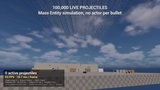
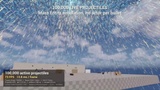
100,000+ live bullets. Real ballistics. No actor per bullet.
Mass Projectile Subsystem is a projectile runtime built on Unreal Engine's Mass Entity system. Every shot is a few dozen bytes of state simulated on worker threads, with no actor, component or Niagara emitter per bullet. One scene can hold 100,000+ live rounds while frame time stays flat.
▶ Trailer: https://youtu.be/ivrcg7fTqmY
📖 Documentation: https://darkmatestudio.vercel.app/docs/mass-projectile-subsystem
💬 Support (Discord): https://discord.gg/CsFsXjxxGG
⚡ SCALE
• 100,000+ simultaneous projectiles, simulated in batches on worker threads
• Budgeted swept collision traces: cost stays bounded and nothing tunnels
• Adaptive tracer budget and cull radius keep GPU and game-thread cost flat
• Per-device tuning through console variables and device profiles
🎯 BALLISTICS
• Gravity, quadratic air drag and wind, frame-rate independent
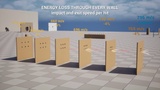
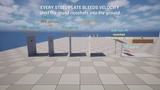
• Penetration per surface: V50 ballistic limit against the real thickness along the shot
• Lambert–Jonas exit speed: every wall bleeds speed, and slow exits drop under gravity
• Ricochet by impact angle and surface hardness
• Physics impulses on hits and near misses
💥 IMPACTS
• Hole decals on entry and exit, plus a bore decal on both faces of a through-shot
• Per-surface impact sounds and Niagara bursts with debris
• Authority-only On Projectile Hit event with impact type (Stop, Ricochet, Penetration Enter/Exit), ready for Apply Damage
🔊 FLYBY AND NEAR MISSES
• A spatial whiz plays at the closest point when a round passes near the camera
• Louder the closer it passes, with random pitch per round
• Per-type sound (SoundWave, SoundCue or MetaSound), radius, minimum speed and volume
• Budgeted, so a 20,000-round volley stays readable instead of noisy
• Your own shots never whiz past you; every client hears everyone else's
• A near-miss air wake nudges light physics bodies the round never touched
• Rifle, shell and plasma whizzes included
🌐 MULTIPLAYER
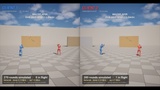
• No per-projectile replication: shots travel as compact, seeded fire events (~40 bytes)
• One event can carry a 20,000-round volley for its whole lifetime
• Client prediction, server validation, latency fast-forward and late-join catch-up
• Server-authoritative damage; dedicated servers simulate hits without visuals or audio
✨ VISUALS
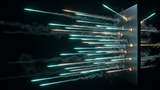
• Pluggable visualizer: the included Niagara visualizer draws tracers, impact bursts and lingering smoke trails
• Documented Niagara user-parameter contract, plus a guide for converting your own VFX
• Swap in your own C++ visualizer if you don't use Niagara
🧩 BLUEPRINT-FIRST
• Spawn Projectiles node, Mass Projectile Fire component (RPM, spread, pellets, muzzle) and Mass Projectile Hit component
• Projectile types are data assets (Rifle, Shell, Plasma included) with Ballistics, Visual, Audio and Surface FX traits
• Every asset is assigned in Project Settings and nothing is hardcoded; everything referenced is packaged automatically
🐞 DEBUGGING
• proj.DebugPaths draws every path coloured by speed, with markers for impacts, ricochets and exits
• proj.DebugHits labels each impact with event, surface, actor and speed
• proj.Stats and a periodic PERF line report live cost
📦 INCLUDED
• Full C++ source: three modules (Runtime, Niagara visualizer, Editor tools)
• Three projectile types, six physical surfaces (concrete, dirt, glass, metal, water, wood) and breachable wall materials
• Blueprint demo map with a flying shooter pawn: fire, switch types, 20,000-round stress volley
• 15 pages of documentation with step-by-step tutorials: installation, firing from Blueprint, weapons, damage, multiplayer, Niagara, performance, API
🕳️ COMING SOON: PROJECTILE HOLES
Real holes cut through the mesh itself, not just decals. Boolean cuts run on background threads, and damaged walls split into pieces. Coming soon to Fab as a separate add-on for Mass Projectile Subsystem.
🛠️ REQUIREMENTS
• Unreal Engine 5.8
• Epic's Mass Gameplay plugin, which Epic marks Experimental. It ships with the engine; the editor shows an experimental-feature notice when you enable it.
• A Projectile collision channel (a two-minute setup, covered in the Installation guide)