








Beschreibung
Documentation
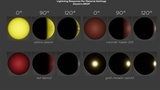
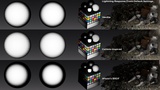
Material Reference for image of "Lightning Response per material settings" Reconstructed Merl Database
Support:
For bug reports, or setup questions, contact: [email protected] or leave a comment here, forum post, yt comment, or msg X
Please include your Unreal Engine version, and the last LogLumenShadingControl engine logs when asking for help.
UPDATE 2.0V
Improved Ahomi BRDF in SSS materials, in 1.2v it could break at extreme angles
UPDATE 1.2V
Added Penumbra Shadow coloring tech and controls, Improved Ahomi BRDF SSS material rendering
Support for UE 5.8
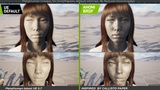
Lumen Shading Control is a shader override plugin for Unreal Engine that gives you direct artistic control over the way light, diffuse response, specular response, and Lumen lightning response. ALL THIS IS NON DESTRUCTIVE, NO NEED TO CHANGE YOUR MATERIALS NOR ART DIRECTION, just change the whole BRDF to fit your needs. This will just unlock your next step into a unique look. (about the materials, you just need to add LSC nodes if you choose the supported BRDFs and want control on it per material)
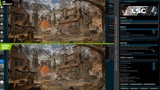
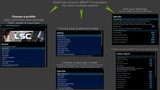
Instead of being locked to Unreal Engine’s default shading, Lumen Shading Control lets you switch between shader rendering profiles, tune their values, and build your own look directly from the editor. The goal is to allow you to Craft Your Own BRDF, look, your own shading style, or whatever you want to call it.
The main feature is Ahomi BRDF, a BRDF profile designed for artists/art direction who NEED smoother terminators, stronger facial form, controlled off angle light response, and cinematic specular shaping all with just a few clicks.
Is Ahomi BRDF Physically accurate?
Pfff no. Not even close. That is not the point. It is a custom artistic BRDF profile for Unreal Engine, combining real-time shading ideas with new controls for stronger form, and more controllable light response. It is inaccurate on purpose. Accuracy is only useful when you have enough control to decide what accuracy means for your material, your lighting, and your art direction. change my mind.
Can I just get the BRDF?
Yes! you just have to go into the plugin folder inside shaders folder and open ShaderManifest.json in there you can search your UE Version and set ApplyPolicy to Disabled instead of always. the patch only needs ShadingModels, BRDF and BasePassPixelShader.
If you have drawn with just a pencil, you know that the shading phase decides the final impact of the art, and often that shading is never accurate because art is a form, not a simulation. I mean, why use a physically correct BRDF for a stylized or art directed character, a little limiting to be honest.
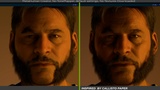
If you want default Unreal shading, you can keep it. If you want softer/serious characters, stronger forms, smoother shadow transitions, stylized metal response, or more readable lighting, Ahomi BRDF gives you the controls to make that happen. if you prefer physically accurate shading, then you can choose the other models in the plugin, like callisto inspired:
Diffuse BRDF Modes
Lambert Default
Burley Diffuse
Oren Nayar Rough Diffuse
Half Lambert Stylized
Toon Ramp Diffuse
Wrapped Diffuse
Chan Rough Diffuse
Callisto Inspired
Ahomi BRDF
Ahomi Toon Hybrid
Specular BRDF Modes
GGX Default
Artistic GGX
Anisotropic GGX
Dual Lobe GGX
Charlie Sheen
Ahomi Callisto GGX
Ahomi Toon Hybrid GGX
Lumen Shading Control is useful for:
stylized realism
cinematic character rendering
MetaHuman look development
toon / hybrid shading
low-poly scenes with harsh shadow breaks
custom art direction
projects that need a recognizable lighting style
artists who want shader-level control without maintaining or get stuck in a custom engine branch
MetaHuman is used only to describe compatibility/testing. This plugin is not made by, sponsored by, or officially connected with Epic Games.
The plugin works by managing shader overrides in a portable and reversible way. It validates engine shader versions, applies override files, applies shader config values from your selected profile, and gives you the option to restore engine defaults when needed.
No source engine build is required.