Descrição
Orthogonal wire routing and graph tooling for Blueprint and Animation editors. Cleaner graphs, fewer crossings, zero runtime cost.
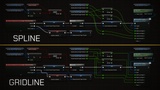
Blueprint graphs are a powerful way to build game logic, but the default curved splines get messy fast. Wires cross, stack, and blur together until dense graphs become genuinely hard to read. Gridline Blueprints replaces those curves with precise right-angle routing and adds a full suite of graph quality-of-life tools on top, including one-click node alignment and search enhancements, bringing the visual discipline of professional schematic editors to your Blueprint workflow.
It is a purely editor-side plugin. It is stripped entirely from packaged builds and has no runtime impact whatsoever.
Key Features: Orthogonal Wire Routing
Every wire routes with clean horizontal and vertical segments. No curves, no diagonal crossings, just structured, readable connections. Works in Blueprint event graphs, function graphs, macro graphs, and Animation Blueprint graphs.
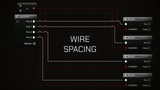
Wire Spacing: When multiple wires run in parallel and overlap, they are automatically offset so each one stays individually visible and selectable. Works in two passes (initial routing and post-avoidance) so newly rerouted wires are always spaced correctly.
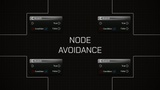
Node Avoidance: Wires detect when they would pass through an unrelated node and route around it. Two styles are available: Simple (lateral segment shift) and Complex (full detour around node bounds). Configurable per-project with adjustable padding.
U-Turn Routing & Smart Flipping: When a destination node sits to the left of its source node, the plugin automatically generates a clean U-turn path. It also automatically flips the visual direction of Reroute (Knot) nodes to prevent wires from doubling back on themselves.
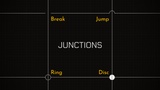
Junctions: Whenever wires from different connections cross, a visual marker makes the crossing unambiguous. Choose from four styles: Break, Jump, Ring, or Disc, and set the indicator size to match your wire thickness.
Flow Animation: Optional animated indicators travel along wires to show data flow direction, even outside of PIE. Choose between Dot or Pulse. Scope animation to execution wires only, data wires only, all wires, or selected node wires only to keep performance manageable.
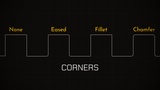
Corner Styles: Three corner shapes are available wherever wires change direction: Eased (smooth Bézier arc), Fillet (precise quarter-circle), or Chamfer (diagonal cut). Corner size is configurable from 0px up to 32px.
Hidden Reroute Nodes: Fully connected Reroute nodes can be hidden along the wire to reduce clutter. They reappear on hover and remain fully interactive.
Short Wire Handling: Wires shorter than a configurable threshold are handled separately. Render them as a smooth spline, a straight diagonal, or full orthogonal segments.
Slice Line Support (UE 5.7+): Full visual support for Unreal Engine 5.7's slice line tool, correctly dimming orthogonal wires when cutting.
Key Features: Named Reroutes
Named Reroutes are a custom node type that lets you label a wire value once and reference it anywhere in the same Blueprint, eliminating the long wires that sprawl across large graph areas.
Declarations & Usages: Declaration nodes carry the value from a source pin with a name and optional color. Usage nodes re-emit that value anywhere in the same Blueprint graph, function, or event graph.
Visual Grouping: Declarations and their Usages share the same title bar color for instant visual identification.
Quick Navigation: Double-clicking a Usage node jumps directly to its Declaration. Double-clicking a Declaration opens Find Results filtered to all its Usages.
Zero Overhead: At compile time, Named Reroute nodes are fully transparent. The compiler sees the original source pin, not the reroute pair.
Safe Plugin Disabling: If you ever need to disable the plugin, Gridline Blueprints detects the change to your .uproject file and offers to automatically convert all Named Reroutes back into standard Reroute nodes, ensuring your project remains completely functional without the plugin.
Key Features: Context Menu
Stop fighting the Blueprint context menu. Gridline Blueprints introduces a suite of togglable enhancements to make finding the right node faster.
Fuzzy Search: Find the nodes you need even if you don't type the exact name perfectly.
Auto-Expand Categories: Automatically expands relevant categories when searching, saving you from endless clicking.
Recent Nodes: Keeps your most-used nodes easily accessible.
Menu Resizing: Expand the context menu to fit your workspace and see more results at a glance.
Key Features: Gridline Nodes
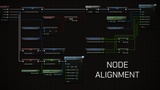
Tired of manually dragging nodes to line them up? The new Gridline Nodes module lets you instantly organize your graphs with a single hotkey.
Instant Formatting: Auto-align a cluster of nodes or your entire execution graph to a clean, readable grid layout.
Smart Grouping: Configurable alignment modes (e.g., Left with Predecessor) ensure data nodes stack neatly next to their execution nodes.
Execution Straightening: Automatically adjusts node vertical placement to keep your main execution wires perfectly straight.
Selected Only Mode: Align only the nodes you have selected, or process entire independent graphs at once.
Links & Support
Documentation: GitHub Pages | Wiki
Bug Reports: Issue Tracker
Discord: Join the Community