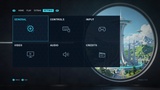
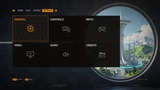
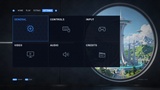
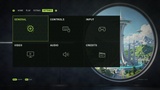
Description
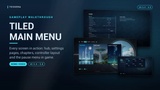
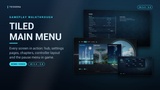
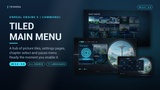
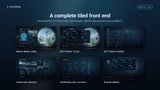
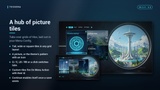
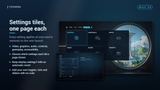
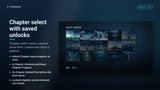
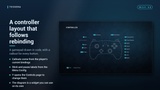
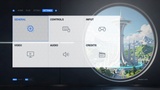
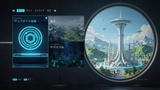
A tiled front end for Unreal Engine, built on CommonUI and ready the moment you enable it. The main menu is a row of tabs over grids of picture tiles; the settings are tiles that open one page each; there is a chapter select with chapters to unlock, a gamepad diagram that shows what every button does, and a pause menu with the settings tiles beside it. Mouse, keyboard and gamepad work out of the box.
Every screen is built in C++ from two data assets: a Theme for the look and a Menu Config for the content. Tabs, tiles, chapters and pause entries are data, so you lay out your own hub without widget wiring or CommonUI input data. Restyle everything from one asset, or design any screen yourself in UMG and keep all of its behaviour.
Use it as the front end of any console style game with modes, news, chapters or extras on its first screen.
Playable Demo | Documentation | Discord Community
──────────────────────────────────
THE SCREENS
──────────────────────────────────
▸ Main menu hub: tabs (Q / E, LB / RB, or click) over grids of tiles, with your key art behind them
▸ Looks like the demo out of the box: its tabs, pictures and chapters are the defaults
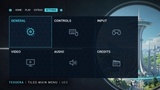
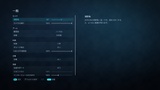
▸ Settings tiles (General, Controls, Input, Video, Audio, Credits) that open one settings page each
▸ Chapter select with locked and unlocked chapters, saved progress and a padlock on chapters not reached
▸ Controller layout: a gamepad diagram with a line from every button to what it does
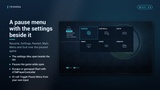
▸ Pause menu with Resume, Settings, Restart, Main Menu and Quit; the settings tiles open beside it over the paused game
▸ Tabbed settings screen for a single Settings entry, credits, confirmation dialogs, a press start screen and a loading screen
──────────────────────────────────
TILES
──────────────────────────────────
▸ Place tiles on each tab's grid with a cell and a span: tall, wide or square tiles in any layout
▸ A picture covering the tile, or the theme's pattern with an icon, plus a category line and an optional badge
▸ Actions: Start Game, Open Level, Open Settings Page, Open Chapter Select, Open Controller Layout, Open Credits, Open Screen, Quit and Custom
▸ Custom tiles fire On Menu Action with their Id, so news, game modes or a store run your own code
▸ Keyboard and gamepad move through the grid in grid order and skip tiles that cannot be used
▸ Continue stays greyed out until a save exists, then enables itself
──────────────────────────────────
SETTINGS THAT APPLY AND SAVE
──────────────────────────────────
▸ Video: window mode, resolution, vertical sync, frame rate limit, render resolution, brightness
▸ Graphics: quality preset, auto-detect, and every scalability group, plus anti-aliasing method (Off, FXAA, TAA, TSR) and motion blur
▸ Audio: master, music, sound effects, dialogue and interface volume, mute in background
▸ Controls: mouse and stick sensitivity, invert Y, vibration, key bindings
▸ Gameplay: field of view, camera shake, difficulty, language
▸ Accessibility: subtitles, colour blind modes (protanopia, deuteranopia, tritanopia) with a strength slider, interface scale
▸ Everything is saved to GameUserSettings.ini and restored on the next launch
▸ Field of view reaches your pawn's camera, zoom effects included, and leaves cutscene cameras alone
▸ Resolution and window mode changes ask "Keep display settings?" and revert by themselves after 15 seconds
▸ Leaving a page with unapplied changes asks to Apply, Discard or Cancel; Reset to Defaults per page
▸ Choose which settings each tile's page shows, hide any built-in setting, or add your own toggles, lists and sliders with no code
──────────────────────────────────
CHAPTER SELECT
──────────────────────────────────
▸ Chapters with a name, a picture, a level and whether they start unlocked
▸ Unlock Chapter saves progress at once; Is Chapter Unlocked and Reset Chapter Progress read and clear it
▸ Picking a chapter fires On Chapter Started with its Id (set up checkpoints or loadouts there), then opens its level
──────────────────────────────────
CONTROLLER LAYOUT
──────────────────────────────────
▸ A gamepad drawn in code, with a callout for every button
▸ Follows key rebinding: the callouts come from the player's current gamepad bindings
▸ Sticks and the pause button take their labels from the Menu Config; buttons with nothing on them show as Unassigned
▸ Y opens the Controls page to change the bindings
▸ The diagram is a widget you can also use on its own
──────────────────────────────────
KEY REBINDING
──────────────────────────────────
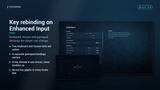
▸ Enhanced Input player mappable keys: primary and secondary keyboard and mouse slots per action, plus a Gamepad Bindings section
▸ Binding a key that is already in use moves it, so keys never double up
▸ Clear a slot with Delete, Backspace or gamepad X, or reset every binding with one button
──────────────────────────────────
MOUSE, KEYBOARD AND GAMEPAD
──────────────────────────────────
▸ Hovering moves focus, so exactly one item is ever highlighted
▸ Footer hints show the key or controller button in use as round glyphs, and the mouse can click them
▸ Xbox, PlayStation or Nintendo button names, detected from the controller in use or set by you
▸ Picking up a gamepad, or going back to the keyboard, keeps focus where it is
──────────────────────────────────
RE-SKIN FROM ONE ASSET
──────────────────────────────────
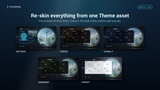
▸ One Theme data asset holds every colour, font, corner radius, size, spacing, background, tile look, animation speed and sound
▸ Five presets to start from: Aether, Forge, Cobalt, Verdant and Frost
▸ Editing the theme while playing in the editor restyles open menus live; swap themes at runtime with one node
▸ Key art behind the main menu, or your menu level as a 3D backdrop
▸ Subtle interface sounds included. They follow the Interface volume, and one action plays one sound
──────────────────────────────────
YOUR OWN DESIGNS
──────────────────────────────────
▸ Adjust a generated layout: make a Blueprint child of any screen and change it in On Default Layout Built
▸ Replace a layout completely: design a Widget Blueprint child in UMG with the documented widget names. Navigation, input hints and theming keep working
──────────────────────────────────
11 LANGUAGES
──────────────────────────────────
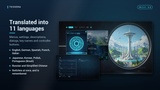
▸ English, German, Spanish, French, Italian, Japanese, Korean, Polish, Portuguese (Brazil), Russian and Simplified Chinese
▸ All of the plugin's own text is translated: menus, settings, descriptions, dialogs, key names and controller buttons
▸ Language setting on the General page. It switches at once, open screens included, and is remembered
▸ Your own text lives in your Menu Config, so the Localization Dashboard gathers it with the rest of your project
──────────────────────────────────
LOADING SCREEN
──────────────────────────────────
▸ Themed loading indicator and a random tip from your list, drawn on its own thread
▸ Minimum display time, so it never flickers; steps aside if your game already has its own
──────────────────────────────────
BLUEPRINT AND C++ API
──────────────────────────────────
One subsystem opens and closes everything: Show Main Menu, Toggle Pause Menu, Open Settings Page, Open Chapter Select, Open Controller Layout, Show Confirm Dialog, Push Screen, Unlock Chapter, Return To Main Menu, Quit Game and more. On Menu Action fires with the Id of every tile and entry, and On Chapter Started with the chapter's Id. Game code reads settings from the settings subsystem and listens to On Setting Changed.
──────────────────────────────────
QUICK START
──────────────────────────────────
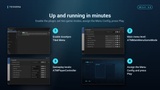
▸ Enable the plugin. It enables CommonUI and Enhanced Input for you
▸ To try it first, open L_ATM_Example_MainMenu and press Play
▸ Set your main menu level's GameMode to ATMMainMenuGameMode
▸ Use ATMPlayerController in gameplay levels for the pause menu, or call Toggle Pause Menu from your own input
▸ Create a Menu Config data asset with your tabs, tiles and levels, assign it in Project Settings and press Play
──────────────────────────────────
WHAT IT IS NOT
──────────────────────────────────
▸ Not a save system - Continue only checks whether a save exists, and chapter progress is the only thing it saves
▸ Not multiplayer - the menus and settings are local, with no lobby, server browser or online features
▸ Not an in-game HUD - this is the front end, the pause menu and the options screen
▸ No Widget Blueprint assets ship with it - screens are generated in C++
──────────────────────────────────
REQUIREMENTS
──────────────────────────────────
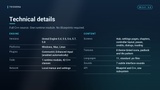
▸ Unreal Engine 5.4 - 5.8
▸ Windows, Mac, Linux
▸ CommonUI and Enhanced Input engine plugins (enabled automatically)
▸ Full C++ source included