Açıklama
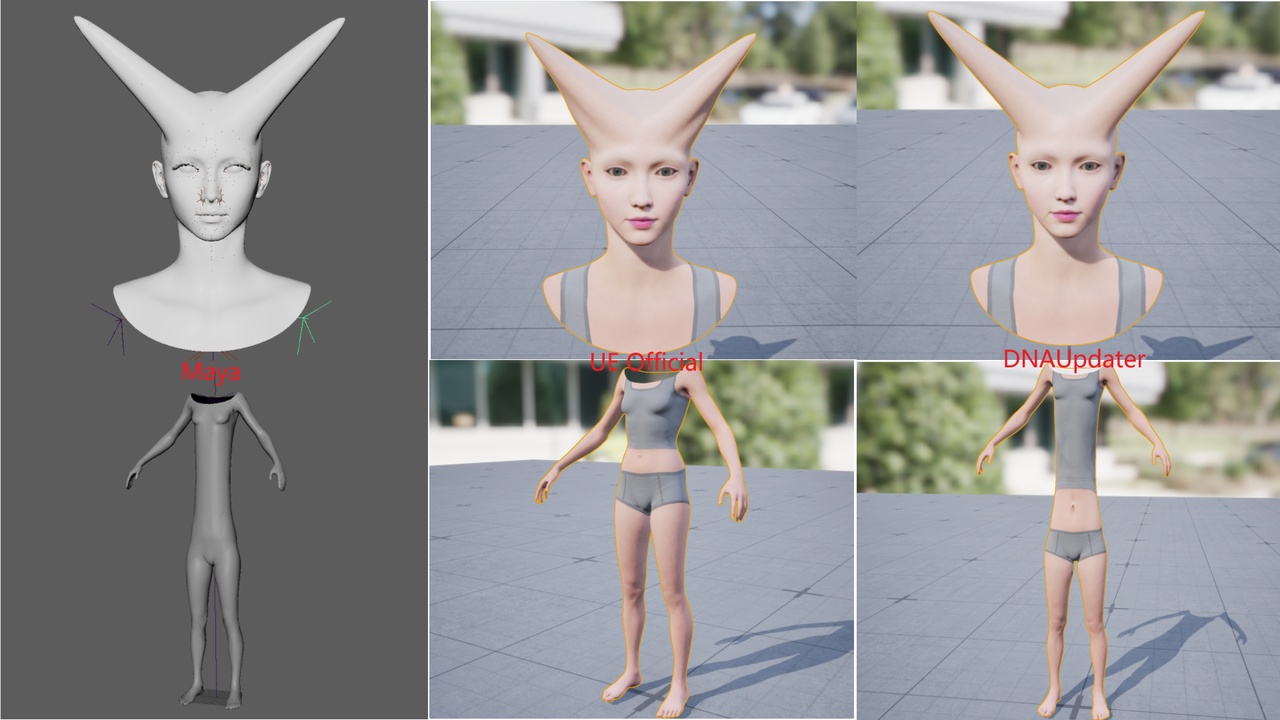
DNAUpdater is used to transfer the modifications in dna files directly into UE metahuman skeletal mesh.
You can change your metahuman without exporting fbx from maya and then importing the fbx and dna to UE as a new metahuman head asset.
【Note】If you change body's bone length such as height, the headmesh should be changed one of the following ways:
Using maya rewirites the DNA file with new bone position. Then import the dna file using this plugin.
Blueprint will share the body height with head, so once the body height is changed, the head will change automatically.
UE 5.8 handles both head and body assets via DNA files. Its workflow differs significantly from previous UE versions, simplifying the character customization process. I highly recommend using UE 5.8 to create custom MetaHumans.
------ UE>=5.8 ------
Document: https://bingothreed.github.io/posts/DNAUpdaterInstruction/
DNAUpdater Toolbox: DNAUpdater.exe
------ UE<5.8 ------
UE5.2-DNAUpdater tutorial .docx
UE5.2-DNAUpdater Body Tutorial .docx
DNAUpdater Toolbox: DNAUpdater4.0.exe
Video1 Tutorial (UE<5.6): https://www.youtube.com/watch?v=q1GZ2xhnmEg
Customize your own head (UE<5.6): https://youtu.be/GPRjWz9aGsQ
Customize your metahuman(UE>=5.6): https://www.youtube.com/watch?v=t9BWwD_KFww
DAZ to Metahuman: Customize Metahuman with DAZ base model (youtube.com)
Add blendshape and GUI control: https://www.youtube.com/watch?v=AF_zoqt0xK4
Pose Matcher: https://github.com/1165048017/MayaPoseMatcher
If any problem please contact with me : [email protected]
If no feedbacks with emails, please comment on my youtube videos.
Note: You'd better restart UE after you import DNA or Joint or BaseMesh to avoid some visualization problems.