Beschreibung
Color Studio 10 is a complete in-Editor workflow for palettes, pixel art, animation, recoloring, and sprite-to-voxel conversion. Create, paint, animate, recolor, and export without leaving Unity.
No external apps. No interrupted workflow. Just faster iteration where you need it.
Compatible with Built-in, URP, and HDRP.
🚀 LATEST IN COLOR STUDIO 10
• Modern color models: OKLch (default), HSL, and RGB with visual pickers.
• Layer-based Pixel Painter animation with frames, playback, onion skinning, and per-frame timing.
• Expanded drawing, shape, text, selection, and transform tools with movable pivots.
• PSD and sprite-sheet import, GIF and sprite-sheet export, plus layered .pp project files.
• Advanced layers with masks, blend modes, opacity, and effects.
• Live-preview filters including sharpen, blur, palette remap, hue, saturation, contrast, tint, posterize, and pixelate.
• Scene texture workflow for browsing and painting GameObject and material textures with live in-scene preview.
• High-performance undo/redo designed for large pixel-art workflows.
🧩 CORE WORKFLOWS
🎨 Design Palettes
Build palettes using color-theory schemes such as complementary, analogous, split complementary, triadic, tetradic, square, spectrum, gradients, and custom layouts. Adjust hue count, shades, saturation, lightness, brightness range, hue spread, and color temperature.
Import ASE files, extract colors from textures, save palettes as ScriptableObjects, and export LUTs, palette textures, or C# color arrays.
🖌️ Paint Sprites and Textures
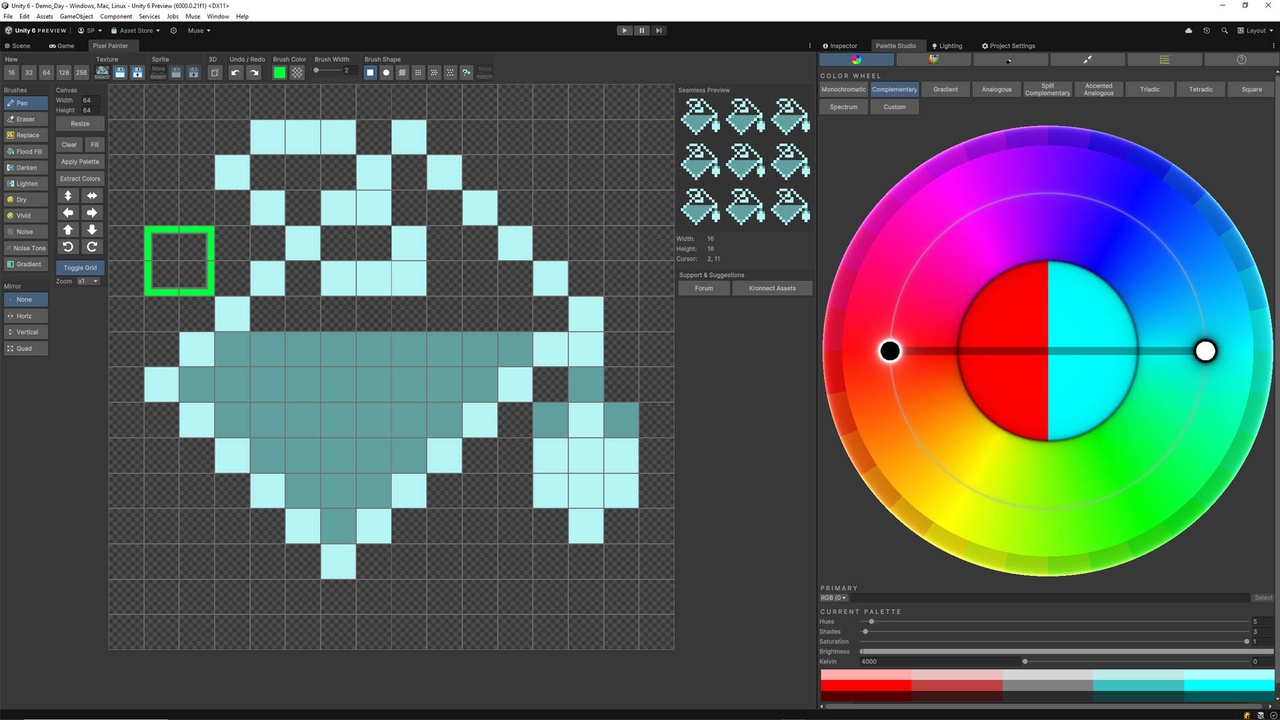
Create or edit sprites, textures, and sprite sheets directly in Unity. Pixel Painter includes configurable brushes, custom patterns, blend modes, mirror painting, gradients, precision shapes, selection tools, text layers, and non-destructive layer effects.
🎞️ Animate Pixel Art
Create frame-based animations with independent layer stacks, thumbnails, playback, looping, per-frame duration, and previous/next-frame onion skinning. Export the result as an animated GIF or sprite-sheet atlas with spacing and automatic slicing metadata.
🌈 Recolor Assets in Editor and Runtime
Apply palettes and per-color rules to sprites, MeshRenderers, and SkinnedMeshRenderers. Use mask textures, color correction, and LUT optimization, then bake final results into materials or textures.
🧊 Convert 2D Art to Voxels
Turn flattened pixel art into an optimized voxel prefab with generated meshes and materials designed for low vertex overhead.
🧱 Paint Scene Materials
Select a GameObject, inspect its editable texture slots, open existing textures, or create missing ones inside Pixel Painter. Preview changes live on meshes, sprites, and UI elements.
✅ FEATURES
🎨 Palette Manager
• Interactive color wheel and key-color controls.
• Monochromatic, complementary, gradient, analogous, split complementary, accented analogous, triadic, tetradic, square, spectrum, and custom schemes.
• Controls for hue count, shades, saturation, lightness, brightness range, and split amount.
• Color temperature controls with Kelvin and strength.
• Add, remove, sort, save, and load custom colors.
• ASE import and 10 included sample palettes.
• ScriptableObject palette assets, project inventory, and compact palette view.
• LUT, palette texture, and C# array export.
• Unique or most-frequent color extraction from textures.
🖼️ Pixel Painter
• Frame-based documents with independent dimensions and layer stacks.
• Layer and frame thumbnails with reorder, duplicate, rename, merge, and flatten actions.
• Load or save individual layers and frames.
• Save complete layered animation projects as .pp files with metadata.
• Recent-file and quick-reopen workflow.
🖌️ Brushes and Painting
• Square, circle, and soft-circle brushes with size and strength controls.
• Line, dither, clipboard, and custom brush patterns.
• Custom brush shapes and patterns can be loaded, saved, and reordered.
• Blend modes: Normal, Multiply, Screen, Overlay, Soft Light, Hard Light, Add, Subtract, Darken, Lighten, Color Dodge, Color Burn, Color, Difference, and Shade.
• Palette-aware Shade mode.
• Spray tool with density and continuous painting.
• Horizontal, vertical, and quad mirror modes.
• Color history and foreground/background swapping.
✏️ Drawing Tools
• Paint, erase, flood fill, replace all, and color replace.
• Linear and circular gradients with optional posterize levels.
• Lines, curves, rectangles, ellipses, regular polygons, contours, and freeform polygons.
• Optional smoothing and configurable foreground/background fills.
• Create new layers automatically for supported drawing tools.
🔲 Selection and Transform
• Rectangle, ellipse, lasso, polygon, contiguous/global magic wand, and edge-snapping magnet selections.
• Adjustable tolerance and thickness.
• Select all, trim, invert, deselect, copy, cut, paste, delete, crop, resize, shrink, expand, border, and zoom.
• Convert a selection into a new layer.
• Move, resize, rotate, flip, and displace selections with a persistent pivot.
• Nearest, Sharp Nearest, Bicubic, and Sharp Bicubic resampling.
📐 Canvas Operations
• Move, free resize, and rotate with an adjustable pivot.
• Optional automatic canvas expansion during transforms.
• Resize with an anchor grid; apply operations to one frame or all frames.
• Crop, flip, rotate, fill, and displace the canvas.
🗂️ Layers, Effects, and Text
• Per-layer blend modes and opacity.
• Layer masks with blended, mask-only, and red-overlay views.
• Drop Shadow, Outline, Inner Shadow, and Outer Glow effects.
• Editable text layers with draggable and resizable bounds.
• Font, size, horizontal/vertical alignment, letter spacing, line spacing, and antialiasing controls.
• Rasterize text or effects when needed.
🎞️ Animation
• Add, duplicate, delete, and reorder frames.
• Playback with FPS and looping controls.
• Per-frame duration and tinted previous/next onion skins.
• Frame scrubber and keyboard navigation.
• GIF and sprite-sheet export.
📦 Import and Export
• Open PNG, JPG/JPEG, TGA, BMP, and PSD files.
• Import 8-bit RGB PSD documents with layer visibility, opacity, and blend modes.
• Slice sprite sheets by frame width and height, opening them as animation frames or individual sprites.
• Save linked textures and sprites, save as a new image, or export the current frame as PNG.
• Export animations as GIFs or sprite sheets.
• Export flattened art as a voxel prefab.
🎮 Scene and Asset Workflow
• Browse project textures, sprites, and sprite sheets in an integrated asset browser.
• Filter by asset type or in-scene usage and locate items in the Project or Scene.
• Open assets directly in Pixel Painter or use drag and drop.
• Edit textures used by selected GameObjects, materials, sprites, and UI elements.
• Inspect texture slots by category, create textures for empty slots, and remove or replace assignments.
• Preview edits live on scene objects.
• Open the tool from GameObject > Edit in Pixel Painter.