설명
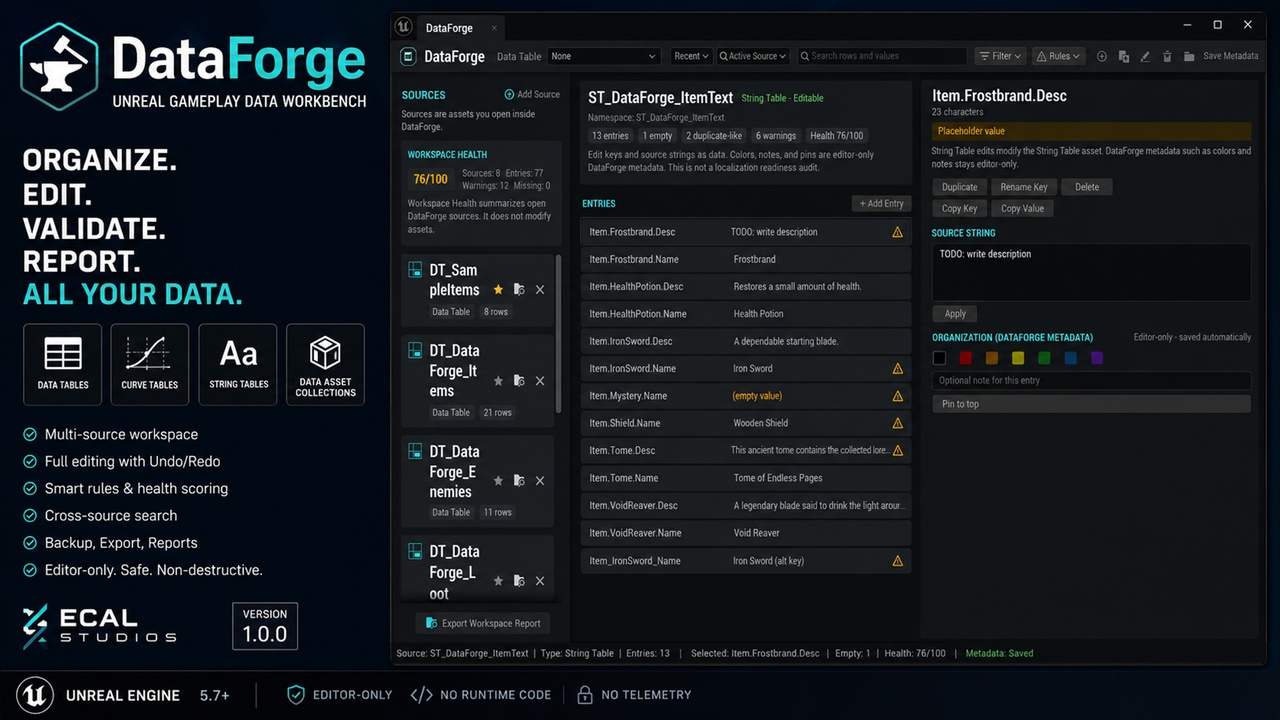
DataForge is an editor-only Unreal Engine plugin for teams and solo developers who manage a lot of gameplay data inside the editor.
Instead of jumping between many separate assets, DataForge gives you one focused workbench for working with Data Tables, Curve Tables, String Tables, and Data Asset Collections. You can organize sources, search across your workspace, edit supported data types, review health warnings, create backups, and export reports for cleanup, QA, or team handoff.
It is especially useful for projects with item tables, loot tables, balance curves, string keys, ability data, economy values, enemy stats, and other design-heavy data that changes often during development.
DataForge does not add runtime systems to your game. It is an editor-only workflow tool designed to help you manage your existing Unreal assets more clearly and safely.
Key FeaturesMulti-source gameplay data workspace
Supports Data Tables, Curve Tables, String Tables, and Data Asset Collections
Full Data Table row editing with Undo/Redo
Virtual folders, colors, notes, pins, and custom ordering for Data Table rows
Multi-row batch editing for shared Data Table fields
Smart rules, warning badges, and per-table health scoring
Curve Table editing for curve rows and Time/Value keys
String Table key and source string editing with an explicit Apply workflow
Data Asset Collection browser for manual or folder-based collections
Read-only Data Asset property preview for simple property types
Active-source search and cross-source workspace search
Workspace health summary with source, entry, warning, and score overview
Local backups for supported source types
Export current views as CSV, JSON, or Markdown
Per-source Markdown reports
Full workspace Markdown report
Content Browser right-click integration
Recent source workflow
One-click demo workspace for testing the plugin
Editor-only sidecar metadata stored as local JSON
No runtime code
No telemetry
No account or online service required
DataForge provides a dedicated Data Table workflow with a hierarchy panel, row list, and inspector.
You can organize rows into virtual folders, add colors and notes, pin important rows, reorder entries, edit row properties, batch edit shared fields, define smart rules, review health warnings, and export backups or reports.
All row operations are designed for normal Unreal Editor workflows and use transactions where supported, so Undo/Redo works as expected.
Curve TablesCurve Tables can be opened and edited directly inside DataForge.
You can browse curve rows, edit Time/Value keys, add and remove keys, duplicate or rename curve rows, assign editor-only notes and colors, review curve health warnings, and export snapshots or reports.
In version 1.0.0, curve tangents and interpolation settings are displayed as read-only.
String TablesString Tables can be managed as structured data.
You can add entries, rename keys, duplicate entries, delete entries, copy keys or values, edit source strings, and review warnings for empty values, placeholder text, surrounding whitespace, duplicate-like keys, and very long strings.
String edits use an explicit Apply button so changes are intentional.
DataForge is not a localization-readiness auditor. For localization QA, use a dedicated localization review tool.
Data Asset CollectionsDataForge can create Data Asset Collections from selected Content Browser assets or from a folder.
Collections are useful for browsing, searching, organizing, and reporting on groups of gameplay Data Assets. You can preview simple properties, add notes, colors, and pins, open assets, reveal them in the Content Browser, copy asset paths, and export collection reports.
Data Asset property editing is read-only in version 1.0.0.
Typical Use CasesOrganize large gameplay Data Tables without changing the underlying table structure
Review item, loot, enemy, ability, or economy data from one editor window
Quickly find rows, keys, curves, or Data Assets across multiple open sources
Add editor-only notes and color labels for design review
Run lightweight rules and health checks before shipping or handing off content
Create backup snapshots before large data changes
Export readable Markdown reports for QA, documentation, or team review
Keep local organization metadata in source control without modifying gameplay runtime behavior
DataForge is built as an editor-only workflow tool.
It stores organization metadata such as folders, colors, notes, pins, ordering, rules, workspace sources, and favorites as local JSON files under:
Config/DataForge/
Generated backups, exports, and reports are written under:
Saved/DataForge/
Removing the plugin does not remove or rewrite your original Data Tables, Curve Tables, String Tables, or Data Assets.
DataForge can edit supported asset data, so normal source control habits are still recommended. Create backups before large editing passes and save assets intentionally.
What DataForge Does Not DoDataForge is focused on gameplay data organization, editing, search, validation, backup, and reporting.
Version 1.0.0 does not include:
Runtime gameplay systems
Data Asset property editing
Asset reference or dependency checking
Localization-readiness auditing
Data diff / compare tools
Automatic external reference rewriting after row or key renames
Curve tangent or interpolation editing
Networking
Telemetry
Online accounts or cloud services
Documentation:
https://www.ecalstudios.com/dataforge/
Support: