설명
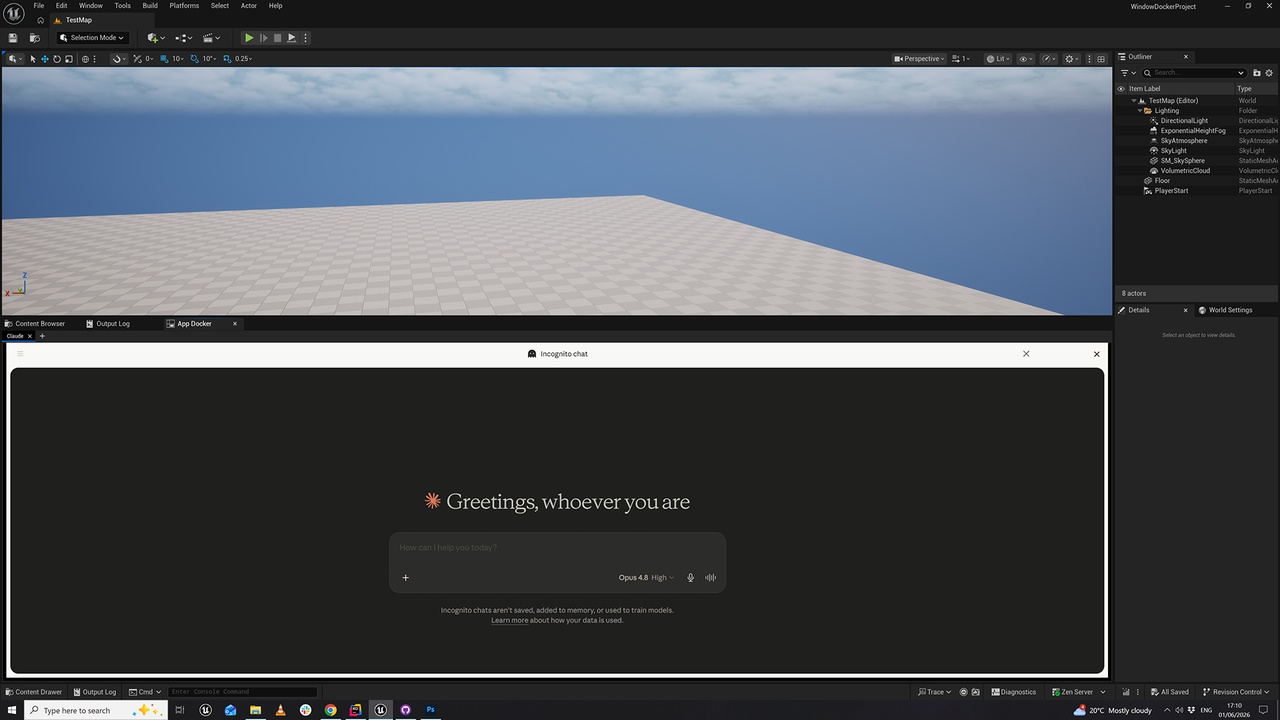
App Docker brings your entire toolchain inside the Unreal Editor. Embed any external Windows application — your DCC tool, a reference image viewer, a web browser, Discord, a code editor, a terminal — directly into a dockable editor panel, so it lives right alongside your viewport instead of fighting for space on a second monitor. No more alt-tabbing, no more lost windows behind the editor. Capture a window with a single click and it snaps into a tab you can dock anywhere in your layout. It is editor-only, requires zero C++ knowledge, and works out of the box: install, restart, and open Window > Tools > App Docker.
App Docker uses native Win32 window reparenting to host the real application — not a screenshot or a stream — so the embedded app stays fully interactive, responsive, and pixel-perfect. When you are done, release it and the window returns to your desktop exactly as it was. "Keep every tool one tab away."
Main Features
• One-click capture of any open external application window.
• Fully interactive embeds — host the real application as a native dockable tab, not a screenshot or a video stream.
• Dock anywhere in the editor layout, just like any built-in Unreal tab.
• Capture multiple windows at once and switch between them with a tab bar.
• Drag tabs to reorder them and organize your workspace.
• Drag a tab outside the panel to instantly release a window back to the desktop.
• Frame-accurate alignment keeps the embedded window perfectly locked to its panel.
• Stays aligned even during modal editor operations, like dragging the editor window.
Auto-Cleanup and Safety
• Closed applications are automatically detected and their tabs removed.
• Releasing a window restores its original size, position, title bar, and frame.
• Closing the panel releases all captured windows back to the desktop.
• All windows are guaranteed to be released on editor shutdown, so nothing is left orphaned.
• Captured state survives re-docking the panel elsewhere in the layout.
Configuration
• Minimized filter — hide or show minimized windows in the capture menu with a single setting.
• Settings live under Editor > Settings > Plugins > App Docker, with no setup required to get started.