Descripción
A UTF-16 source file is invisible until it costs you.
It compiles. It opens correctly in your editor. And it hides from every tool you would reach for
to find it — run `grep` or `Select-String` across a UTF-16 file and you get zero matches for text
that is plainly in it, because every other byte is a null. It looks exactly like the symbol does
not exist in your project.
One file saved once from Notepad, from PowerShell's `Out-File`, or from Visual Studio's *Save
with Encoding* is enough to introduce one. Most developers find out it was there when a
submission comes back.
EncodeMedic reads every text file in your plugin, works out what it actually is from the
bytes on disk, and rewrites the ones that are wrong as strict UTF-8 — then checks the rest of
what gets a submission bounced.
### What it finds and fixes
Every non-UTF-8 encoding, named exactly. UTF-16 LE and BE with or without a BOM, UTF-32,
UTF-8 with a byte order mark, and 8-bit ANSI (Windows-1252). BOM-less UTF-16 is identified by
null-byte parity rather than guessed at, so a genuinely binary file is never mistaken for text.
ANSI files, with the evidence. Decoding a file that is not valid UTF-8 always appears to
succeed, so the report names the offending byte and quotes the line it sits on — you confirm the
reading is right before committing to it, instead of trusting a silent conversion.
Mixed line endings, with a fix that matches whatever convention each file already uses, so
the diff is only the lines that were odd.
Names that travel badly. Non-ASCII characters, Windows-reserved characters, trailing dots and
spaces, and paths long enough to hit `MAX_PATH` on a buyer's machine — where the failure never
says "path too long", it arrives as a compile error with nothing wrong in the code.
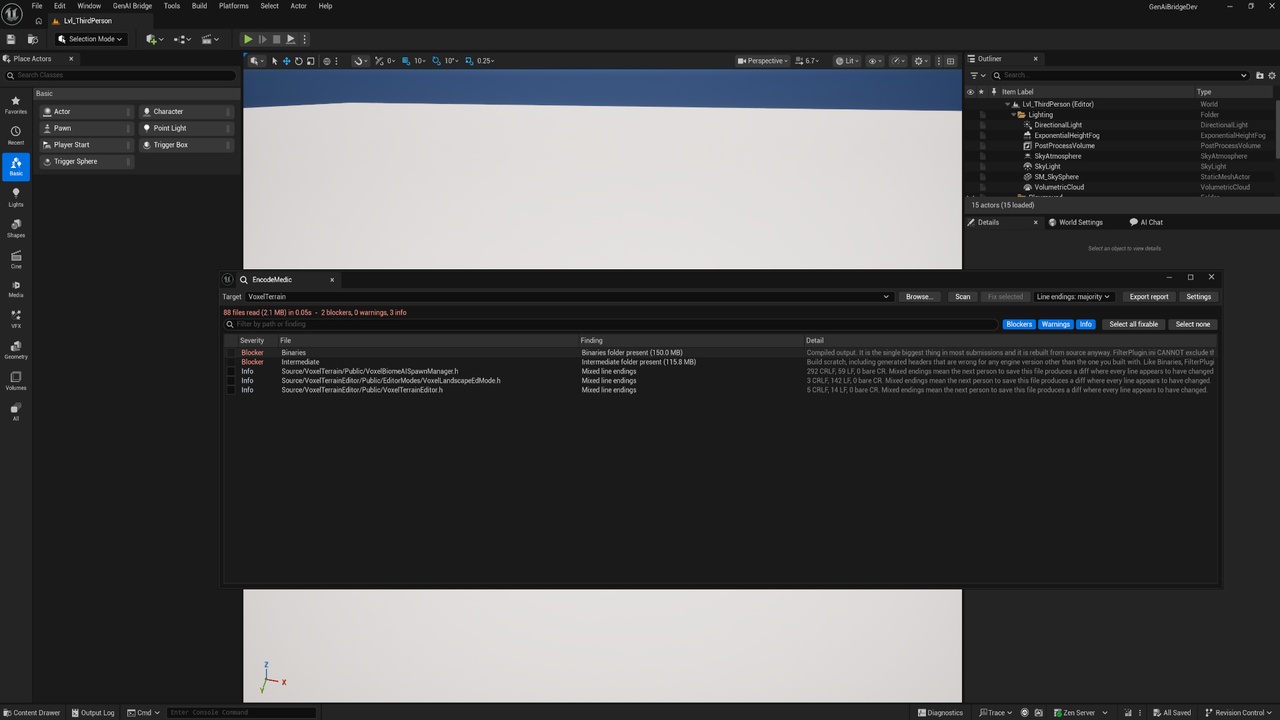
What is still in the tree. `Binaries`, `Intermediate`, `.git`, `.vs`, `Saved`, `node_modules`
and scratch files, each with its size, so you can see exactly what is inflating the upload.
A packaging filter that actually works. Missing `FilterPlugin.ini`, a missing `[FilterPlugin]`
section (which silently drops every entry), and entries naming files that no longer exist.
Descriptor fields a reviewer checks. Invalid JSON, empty `FriendlyName`, `Category`,
`CreatedBy`, `VersionName` or `SupportURL`, a too-short description, `"Installed": true`,
deprecated module types — and a module named in the descriptor whose `Source` folder does not
exist, which makes the engine refuse to load the plugin entirely.
### Findings you can act on
Every finding is graded Blocker, Warning or Info, and each one says what it costs you, not
just what it is. A tool that calls everything an error is a tool you learn to ignore, so the
severity means something: Blocker has been observed to fail review or break a buyer's build,
Warning is wrong but survivable, Info is hygiene.
Tick the fixable ones and press Fix. Filter by severity or search text, double-click any row to
open the file, and export the whole report as Markdown to work through later.
### Safe by construction
It cannot touch a binary asset. Only extensions on an allowlist are ever opened, so a
`.uasset` is never read, never decoded and never written. That is a property of the design, not a
promise.
Every file is backed up before it is rewritten, into your project's `Saved` folder, mirroring
its path inside the plugin. Undo a run by copying the folder back.
Every conversion is verified. After writing, the file is read back off disk and re-detected.
If it does not come back as strict UTF-8, the fix reports failure and points you at the backup —
it does not report success and hope.
Read-only files are skipped, not forced. Under Perforce that flag means "not checked out",
and writing anyway produces a change your server has no record of.
It never deletes and never renames. Leftover folders are reported with their path and size;
awkward filenames are reported with the reason. Deleting a folder is not undoable by a backup,
and renaming a source file breaks every `#include` that names it — those decisions stay yours.
### Run it in your build script
A commandlet gives you the same checks headless, with exit codes a packaging script can branch
on: non-zero on Blockers, and warnings deliberately do not fail the run — because a build that
fails on advice is a build people learn to bypass.