



Описание
Videos List:
Update LOG
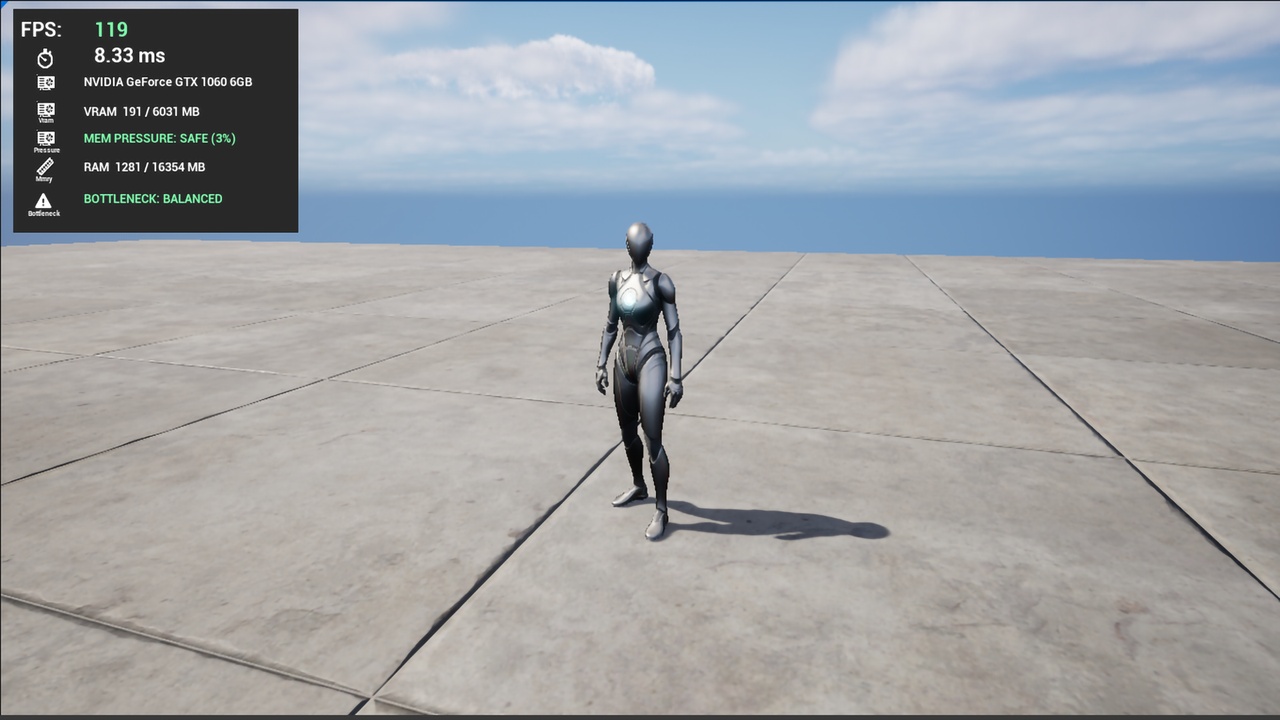
Minimalistic Performance Viewer is a drop-in performance monitoring HUD for Unreal Engine 5. Built for developers who need clean, readable stats on screen without the noise, without the setup, and without it falling apart in a packaged build.
Version 1.1 ships with 36 bindable stats across FPS, thread times, GPU info, VRAM, RAM, memory pressure, battery, temperature, and graphics API — all collected from the correct platform APIs and exposed to your UMG layout automatically every tick.
What it monitors
FPS & Frame Timing
Smoothed FPS with exponential moving average so no jitter
Raw frame time in milliseconds
Color-coded Good / Warning / Critical against your target FPS
Thread Times (requires bAllowStatsInShipping=true in packaged builds)
Game Thread, Render Thread, GPU time in ms
Automatic CPU vs GPU bottleneck detection with 10% hysteresis and no per-frame flipping
GPU
GPU name and vendor detected at startup (NVIDIA, AMD, Intel, Qualcomm/Adreno, ARM/Mali, Apple, Imagination/PowerVR)
Graphics API: DirectX 11/12, Vulkan, Metal, OpenGL
VRAM / Texture Pool
Used, Total, and Available : separately bindable
Desktop (Windows / Mac / Linux): reads real dedicated video memory via RHIGetTextureMemoryStats()
Mobile (Android / iOS): uses Unreal's managed texture streaming pool : the value that actually drives texture quality, streaming decisions, and OOM kills on mobile
Memory Pressure (new in 1.1)
Derived 0–1 ratio of texture pool consumed
Safe / Warning / Critical thresholds
The most crash-predictive GPU memory metric on mobile and could be more useful than raw MB
System RAM
Used, Total, and Free : separately bindable
Dynamic scale from real device total, no hardcoded values
Platform
Battery level : Android and iOS, auto-hidden on desktop
Device temperature level : Android, shows N/A elsewhere
How it works
Drop in the HUD Blueprint, create a UMG Widget Blueprint parented to UPerfOverlayWidget, name your text blocks, progress bars, and sparklines using the reserved binding names and everything populates automatically every tick. No Blueprint wiring. No C++ required to get started.
Text_FPS Text_FPS_Value
Text_FrameTime Text_FrameTime_MS
Text_GameThread Text_GameThread_MS
Text_RenderThread Text_RenderThread_MS
Text_GPU Text_GPU_MS
Text_Bottleneck
Text_VRAM Text_VRAM_Used Text_VRAM_Total Text_VRAM_Free
Text_RAM Text_RAM_Used Text_RAM_Total Text_RAM_Free
Text_MemoryPressure Text_MemoryPressure_Pct
Text_GPUName Text_GPUVendor Text_GraphicsAPI
Text_Battery Text_Temperature
Bar_VRAM Bar_RAM Bar_Battery Bar_MemoryPressure
Sparkline_FPS Sparkline_FrameTime Sparkline_GPU Sparkline_RAM Sparkline_VRAM
For custom layouts, override the Blueprint events to format stats your own way: BP_OnFPSUpdated · BP_OnThreadTimesUpdated · BP_OnMemoryUpdated · BP_OnGraphicsInfo · BP_OnPlatformInfo · BP_OnStatsUpdated
Technical highlights
Pure Runtime plugin : works in Editor, Development, and packaged Shipping builds
Zero crashes in any config : every unavailable stat returns a safe sentinel and shows N/A, never a misleading zero
All stats exposed as a single Blueprint struct (FPerfFrameData) : accessible from any Blueprint
Uses only HAL platform abstraction : no direct Android/iOS headers, NDK cross-compilation works out of the box
GPU info and Graphics API cached on first tick : zero per-frame overhead for static data
Toggle, show, or hide the overlay at runtime via Blueprint or C++
Full documentation and error reporting links included
* Requires bAllowStatsInShipping=true in packaged builds. Degrades gracefully otherwise.
Demo Video 1 : Gallery presentation on Artstation
Demo Video 2 : How to use in Unreal Engine
Documentation : Github
Bug Reports : Github
If this plugin saves you time, an honest review goes a long way, it helps more developers find it and tells me what to improve next.
Changelogv1.2
New Stats Added
Old Bug Fixes
Performance improved
UE-5.8 Version Updates
Changelogv1.1
VRAMAvailableMB field --> cross-platform texture pool headroom
GPUName and GPUVendor --> cached on first tick, displayed in overlay
EMemoryPressure enum + MemoryPressureRatio --> crash-predictive mobile metric
GetVRAMHistory() + Sparkline_VRAM binding
Split text bindings --> Text_VRAM_Used/Total/Free, Text_RAM_Used/Total/Free, Text_FPS_Value, Text_FrameTime_MS, Text_GameThread_MS, Text_RenderThread_MS, Text_GPU_MS, Text_MemoryPressure_Pct
Bar_MemoryPressure progress bar binding
BP_OnMemoryUpdated extended with VRAMAvailableMB, EMemoryPressure, PressureRatio
BP_OnGraphicsInfo extended with GPUName and GPUVendor
Fix: VRAM now uses RHIGetTextureMemoryStats() --> replaces previously non-compiling FRHIMemoryStats / GetMemoryStats() path
Fix: Removed SetStatEnabled call (protected member) --> replaced with ini/console guidance
Fix: Removed direct Android/AndroidMisc.h and IOS/IOSPlatformMisc.h includes --> fixes NDK cross-compilation fatal error in packaged plugin builds
Fix: Battery and GPU name now routed through FPlatformMisc HAL --> no platform header required
Fix: GPUFrameTime[0] (correct UE5 field) replaces GPUTime (UE4 field, doesn't exist in UE5)
Fix: Bottleneck detection uses 10% hysteresis band to prevent per-frame state flipping
Fix: RAM progress bar uses real RAMTotalMB instead of hardcoded 8192 MB
v1.0
Initial release: FPS, frame time, thread times, RAM, basic VRAM, draw calls, graphics API, battery, temperature, sparklines