
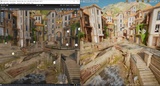
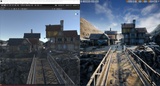
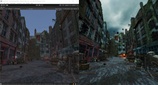
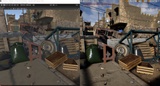

Description
The Exporter for Unreal to Unity is a powerful tool that can help you save time and effort when converting your Unreal Engine projects to Unity. It is an unreal plugin (it will work only when placed in Unreal, see tutorial) that will export complete Unreal levels to Unity. That means it will batch convert static meshes with LODs, collision shapes, actor placement, decals, lights, reflection probes, spline meshes, skinned meshes with animations, animation notifies, terrain, foliage, materials (even post processing materials under URP), textures and also automatically create the corresponding Unity scene.
If you’ve ever dreamed of transferring your detailed work from Unreal to Unity without losing crucial elements, look no further.
Watch the video tutorial here : https://youtu.be/_BXcOMBAhGk?si=Bu_rib55L_TY945e&t=144
Workflows
Meshes - All meshes are exported as individual FBXs per original unreal asset with per LOD geometry
Materials & Textures - There are multiple options : the default is custom shaders which replicate the unreal materials exactly. This also includes shader parameters,vertex animations, procedural texturing (like WorldAlignedTexturing or UV panning),post processing shaders (URP only). You can also try using standard shaders with or without baking. Prior to export you can use the BakeTextures option if you want to preserve the original material look AND use the standard shaders. Do note that baking significantly increases the number of textures in your project (increasing VRAM consumption), may create duplicate textures or may create additional textures where none were originally used (like if a single float was used for roughness/metallic/AO for example).
Nanite meshes - There are 2 options : either export the original mesh OR the coarse/simplified mesh.
Skinned meshes & Animations - There's an option to either export as Skinned mesh or convert to static mesh. Every skinned actor exports its assigned animation asset OR there is an option to export all animations compatible with the skinned mesh skeleton.
Collision - All collision shapes are exported including convex hull colliders. This also takes into account the per project or per mesh collision complexity setting so watch out for those in case of issues.
Prefabs - There is an option to either not create them (useful when you want to export multiple scenes), create per mesh/material combination or the new experimental option to create prefabs only for original blueprints.
Terrain - Prior to export, please use the ConvertLandscapesToStaticMeshes. This makes the terrain a static mesh and preserves original material & textures. There is also an experimental Landscape export to multiple unity terrains (1 per landscape component) which requires you to use UnrealToUnity->ImportTerrainHeightmapAndGrass option in Unity but do note that this way materials & textures are not transferred yet.
Foliage - There are 2 options : either every instance is converted to a static mesh actor prior to export OR you can use the TreeInstances workflow where data about foliage is put into a GameObject and then in unity after opening your scene you must select UnrealToUnity->MoveTreeDataToTerrain. This moves the tree instances data into a newly created Unity terrain's TreeInstances. This is much faster than per instance game objects but do note it's not as fast as unreal and you will always need a unity terrain to render them.
Sounds - All sound wave assets are exported as OGG files.
Supported Unity versions :
Built in pipeline : Unity 2019.4 or newer
URP : Unity 2021.2.7 or newer ( URP 11.0 or newer )
HDRP : Unity 2021.2.7 or newer ( HDRP 11.0 or newer )
Supported Unreal Platforms
Windows, MacOS, Linux
- certain materials will not look 100% like in Unreal, one aspect being the smoothness curve, and a few others containing exotic material nodes
- for terrain you need to first select the ConvertLandscapesToStaticMeshes option.
- if for any reason you have shader compilation errors give me an e-mail at [email protected]
- light intensities will not match exactly
- creates prefabs for instanced meshes for easier editing
What doesn't get exported :
cloth
exotic material nodes that I haven't fixed yet
particle emitters
wind modifiers
subsurface scattering
tessellation
terrain with over ~30 million polygons as the FBX exporter will crash.
RuntimeVirtualTextures
Grass feature
Clouds feature
Level Sequences
Groom Assets
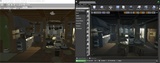
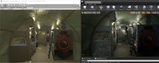
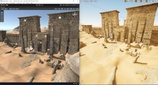
Here's a few sample projects exported with this plugin :
VictorianStreet Fantasy Village
In case you're wondering about the legality of transferring assets from Unreal, the Unreal Engine FAQ says
"In fact, you can use assets created and/or modified in Unreal Engine in other video game engines without incurring any royalty obligation, provided that those assets don’t use or rely on Unreal Engine code and are not UE-Only Content provided by Epic"
If you encounter any problem, don't hesitate to contact me at [email protected] !