![Multimedia 1 para anuncio Dark Jester Headgear - [Metahuman]](https://media.fab.com/image_previews/gallery_images/0f7a9b13-5a18-4933-a1b6-9cc9458f967b/8d9cde84-cfb4-40e4-8ae2-2f9ae1e9676d.jpg)




Descripción
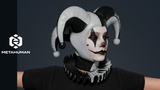
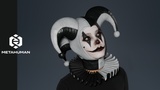
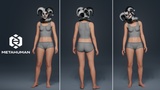
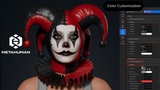
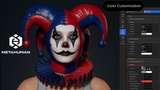
Create realistic MetaHuman characters with this jester headgear and ruff collar set, specifically designed for MetaHuman Creator and Unreal Engine. This outfit is fully compatible with all MetaHuman body types and automatically adapts to various body shapes and proportions directly within MetaHuman Creator, ensuring a clean fit without the need for manual adjustments.
_________________________________
Perfect for creating characters as:
Court jesters, circus performers, and tricksters in fantasy or medieval settings
Dark carnival, horror game characters, or thriller protagonists
Harley Quinn-inspired antiheroes, villains, and edgy modern youth
Cosplay characters, unique NPC assets, and stylized indie game heroes
Festive characters for Halloween specials, circus-themed events, and holiday updates
_________________________________
Features:
Full compatibility with MetaHuman Creator
Support for all MetaHuman body types
Automatic shape adaptation
Easy color customization
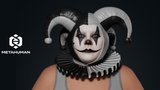
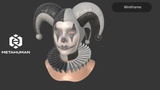
All clothing parts and accessories (jester hat, horns, pom-poms, and ruff collar) are provided as separate meshes
All textures are 4K high-resolution with realistic leather and fabric details
_________________________________
User Guide:
Download the AO_Jester_Headgear.mhpkg file.
Open your project in Unreal Engine.
Create an Outfits folder.
Inside, create a JesterHeadgear folder.
Drag and drop the AO_Jester_Headgear.mhpkg file into the JesterHeadgear folder.
Ensure the MetaHuman Creator plugin is installed.
Open MetaHuman Creator.
Drag the AO_Jester_Headgear asset into the Clothing section and apply it to your MetaHuman character.
_________________________________
Clothing Part Separation Guide:
Open the CA_Jester_Headgear asset, delete the unnecessary SkeletalMeshImport by holding ALT + clicking on the Collection, and save the file.
Open the AO_Jester_Headgear asset. In the top-left corner of the screen, find Evaluate Dataflow Graph, click the three dots, and switch the mode from Automatic Graph to Manual Graph.
In the AO_Jester_Headgear tab, locate Variable Overrides. Under Source Asset, click Reset (the arrow icon) and reassign the same CA_Jester_Headgear asset. Switch the Evaluate Dataflow Graph mode back from Manual Graph to Automatic Graph and save.
Go to your MetaHuman tab and click Refresh Preview at the top of the screen. You are done!
_________________________________
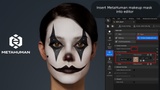
How to insert the makeup mask for the MetaHuman into the editor:
Open AO_Jester_Headgear.
Find the Editor Pipeline tab.
Expand the Outfit tab and add the desired makeup map.
_________________________________
Technical Specifications:
Engine: Unreal Engine 5.8
Platform: MetaHuman Creator
Asset Type: Parametric Clothing / Complete Outfit Set
Gender: Female / Unisex (depending on setup)
Supported Body Types: All MetaHuman body types
Textures: All textures in 4K resolution
_________________________________
Support & Contact:
If you have any questions or need assistance before or after your purchase, please feel free to reach out via email at [email protected].
I hope this asset fits your project perfectly!