Описание
Tired of endless folder diving and broken naming conventions? Stop wrestling with the Content Browser and start curating your workspace.
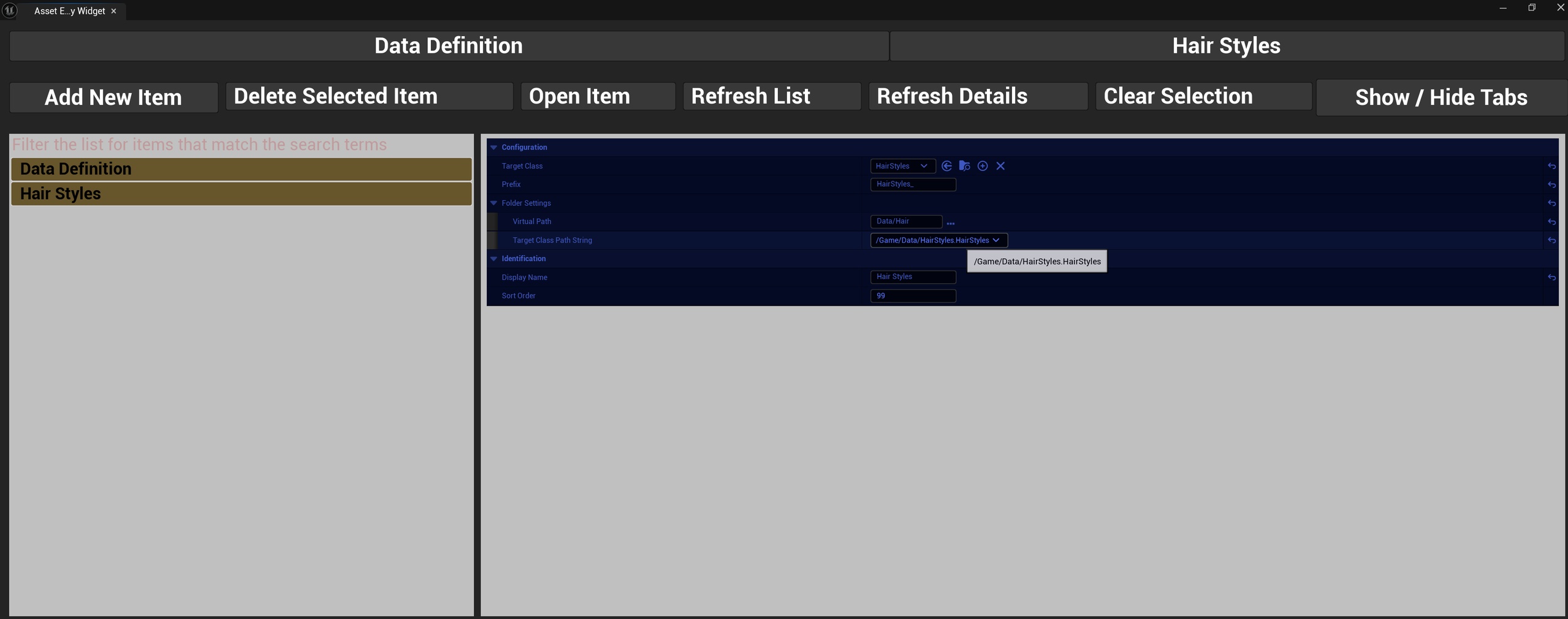
The Asset Editor Workspace is a fully self-contained, generalized data management suite for Unreal Engine. Unlike traditional hardcoded tools that only work for a single project, this plugin allows technical designers and programmers to spin up entirely custom asset-management interfaces for any custom Primary Data Asset class in under 60 seconds—without writing a single line of code.
🚀 The "Never Leave the Tool" Pipeline
Instant Tab Deployment: Create a custom workspace tab for any PDA (e.g., ShipData, HairStyles, ItemData) simply by creating a DataDefinition profile inside the editor.
On-the-Fly Scaffolding: Generate new Primary Data Asset blueprints directly inside your customized tab layout. The asset registry is scanned dynamically, populating your UI drop-downs instantly.
Automated Asset Naming: Define unique folder directories and literal file naming prefixes (e.g., DA_HairStyles_). New assets are automatically generated in the correct paths with consistent naming conventions, completely removing friction for production teams.
🛠️ Advanced Core Utilities
Unified Asset Scroll Box: View all asset instances matching the active tab's filter in a centralized list. Selecting an item pushes its fields instantly into the integrated details panel.
Double-Click Inspection: Double-clicking an asset (or clicking 'Open Item') opens it in a standalone native engine window while keeping it active inside your layout panel.
Stable Bi-Level Sorting: Workspace tabs and items utilize a stable sorting algorithm. Elements are ordered primarily by a custom Sort Order index and automatically fallback to alphabetical tie-breaking using the asset's display name.
Literal Search Filtering: Find specific items instantly using an inline search bar that respects literal space sequences (e.g., searching "f a" matches "Half Apple" but excludes fuzzy-matches like "Action Freeze"). [1]
Safe Erasure Buffering: Clicking 'Clear Selection' completely neutralizes data references, protecting your production files from accidental deletions.
🛡️ Clean Workspace Architecture
Zero Build Footprint: Configured strictly as an Editor module. All generated tab assets, widgets, and metadata objects are automatically stripped during packaging and leave absolutely zero overhead in your final game client.
Source Control Friendly: Workspace hidden configurations are serialized seamlessly to your local .ini developer config profiles. Personalize, show, or hide your workflow tabs on a whim without dirtying team repositories.
Automated Map Synchronization: Deleting stale data assets on disk automatically triggers an asset sweep, perfectly cleaning historical snapshots out of your local configs.
Technical DetailsFeatures:
Fully generalized Primary Data Asset manager workspace.
Integrated Details Panel and standalone inspection workflows.
Stable bi-level numerical and alphanumeric sorting algorithm.
Automated asset generation with custom folder paths and literal naming prefixes.
Inline search bar with strict substring matching rules.
Local .ini serialization for source-control safe workspace layout customizations.
Code Modules:
AssetEditorRuntime [Runtime]
AssetEditor [Editor]
Number of Blueprints/Widgets: 12 Core Assets (Including data definitions, interfaces, dynamic rows, and utility layout frameworks).
Number of C++ Classes: 7 Core Classes / Interfaces (UAssetEditorProxy, UAssetEditorPerUserSettings, FContentBrowserFolder, UDataDefinitionBase, UEditorUtilities, USortable / ISortable, FAssetEditorRuntimeModule).
Network Replicated: No (Editor-only utility).
Supported Development Platforms: Win64, Mac, Linux
Supported Target Build Platforms: Win64, Mac, Linux, Android, iOS, PlayStation 5, Xbox Series X/S
Example Project: Not applicable. Instantly integrates with any project baseline.
Documentation: Comprehensive inline C++ header tooltips and a README.md file bundled inside the plugin Docs directory.
Important / Additional Notes: Relies on native AssetSearch plugin (must be enabled). Local configs serialize to Saved/Config/ paths.