Descripción
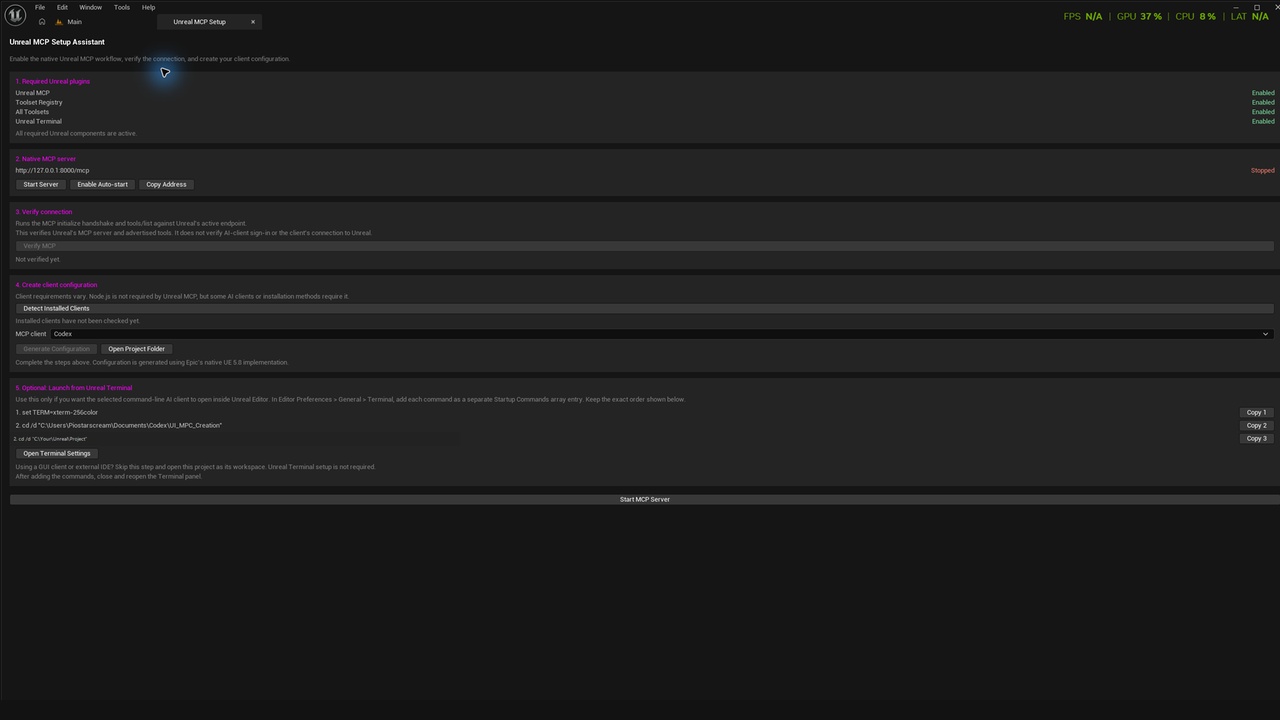
Unreal MCP Setup Assistant turns Epic’s experimental Unreal Engine 5.8 MCP setup into a clear, guided Editor workflow.
ENABLES REQUIRED UNREAL PLUGINS
After the assistant is enabled and Unreal Editor is restarted, its required plugins are also enabled:
• Model Context Protocol (Unreal MCP)
• Toolset Registry through the All Toolsets dependency
• All Toolsets
• Unreal Terminal
The panel reports component status, starts Unreal’s native local MCP server, performs the MCP initialize handshake
and tools/list check, detects supported AI clients, and safely creates project-level client configuration.
Optional Unreal Terminal startup instructions are displayed and copied individually in the required sequence.
The plugin never changes Terminal preferences automatically. Users working with a GUI client or external IDE
can skip Terminal setup and open the Unreal project as their workspace.
Tutorial: Youtube
FEATURES
• Guided panel under Tools > Unreal MCP Setup
• Required Unreal plugin activation
• Live dependency and server status
• Native MCP server start and optional per-project auto-start
• MCP initialize and tools/list verification
• Node.js and supported AI-client command detection
• Configuration support for Codex, Claude Code, Cursor, VS Code, and Gemini
• Safe handling of existing configuration files
• Custom-client guidance
• Optional Unreal Terminal instructions and direct access to Terminal preferences
• Project-level configuration generation
VERIFICATION BOUNDARY
The plugin verifies Unreal’s MCP server and its advertised tools.
It does not verify AI-client sign-in or confirm that the selected client can connect to Unreal.
REQUIREMENTS
• Unreal Engine 5.8
• Epic’s experimental Unreal MCP and related plugins
• A compatible MCP client
• Node.js only when required by the selected client or installation method
PLATFORM STATUS
• Tested and supported: Windows 64-bit with Unreal Engine 5.8
• macOS and Linux are not currently validated or claimed as supported
OPEN SOURCE
Source code, issues, and contribution information: GitHub
TECHNICAL INFORMATION
Features:
Guided dependency setup, native MCP server controls, MCP initialize and tools/list verification, installed-client detection, safe project-level configuration generation, existing-configuration handling, custom-client guidance, and optional Unreal Terminal instructions.
Code Modules: MCPSetupAssistant — Editor
Number of Blueprints: 0
Number of C++ Classes: 6
Network Replicated: No
Supported Development Platforms:
• Windows: Yes
• Mac: No
Supported Target Build Platforms: None.
Editor only; no packaged-game or runtime functionality
Documentation Link: GitReadme
Example Project: Not applicable. The plugin works directly inside the user’s Unreal project.
Installation and use are demonstrated here: Video Link
Important/Additional Notes:
• Version: 0.1.0
• Engine version: Unreal Engine 5.8
• Module type: Editor
• Contains Unreal assets: No
• Contains C++ source: Yes
• External service included: No
• Tested target platform: Win64
• Connects only to Unreal’s configured local MCP HTTP endpoint. Epic’s default is http://127.0.0.1:8000/mcp.
• Client requirements vary. Unreal MCP does not require Node.js, although some clients or installation methods may require it.
• The plugin does not contain, distribute, download, install, launch, or execute executable or installer files.
• Installed-client detection performs read-only file-existence checks against the user’s PATH. The .exe, .cmd, and .bat suffixes in the source
identify commands already installed by the user. Detected files are never opened, executed, modified, downloaded, or included with the plugin.
• This read-only detection behaviour was clarified with Fab Support.
VERSION NOTES
Initial v0.1.0 release for Unreal Engine 5.8, tested on Windows 64-bit. Includes guided dependency setup, native MCP verification, safe client configuration,