説明
⚡ Async Load Toolkit — Async Asset Loading, Anywhere in Blueprint
Async Load Toolkit gives Blueprint the full power of Unreal's streaming system — progress, cancellation, priority, batching and memory control — without a single line of C++.
Drop the plugin in your project and call LoadAssets from anywhere: an Event Graph, a Blueprint Function, a Macro, an Interface. Every request returns a storable Handle you can poll, cancel or re-bind at any time, and the built-in reference counter keeps your assets alive exactly as long as you need them.
Vanilla Blueprint gives you a single fire-and-forget node that only works in the Event Graph, with no progress, no cancel, no batching and no protection against GC. Async Load Toolkit fixes all of it.
💬 Discord
📦 LOADING
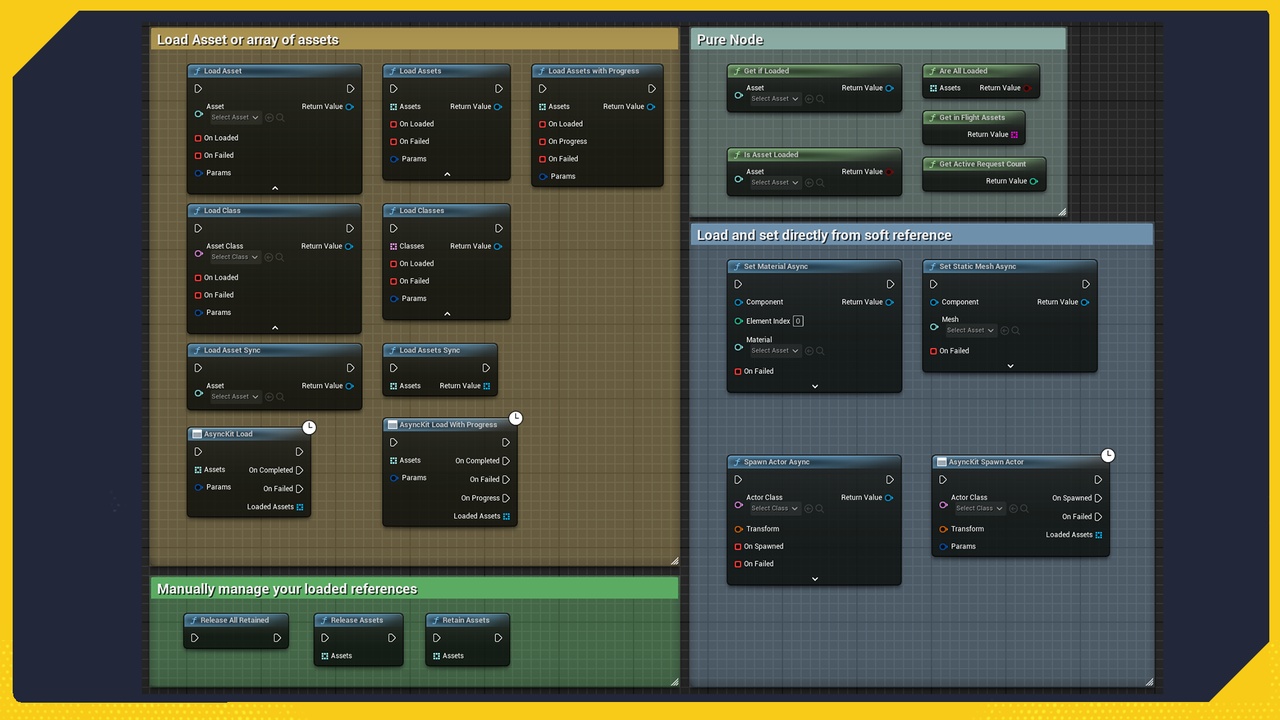
Load a single asset, an array of assets, or soft class references
Batch loading on every supported engine version — no Asset Manager setup required
Typed loaders — StaticMesh, SkeletalMesh, Texture2D, Material, Sound, AnimSequence, Niagara, DataAsset, Widget Class — no manual casting
Synchronous fast path — if assets are already in memory, the callback fires the same frame
Explicit synchronous loaders included, clearly marked, for the cases where you want them
🧩 CALLABLE ANYWHERE
Delegate-based functions work in Blueprint Functions, Macros and Interfaces — not just the Event Graph
Classic async nodes with On Completed / On Progress / On Failed pins for Event Graph use
Bind any Custom Event as the completion callback via Create Event
🎛️ FULL CONTROL
Storable Handle object — keep it in a variable, poll it, pass it around
Real progress 0–1 and loaded/total counts — drive any loading bar
Cancel in-flight requests at any time
Three priority levels for queue ordering
Optional timeout with typed failure reportin
🧠 MEMORY & PERFORMANCE
Reference-counted Retain / Release — assets stay loaded until every system releases them
Automatic protection against post-callback garbage collection
Request deduplication — identical or in-flight requests join the existing handle instead of reloading
Chunked throttling — load thousands of assets in controlled batches with a flat memory footprin
⚙️ QUALITY OF LIFE
Set Static Mesh Async / Set Material Async — load and apply in one node, safe against destroyed actors
Spawn Actor Async from a soft class reference
Query helpers — Is Asset Loaded, Get If Loaded, Are All Loaded
Project Settings for global defaults (dedup, fast path, chunk size, timeout)
🔍 DEBUGGING
In-game debug overlay listing every in-flight request
Console commands — AsyncKit.Debug, AsyncKit.DumpRetained, AsyncKit.CancelAll
Optional request logging and synchronous-load warnings
⚠️ Important Notes
Async nodes with multiple execution pins can only be placed in Event Graphs — this is an Unreal Blueprint compiler restriction, not a plugin limitation. The delegate-based functions are provided precisely for Functions, Macros and Interfaces.
Asynchronous loading means your logic continues immediately. Anything that consumes the loaded assets must live in the callback, not after the
loading node.
Synchronous loaders block the game thread by design and will hitch. They are included for deliberate use and are clearly marked.
🛠️ Supported Engine Versions
Unreal Engine 5.2 – 5.8
Blueprint-only projects fully supported — no C++ required
🛠 Support
All support is provided after product ownership verification.