Descripción
Multiplayer Network Test Lab: Lag, Ping & Packet Loss
Version 1.0.0
Reproduce multiplayer networking bugs on demand, without leaving PIE
Tickrate Multiplayer Test Lab is a complete multiplayer testing toolkit for Unreal Engine.
Unreal Engine's built-in packet simulation can only target the server, all clients, or everyone, and must usually be configured before starting the session.
Tickrate Multiplayer Test Lab gives you full control while the game is already running.
Select a specific client and instantly simulate:
- Latency
- Jitter
- Packet loss
- Packet duplication
- Upload degradation
- Download degradation
- Full round-trip connection issues
Test one player without affecting the rest of the session, reproduce difficult networking bugs consistently, and export detailed reports for later analysis.
Key Features
One-click PIE multiplayer sessions
Launch a listen server and multiple client windows as genuine PIE instances.
The plugin automatically uses:
- Your current level
- Your existing Play settings
- Your configured number of players
- Separate PIE windows
No standalone processes and no manual console setup required.
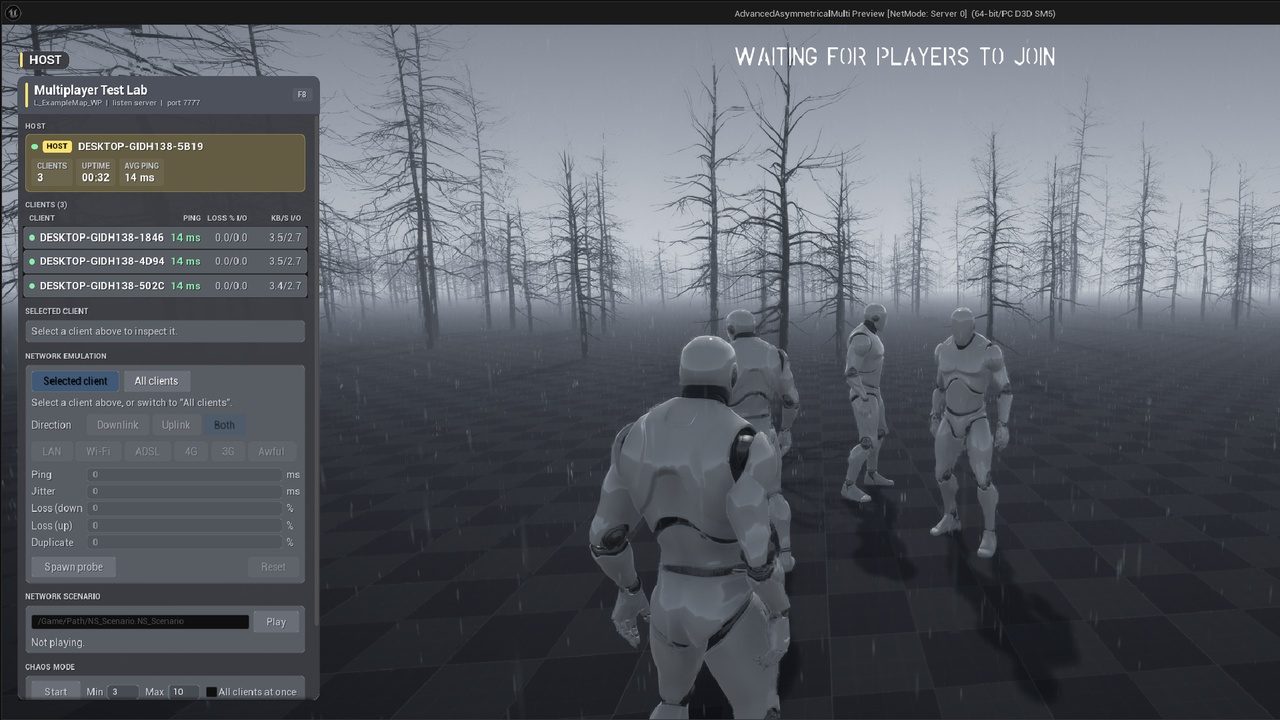
Live Host Debug HUD
Press F8 on the listen server to open the multiplayer testing panel.
Monitor every connected client in real time:
- Connection status
- Ping
- Packet loss
- Bandwidth
- PlayerController
- Pawn
- Network address
Select a client and apply network conditions instantly without restarting the session.
Built-in Network Presets
Quickly reproduce common connection environments using ready-to-use presets:
- LAN
- Wi-Fi
- ADSL
- 4G
- 3G
- Awful Connection
You can also configure exact values manually for precise and repeatable testing.
Per-client Network Emulation
Apply network degradation to one specific client without affecting the others.
This makes it possible to test situations such as:
- One player experiencing high latency
- A single client losing packets
- One unstable mobile connection
- Different network conditions for every connected player
Per-direction Control
Simulate network issues independently for each direction:
- Downlink: packets received by the client
- Uplink: packets sent by the client
- Both: full round-trip degradation
Reproduce problems that only affect player input, server updates, replication, or the entire connection.
Client-side Self-testing
Clients can apply network emulation to their own connection through:
- Console commands
- Blueprint nodes
This is useful for testing how the game behaves from the affected player's perspective, including packaged builds and sessions without the Host Debug HUD.
Scripted Network Scenarios
Create repeatable network test sequences using Data Assets.
Example scenario:
1. Stable connection
2. Poor Wi-Fi for 10 seconds
3. Sudden packet-loss spike
4. High latency period
5. Gradual recovery
Replay the exact same sequence during every test pass for consistent debugging and comparison.
Chaos Mode
Automatically rotate network conditions across connected clients.
Chaos Mode can randomly:
- Select clients
- Apply different presets
- Change conditions over time
- Stress-test replication and multiplayer systems
Ideal for discovering networking issues that may not appear during normal testing.
Session Reports
Record detailed information from every test session.
The plugin exports two CSV files:
- A session summary
- A complete timeline
Reports can be opened in Excel or processed with your own tools.
You can also compare two exported sessions directly inside the Unreal Editor using a colour-coded delta view.
Complete Blueprint API
All major features are available through Blueprint.
You can:
- Apply network emulation
- Clear network emulation
- Read live connection statistics
- Start and stop scenarios
- Enable Chaos Mode
- Export reports
- Control packaged-build activation
No C++ knowledge required.
Safe Packaged-build Integration
The plugin remains dormant outside the editor by default.
It only activates when explicitly enabled through:
- GameMode
- PlayerController
- Level Blueprint
- Console variable
- Console command
- Command-line argument
You can keep the Test Lab included in a packaged build and activate it only when needed for QA, internal testing, or remote debugging.
Ideal For
Tickrate Multiplayer Test Lab is designed for:
- Multiplayer game developers
- Network programmers
- Blueprint developers
- QA teams
- Indie studios
- Replication debugging
- Lag compensation testing
- Dedicated-server testing
- Packaged-build network testing
Support and Feedback
Found a bug or have an idea for a new feature?
Every report and suggestion is reviewed.
Email: [email protected]
Website: tickrate.fr