
描述
The Unreal console is one of the most powerful tools in the editor. It is also one of the worst places to work.
You type a command. You forget the name. You apply three cvars to calm Lumen, then you cannot remember which ones. The viewport looks wrong and you have no idea whether the engine even accepted the last line. That is not a skill issue. That is a bad interface for a good system.
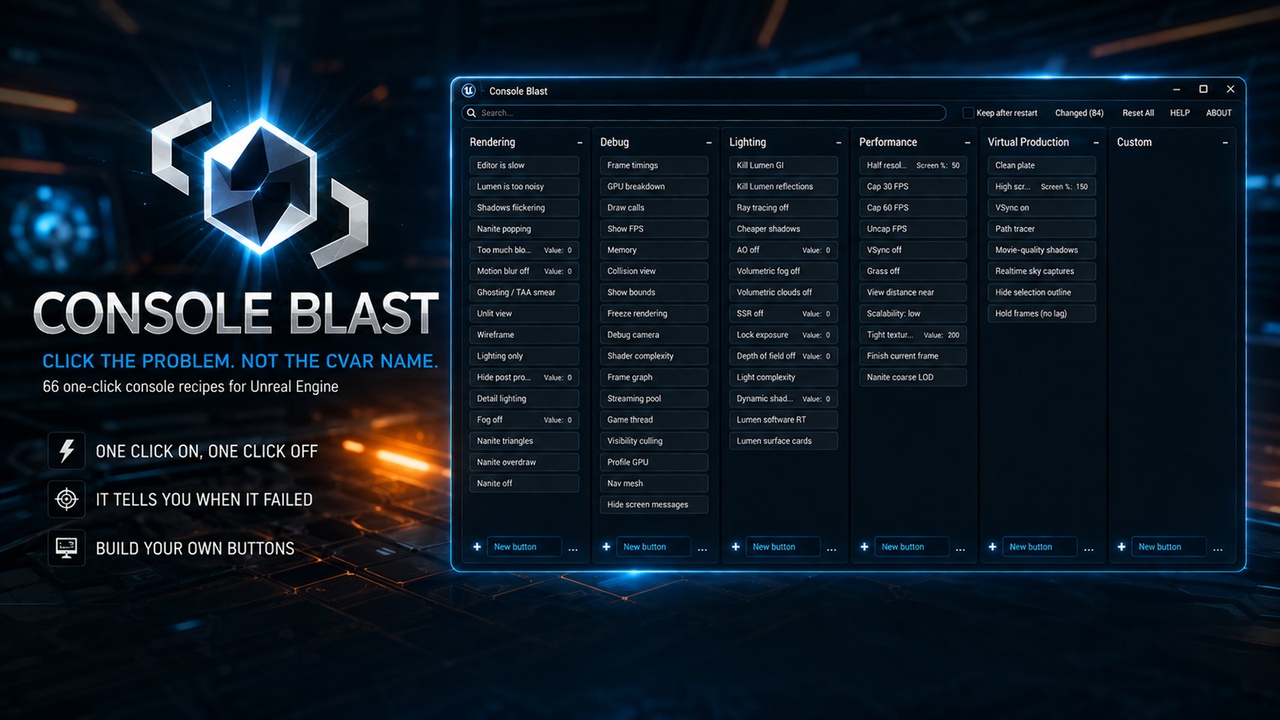
Console Blast is the interface. It turns Unreal's console into a board of buttons you can actually work with.
Stop hunting for the name in a forum thread from 2019. Console Blast ships with 66 ready-made recipes named after the problem — Editor is slow, Lumen is too noisy, Shadows flickering.
Click once to apply. Click again to restore. Every button remembers what the engine looked like before you pressed it. You are not fighting the console. You are toggling a known, reversible state.
It tells you the truth. Green means the engine accepted the recipe. A dashed green edge means only part of it landed. Amber means Unreal ignored it — read-only, overridden, needs a restart — and the tooltip says why. No fake success. No silent failure you only notice ten minutes later.
Built around how you think. Search for flicker, lag, stat, nanite. Columns are Rendering, Debug, Lighting, Performance, Virtual Production, plus a Custom column that belongs to you.
Drag buttons between columns. Rename anything. Collapse a column to a letter when you need the room.
Your own buttons, in seconds. Type a cvar or a raw exec in the + field. Or open the picker and grab an engine command from that column's topic — it shows each cvar's current value and warns you when one needs a restart. Right-click a button -> Edit Command to set the title, tooltip, tags, On / Off lines, and a quiet colour mark so the button you need is the one your eye finds first. Export the board and bring it to your next project.
Know what changed — and take it back.
* Changed lists the cvars that are no longer at engine default — your own changes grouped at the top, Unreal's own start-up configuration below — with a one-click revert on each row.
* Value chip on single-number recipes — with a slider where the range makes sense.
* Reset All — a factory reset: it restores every value the board applied, then puts the board itself back to how it shipped. It asks first if that would lose buttons you built.
* Clear All Marks — removes colour marks only, leaving your buttons and values untouched.
Team-friendly persistence. Keep after restart is off by default. Turn it on, and the values are written to your project's DefaultEngine.ini under [SystemSettingsEditor] — so you know exactly what changed, and your team sees it in source control (like Perforce) instead of wondering. The plugin also puts them back itself once the editor has finished loading, so they hold even against scalability and device profiles.
Console Blast is editor-only. It does not modify engine source. It does not ship into the game. It sits in Window -> Console Blast and gives the hours back that used to disappear into the console.
Unreal Engine 5.5, 5.6, 5.7 and 5.8. Made for people who already know the console is powerful — and are tired of treating it like a typewriter.
Official Website > https://blastplugins.com/consoleblast/
Documentation > https://blastplugins.com/docs/consoleblast/