Opis
Viewport Actor Widgets for Unreal Engine
Pin interactive UMG widgets to your actors directly in the editor viewport. Build per-actor property panels, action buttons that call functions on the selected actor, live status displays, and custom editor tools - all using UMG, no Slate or editor-module C++ required.
Note: This plugin is currently in an experimental stage and is under active development. If you encounter any issues or have suggestions, please reach out before leaving a negative review --- your feedback helps me improve the product and I'm happy to assist with any problems directly. You can contact me through the support page or the Epic Developer Community.
Overview
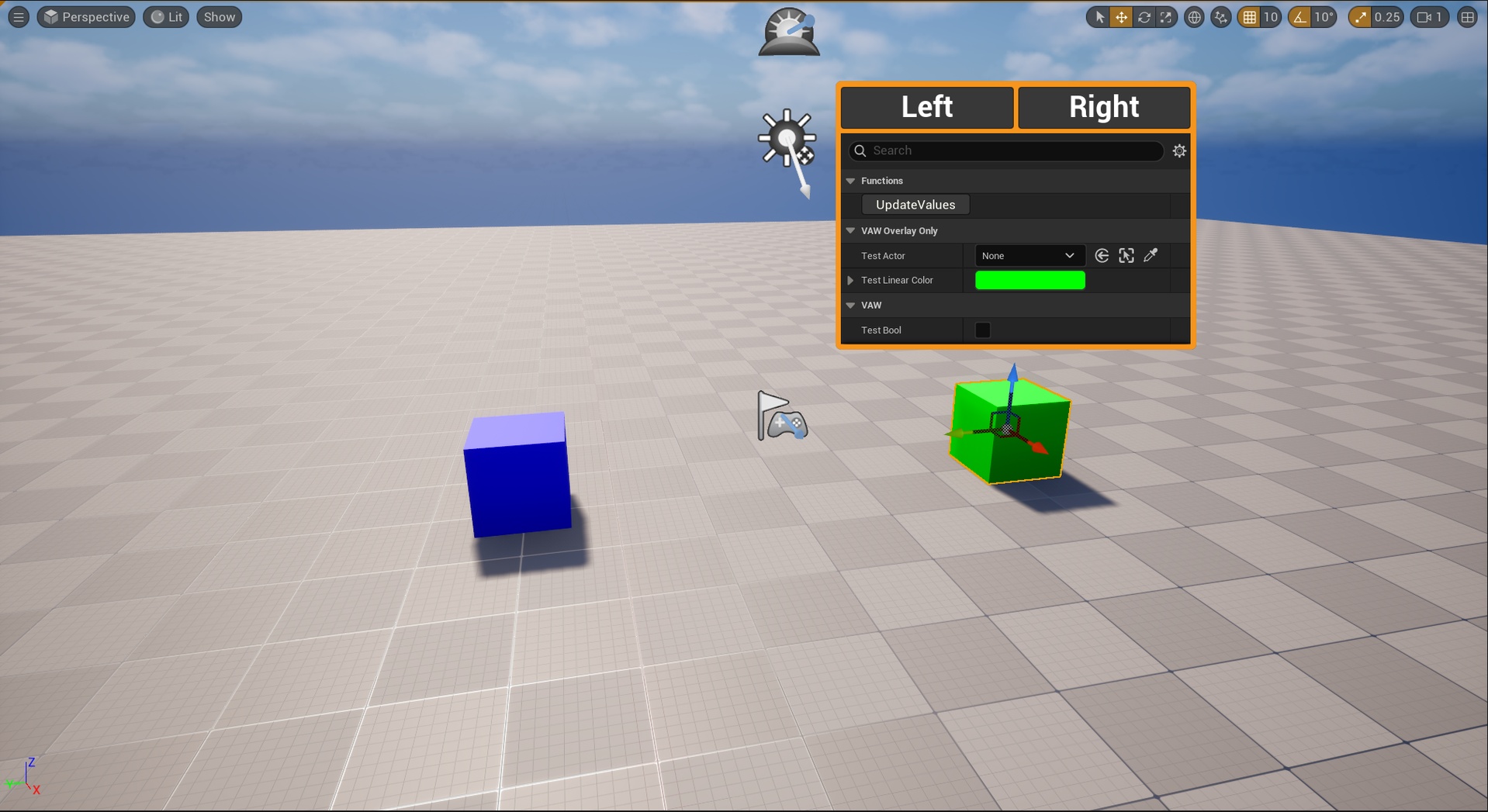
Drop a ViewportActorWidgetComponent on any actor, assign your UMG widget class, and it appears in the editor viewport pinned to the actor's transform. Two render modes cover the typical use cases:
Worldspace 3D - The widget is rendered as a textured quad in the world, scaling and rotating with the actor's transform. Click, hover and mouse-wheel events are raycast into the offscreen Slate window so the widget is fully interactive without leaving the viewport. Great for debug overlays, status panels above NPCs / props, or in-world dashboards on important level actors.
Screen Overlay - The widget lives in the editor's Slate hierarchy, projected to screen-space above the actor. Auto-shown on actor selection and auto-hidden on deselect. Full popup-picker compatibility (color, asset, class picker work natively). Best for per-actor DetailsView panels and action buttons that need to host complex property editors.
Key Features
Plug & Play - Add the component, pick a widget class, done. No programming required if you just want to display a UMG widget above an actor.
Two render modes - Worldspace 3D (in-world quad) or Screen Overlay (screen-space, follows projection). Switch at any time per component.
Full input routing in 3D - Click, hover, mouse-leave and mouse-wheel events are forwarded to the offscreen Slate window so buttons, sliders, scroll boxes and DetailsView panels respond as expected.
Camera-zoom safe scroll - Mouse-wheel events at scroll limits are consumed so they don't bubble up to the editor viewport's camera zoom (the usual annoyance with embedded scrollable widgets).
Construction Script survival - A transient shadow actor pattern keeps the widget alive across Construction Script rerun, so editing your actor BP doesn't kill the live widget.
DPI-aware overlay - Screen Overlay correctly accounts for the viewport's DPI scale on 4K / high-DPI displays, so the widget stays anchored to the actor at any Windows scaling factor.
Selection-driven auto-show - Overlay widgets appear automatically when their owning actor is selected, and tear down on deselect, so the viewport stays clean.
Owner-binding helpers - The optional ViewportActorWidget base class exposes OwnerActor / OwnerComponent bound before widget construction, so your DetailsView can bind to the actor on PreConstruct without needing a workaround.
Blueprint function library - Reverse lookup from any UUserWidget back to the actor that owns its host component, useful when widget BPs are reused across multiple actors.
Editor-only, no runtime cost - The whole plugin is editor-targeted and doesn't ship in packaged builds.
How It Works
The component is just a descriptor (transform, widget class, draw size, render mode). When the dedicated editor mode is active (or when the actor gets selected, depending on mode), the plugin's editor subsystem spawns the actual renderer:
For Worldspace 3D, a transient shadow actor hosts a UWidgetComponent at the descriptor's world transform. The subsystem's tick keeps the shadow synced to the descriptor each frame, surviving SCS rerun by re-resolving the descriptor by name. The editor mode raycasts viewport clicks against tagged widgets and routes pointer events into the offscreen Slate window.
For Screen Overlay, the widget is added as an SCanvas overlay on the active level viewport. Each frame the subsystem projects the actor's world position into Slate-space and updates the canvas slot position.
Use Cases
Per-actor property panels with DetailsView UMG for level designers and technical artists
Action buttons above important level actors (rebuild geometry, randomize seed, refresh data, regenerate splines, etc.)
Live status / debug HUDs pinned to gameplay actors during editor preview
Custom editor tools that need contextual UI without authoring an Editor module / Slate widget
Procedural / parametric actors exposing controls directly in the viewport without forcing the user to consult the Details panel
Limitations
Worldspace 3D mode cannot host engine pop-up pickers (color picker, asset picker, class picker, struct viewer). These FMenuStack-managed popups treat the offscreen routed click as "outside" and dismiss themselves immediately. Use Screen Overlay for widgets that rely on those pickers - it's the supported workflow.
Editor-only. The plugin is targeted at editor tooling and is not packaged in shipping builds.
Technical Details
- Module Type: Editor
- Platforms: Windows
- Engine version: UE 5.5+
- Dependencies: UMG, Blutility (DetailsView UMG support is provided by an engine built-in module, no extra plugin required)
Support
This plugin is experimental and actively maintained. If something doesn't work as expected, please get in touch --- I'd much rather help you solve the issue than have you walk away frustrated: