Описание
Project Health Toolkit is an editor-only C++ plugin for Unreal Engine that helps developers find asset-quality problems early, maintain consistent project standards, and reduce repetitive cleanup work.
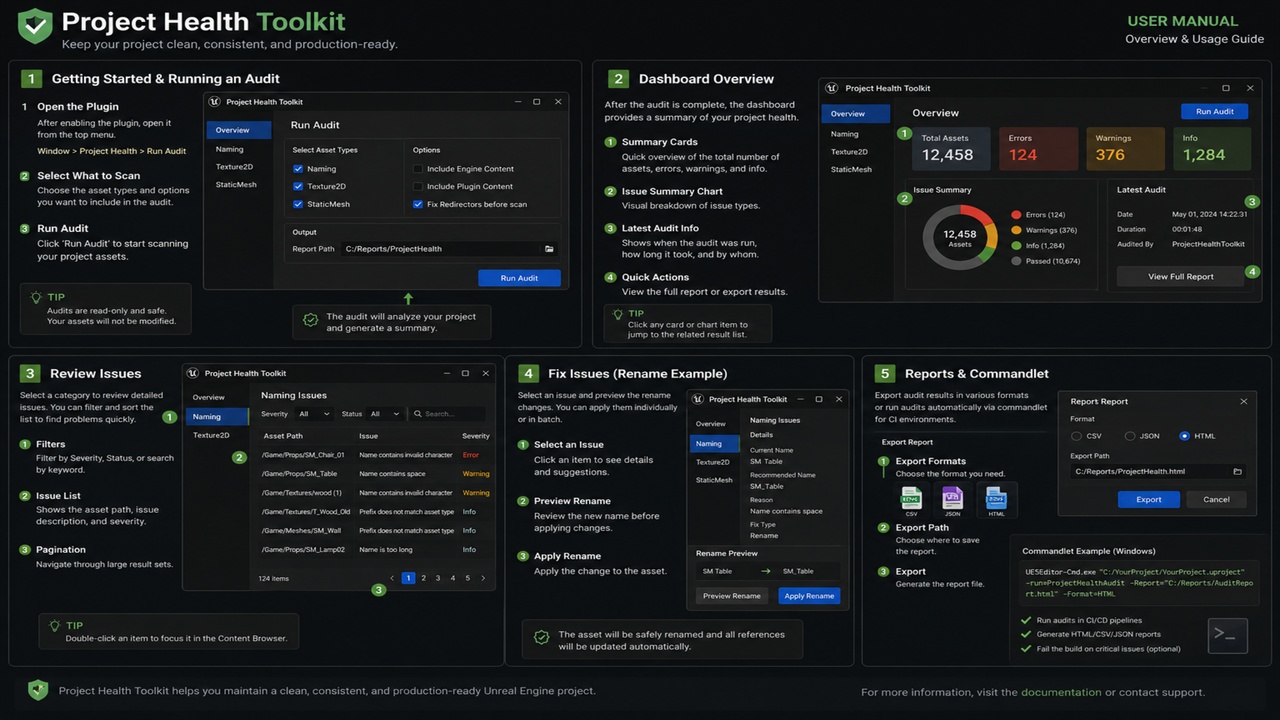
Run a complete project audit or focused scans for Naming, Texture2D, and StaticMesh assets. Review the results in a searchable and sortable dashboard, jump directly to affected assets, apply validated naming fixes, and export reports for documentation or CI pipelines.
KEY FEATURES
PROJECT-WIDE ASSET AUDITING
• Run Scan All, Scan Naming, Scan Textures, or Scan Static Meshes
• Configure included and excluded package paths
• Review Error, Warning, and Info results in one dashboard
• Search by asset, class, rule, package, message, or suggested action
• Sort results by severity, category, asset, rule, or package
• Double-click a result to locate the affected asset in the Content Browser
CONFIGURABLE NAMING VALIDATION
• Asset-class-based prefix rules
• Maximum asset name length
• Duplicate prefix detection
• Repeated underscore detection
• Uppercase-after-prefix conventions
• Configurable rules for different asset classes
ONE-CLICK SAFE NAMING FIXES
Apply every currently validated naming rename through a single workflow.
Before execution, Project Health Toolkit validates the source asset and destination again. Unsafe candidates are blocked instead of being applied.
The validation system detects and blocks:
• Existing assets at the destination path
• Multiple assets targeting the same destination
• Invalid package or object paths
• Missing or changed source assets
• Redirector assets
• Conflicting rename suggestions
• Unchanged names
• Disallowed locations outside /Game
Large rename operations are automatically divided into configurable batches. If a batch fails, processing stops and the dashboard clearly reports applied, blocked, failed, and remaining items.
After completion or partial failure, the previous scan is automatically executed again so that the dashboard reflects the current project state.
RENAME PREVIEW
For item-level control, use Preview Selected Rename or Preview All Renames.
The preview window displays:
• Current asset name
• Proposed asset name
• Destination path
• Validation status
• Blocking reason, when applicable
Only checked and validated proposals are submitted for renaming.
TEXTURE2D AUDITING
Detect common Texture2D production issues, including:
• Imported dimensions exceeding the configured limit
• Non-power-of-two dimensions
• Disabled mip generation
• Normal-map compression and sRGB mismatches
• Mask-texture compression and sRGB mismatches
• Configurable normal-map and mask naming suffixes
STATIC MESH AUDITING
Review StaticMesh production health, including:
• Missing or invalid LOD0 geometry
• Invalid, zero, or oversized bounds
• Excessive material-slot counts
• Empty material slots
• Insufficient LOD coverage
• High-detail non-Nanite review candidates
• Missing simple collision as an optional rule
• Complex-as-simple collision triangle budgets
• Invalid lightmap coordinate indices
REPORT EXPORT
Export the complete most recent scan as:
• CSV for spreadsheets and issue trackers
• JSON for automation and custom tools
• Standalone HTML for immediate browser review
Exported reports contain the complete scan result, not only the rows currently visible through dashboard filters.
COMMANDLET AND CI SUPPORT
Use the ProjectHealthAudit commandlet in automated validation and continuous-integration pipelines.
The commandlet supports:
• Naming, Texture, StaticMesh, or complete audits
• CSV, JSON, HTML, or combined report output
• Configurable failure thresholds
• Explicit process exit codes
• Unattended execution
Example:
UnrealEditor-Cmd.exe Project.uproject -run=ProjectHealthAudit -Mode=All -Format=All -FailOn=Warnings -unattended -nop4 -nosplash
IMPORTANT AUTOMATIC-FIX SCOPE
Version 1.1 automatically modifies only validated naming rename candidates.
Texture and StaticMesh findings are advisory. Their settings are not changed automatically because the correct solution can depend on the intended use of each asset and the production rules of the project.
TECHNICAL INFORMATION
• Editor-only Unreal Engine C++ plugin
• Source code included
• No runtime gameplay module
• Configurable through Project Settings
• Engine-specific packages are provided for the supported versions listed on the Fab product page
• Source control or a project backup is recommended before applying large rename operations