Beschreibung
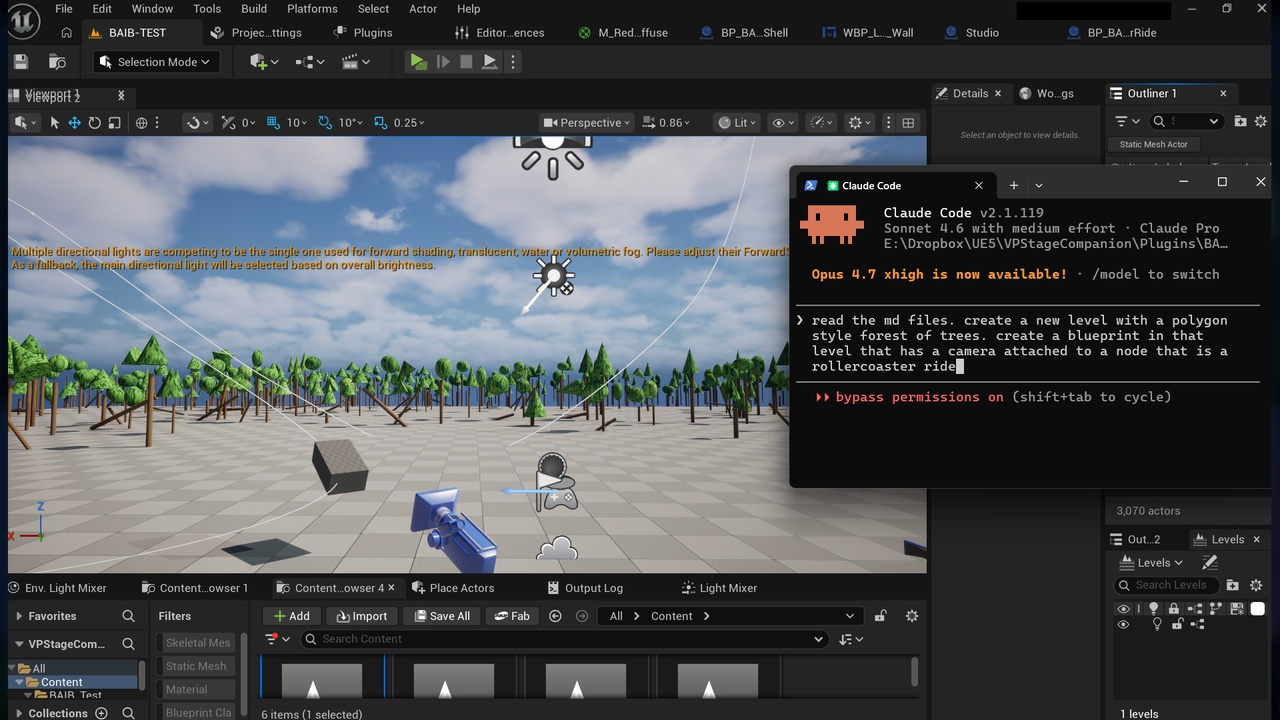
Turn any AI into an Unreal Engine developer. 1050 MCP tools + a token-optimized Blueprint format let Claude, Codex, Gemini, or any LLM build Blueprints, materials, VFX, UI, and whole levels — straight from your CLI.
BAIB v2 — Blueprint AI Bridge + MCP connects AI agents directly to the Unreal Editor. It ships a full MCP (Model Context Protocol) server inside the editor exposing 1050 automation tools across 22 domains, plus a token-optimized Blueprint text format (AIBP-RT2) that makes AI-driven Unreal development fast, cheap, and reliable.
Whether you use Claude Code, OpenAI Codex, Gemini CLI, or your own agent framework — BAIB turns "describe what you want" into compiled, validated Unreal content.
--- Token-Optimized by Design
LLM tokens are money. BAIB is built around spending as few of them as possible:
- AIBP-RT2 compression — Unreal's native Blueprint clipboard text is enormously verbose. RT2 distills a graph down to just the nodes, pins, wires, and defaults an AI actually needs, cutting a graph's token footprint to a small fraction of the raw export — so bigger graphs fit in context and every round-trip costs less.
- One call instead of ten — consolidated inspection tools (`get_blueprint_summary`, `inspect_material`, `get_widget_hierarchy`) return everything about an asset in a single compact JSON response instead of forcing agents to burn calls exploring.
- Batch and spec tools — `batch_call`, `apply_widget_spec`, `apply_material_spec`, `apply_niagara_spec`, and `wire_logic_pattern` stamp entire structures in one request.
- Snippet library — 25 parameterized, pre-verified Blueprint subgraphs (damage handling, cooldowns, traces, pickups, timers, UI fades…) that agents apply by name instead of regenerating logic token-by-token.
- Compact, actionable errors — every tool returns structured JSON errors with recovery hints, so agents self-correct in one step instead of flailing.
--- Control Unreal from Your CLI
BAIB is built for the CLI-agent era:
- Launch CLI from the editor — the BAIB panel auto-detects installed AI CLIs (Claude Code, Codex, Gemini) and opens one pointed at your project with a single click.
- In-editor MCP server (localhost) — any MCP-compatible client connects instantly; token-authenticated, local only.
- Standalone Python gateway — survives editor restarts, adds editor lifecycle control (relaunch, build-and-restart) and a crash watchdog for long unattended sessions.
- MCP stdio bridge — drop-in config for Claude Code / Claude Desktop and other MCP clients.
- Clipboard workflow too — no agent needed: select nodes, Ctrl+Shift+C to copy as RT2 + system prompt, paste into any chat AI, Ctrl+Shift+V to apply its answer back into your Blueprint.
- Autonomous edit-compile-verify loop — agents can trigger Live Coding hot-reload, take viewport/editor/PIE screenshots to see their work, drive PIE with injected input, and read compile results — a full loop with no human in the middle.
--- 1050 Tools Across 22 Domains
- Blueprints — create assets, place nodes, smart-connect with automatic type-conversion, variables, functions, macros, dispatchers, timelines, interfaces, RT2 apply, compile + validation
- Widgets / UMG — full designer-tree authoring, slots, styling, themes, focus/navigation, list views, live PIE widget inspection
- Materials — expression graphs with stable IDs, instances, functions, layers, parameter collections, Substrate, one-call recipes (decal, post-process, translucent, landscape)
- Niagara VFX — systems, emitters, module stacks, renderers, simulation stages, intent-style presets (fire, smoke, sparks, explosion…), profiling and cost estimation
- Levels & Actors — spawn/transform/properties (including component properties), lights, volumes, sky rigs, World Partition and Data Layers, streaming
- Sequencer & Animation — level sequences, tracks, bindings, CineCamera, AnimBP, montages, blend spaces, notifies, Control Rig tracks
- Gameplay Systems — Enhanced Input, AI Blackboards/Behavior Trees, GAS scaffolding, gameplay tags, save games, data tables, vehicles
- Physics, Audio, Landscape, Foliage, PCG — physics assets and constraints, sound cues and MetaSounds, landscape sculpt/paint/splines, foliage types, PCG graphs
- Rendering — Lumen, Nanite, VSM, upscalers, post-process presets, scalability, GPU diagnostics
- Production Pipeline — config files, plugin management, asset validation, logs, DDC/shader stats, Horde/Zen probes
- C++ Codegen — reflection-driven header/scaffold generators for classes, components, subsystems, modules, tests
- Assets & Content — import/export, data tables, collections, reference graphs, bulk rename, naming audits
Tools come in three tiers: surgical (one precise edit), batch/spec (whole structures in one call), and intent (describe the goal, get the assembly).
--- Built for Safe Automation
- Localhost-only server with token authentication (environment-configurable)
- Destructive operations require explicit `confirm:true`
- Python execution disabled by default behind an environment flag
- Modifying tools auto-compile and auto-validate, and report results honestly
- Creation-only RT2 guard prevents accidental graph overwrites
--- Technical Details
- Engine versions: UE 5.2-5.8.
- Platform: Windows editor only (development-time tool; adds nothing to shipped builds)
- Requirements: Python 3.x only for the optional standalone gateway; the in-editor MCP server has no external dependencies
- Includes: full C++ source, user documentation, agent instruction guide, Python gateway + crash watchdog, MCP bridge configs, smoke-test suite
BAIB does not include or require any AI subscription — bring your own agent. Works with any MCP-compatible client or any chat AI via the clipboard workflow.