الوصف
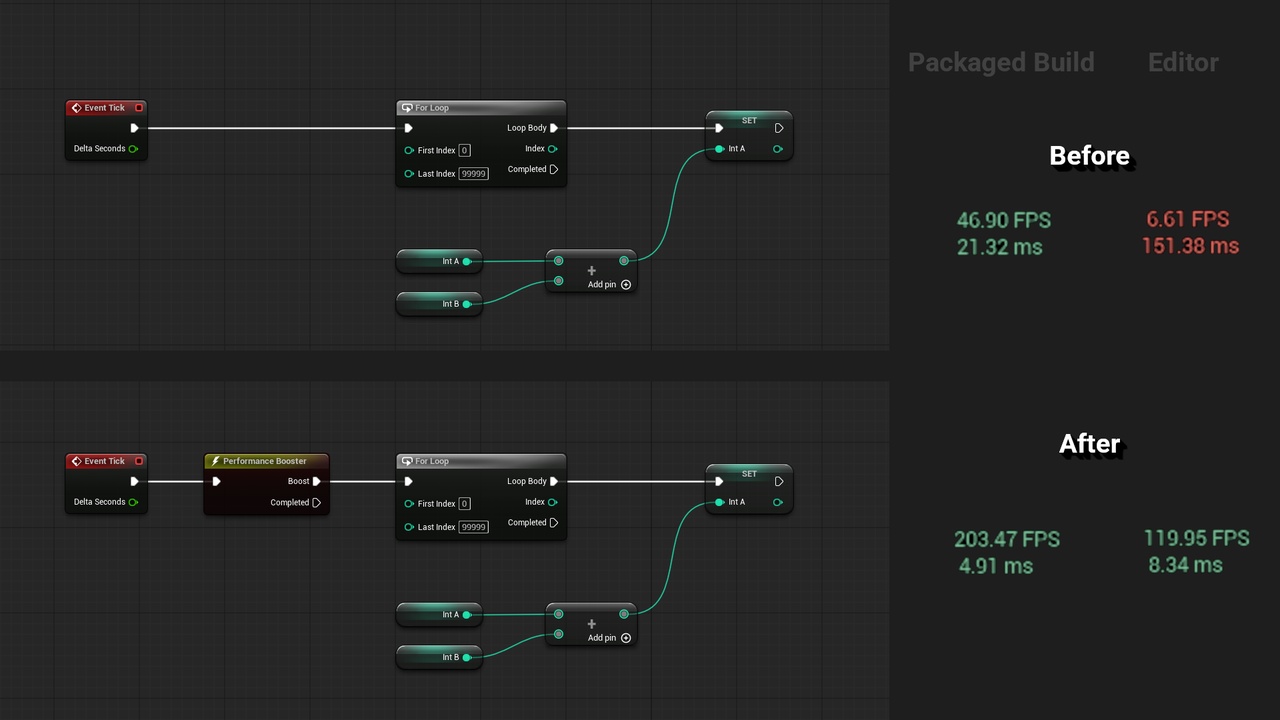
Blueprint Performance Booster reduces the performance overhead of Blueprint nodes for complex math operations and loops.
This plugin adds a Performance Booster node that can be added to Blueprints.
All nodes executed from the Boost pin on the Performance Booster node will be optimized.
The performance gain is proportional to the number of operations making it most effective when used on loops and complex math operations.
Hundreds of Blueprint node types are compatible including StandardMacros, KismetMathLibrary, and Actor and Scene Component transformation functions.
Supported variable types are Bool, Int, Float (Double), Vector, Rotator, Transform , Quaternion, Actor, and Scene Component.
Supported container types are TArray, TMap, and TSet.
The execution can be continued to non-compatible Blueprint nodes from the Completed pin on the Performance Booster node.
Support Email: [email protected]
Limitations
Consideration needs to be taken to which Blueprint nodes are compatible. Non-compatible nodes will give a compile error if connected to the Boost pin on the Performance Booster node. Compatible nodes are listed in the documentation.
To allow a node on the Boost pin to use an output value from a non-compatible node you need to use a set variable node before the Performance Booster node. The value can then be used by nodes on the Boost pin using a get variable node. See the documentation for additional details.
All benchmarks are conducted in an empty project in UE 5.6 using a 13th Gen Intel Core i5-13400F CPU running windows 11.
Quick-start Guide
Install plugin to Unreal Engine.
Enable plugin in project and restart editor if necessary.
Right-click on a Blueprint graph to open the action context menu. Search for "performance" and/or "booster".
Add the Performance Booster node before any chain of Blueprint nodes that needs boosting.
Compile the Blueprint and check for compile errors.
If the compiler has found non-compatible nodes, remove the non-compatible nodes from the Boost pin. Consider adding them to the Completed pin or placing them before the Performance Booster node.