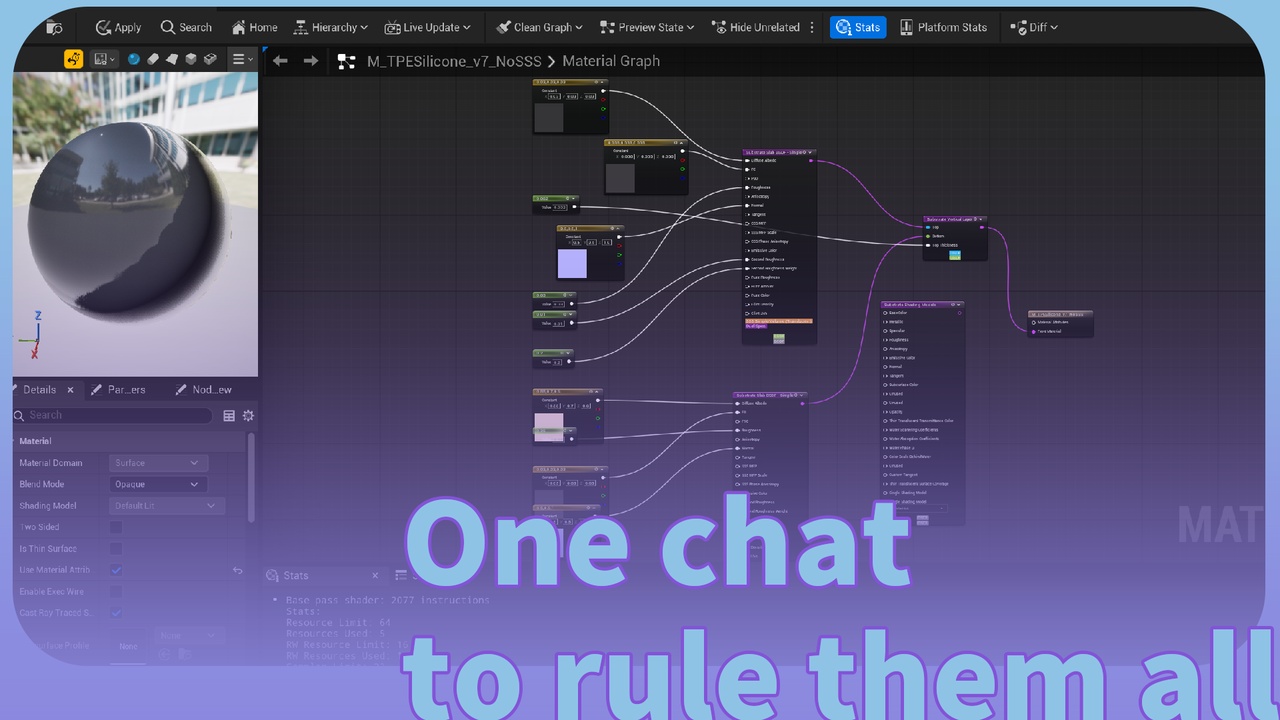


描述
One chat generated UMG. ""Use llm-material to generate a [xxxxxxx] material based on standard material/substrate.""
Prompt, skill ➡️ https://github.com/ituiyuio/Yomin-Fab-LLM-Unreal-Pluagin-Skill.git
GitPage:LLM Dynamic UI - DSL Schema Guide | YominUnreal Plugins
# LLMMaterial - JSON-driven Material Generation Engine
LLMMaterial is a DSL-driven material generation system for Unreal Engine 5. Create and modify Material Blueprint assets via JSON definitions with full Substrate support.
## Features
- JSON-to-Material: Define materials using `.llmmat` JSON format
- Bidirectional Conversion: Export existing materials back to JSON
- Expression Nodes: Full support for Material Expression nodes (Add, Multiply, TextureSample, etc.)
- Substrate Support: UE5 Substrate BSDF materials (Slab, VerticalLayering, HorizontalMixing)
- HLSL Shader Functions: Define custom `.ush` shader functions inline
- Auto-Layout: Automatic node graph layout with Sugiyama algorithm
- Editor Panel: Three-panel UI (File List, Node Tree, Property Editor)
- Live Preview: Real-time property editing and visual feedback
## Installation
1. Copy `LLMMaterial` plugin to your project's `Plugins/` directory
2. Enable the plugin in Unreal Engine Editor (Edit → Plugins → AI → LLMMaterial)
3. Restart the Editor
## Quick Start
### Create a Material from JSON
```json
{
"version": "1.0",
"name": "MyRedMaterial",
"domain": "Surface",
"blendMode": "Opaque",
"shadingModel": "DefaultLit",
"nodes": [
{
"id": "color",
"type": "Constant3Vector",
"properties": { "Constant": [1.0, 0.0, 0.0] }
}
],
"output": {
"baseColor": { "node": "color", "pin": "Result" }
}
}
```
Save as `MyMaterial.llmmat` and generate:
```bash
material generate /Game/Materials/MyRedMaterial --from MyMaterial.llmmat
```
### Export Existing Material
```bash
material export /Game/Materials/ExistingMaterial --output export.llmmat
```
## File Format (.llmmat)
```json
{
"version": "1.0",
"name": "MaterialName",
"domain": "Surface",
"blendMode": "Opaque",
"shadingModel": "DefaultLit",
"nodes": [...],
"connections": [...],
"output": {...}
}
```
### Material Domains
- `Surface` - Surface material (default)
- `PostProcess` - Post-process material
- `UserInterface` - UI material
- `VirtualTexture` - Virtual texture
### Blend Modes
- `Opaque` - Opaque (default)
- `Masked` - Masked (uses OpacityMask)
- `Translucent` - Translucent
- `Additive` - Additive blending
- `Modulate` - Modulate blending
### Shading Models
- `DefaultLit` - Default lit (default)
- `Unlit` - Unlit
- `Subsurface` - Subsurface scattering
- `SubsurfaceProfile` - Subsurface with profile
- `ClearCoat` - Clear coat
- `Hair` - Hair
- `Cloth` - Cloth
- `Strata` - Strata (for Substrate)
## Node Types
### Math Operations
| Type | Description | Inputs | Outputs |
|------|-------------|--------|---------|
| `Add` | Addition | A, B | Result |
| `Multiply` | Multiplication | A, B | Result |
| `Subtract` | Subtraction | A, B | Result |
| `Divide` | Division | A, B | Result |
| `Power` | Power | Base, Exp | Result |
| `Sine` / `Cosine` | Trigonometry | Input | Result |
| `Clamp` | Clamp range | Input, Min, Max | Result |
| `Lerp` | Linear interpolation | A, B, Alpha | Result |
### Constants
| Type | Description | Properties |
|------|-------------|------------|
| `Constant` | Scalar constant | Value |
| `Constant2Vector` | 2D vector | Constant [X, Y] |
| `Constant3Vector` | 3D vector/color | Constant [R, G, B] |
| `Constant4Vector` | 4D vector/color+Alpha | Constant [R, G, B, A] |
### Textures
| Type | Description | Properties |
|------|-------------|------------|
| `TextureSample` | Texture sample | Texture (path) |
| `TextureCoordinate` | UV coordinates | CoordinateIndex |
### Parameters
| Type | Description | Properties |
|------|-------------|------------|
| `ScalarParameter` | Scalar parameter | ParameterName, DefaultValue |
| `VectorParameter` | Vector parameter | ParameterName, DefaultValue |
| `TextureSampleParameter` | Texture parameter | ParameterName, Texture |
## Substrate Materials
UE5 Substrate provides physically-based layered materials:
```json
{
"version": "1.0",
"name": "MySubstrateMaterial",
"domain": "Surface",
"substrate": {
"slabs": [
{
"id": "main_slab",
"type": "SubstrateSlabBSDF",
"inputs": {
"DiffuseAlbedo": [0.8, 0.8, 0.8],
"Roughness": 0.3,
"F0": [0.04, 0.04, 0.04],
"Metallic": 0.0
}
}
],
"root": { "type": "VerticalLayering", "top": "main_slab" }
}
}
```
### Slab Types
- `SubstrateSlabBSDF` - Surface BSDF (default)
- `SubstrateHairBSDF` - Hair BSDF
- `SubstrateUnlitBSDF` - Unlit BSDF
- `SubstrateEyeBSDF` - Eye BSDF
- `SubstrateSingleLayerWaterBSDF` - Single layer water
## Editor Panel
The LLMMaterial editor provides a three-panel interface:
1. File List (left): Manage `.llmmat` files
2. Node Tree (center): View material structure
3. Property Panel (right): Edit node properties
### Toolbar Actions
- Generate: Create materials from selected files
- Export Material: Export existing material to JSON
- Export Schema: Export expression schema reference