

Descrição
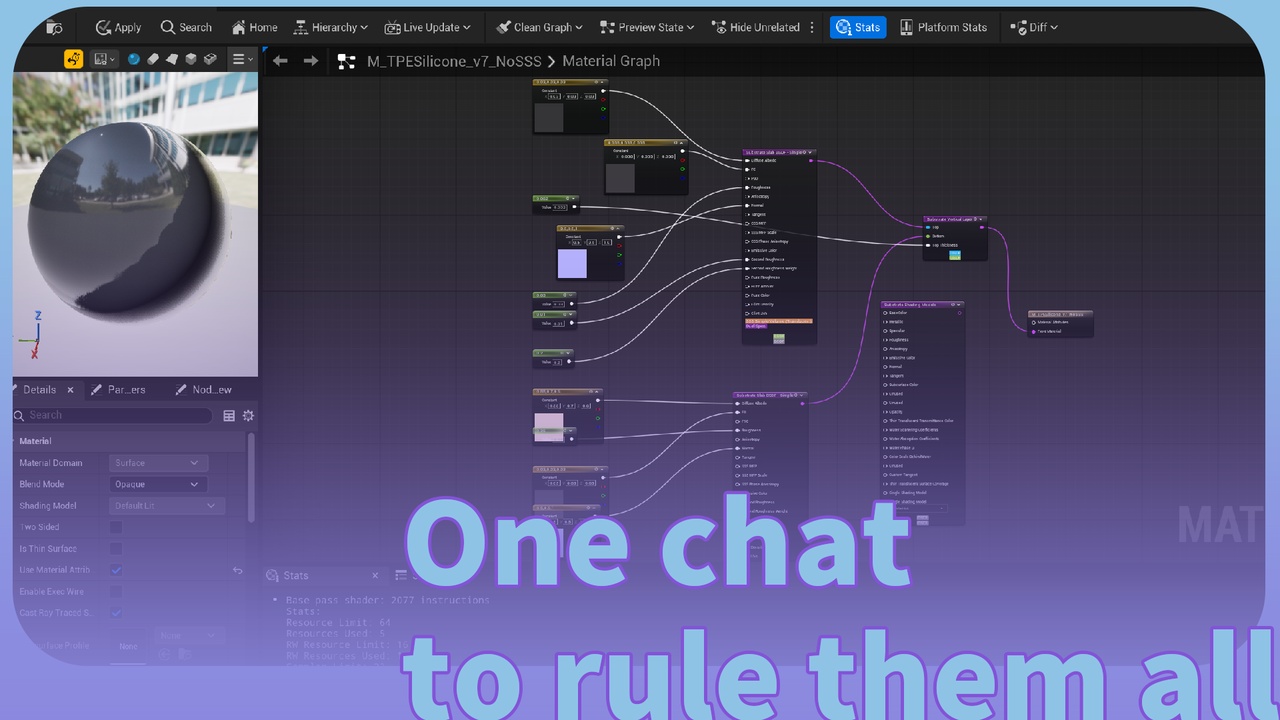
🎯 One chat generated Material.
"Use llm-material to generate a [glass / metal / hologram / fabric] material for [your model]."
🤖 Or via Agent Online — if you have LLMEasyShell / LLMEasyShellLite installed, invoke the auto-registered C++ ability material to drive this end-to-end from any LLM agent. Material skill + Agent skill are online in the skill repo.
📚 Tutorial: LLM Material - DSL Schema Guide · 🛠 Skill Repo: github.com/ituiyuio/Yomin-Fab-LLM-Unreal-Plugin
Features:✅ One JSON, Complete Material - Graph, nodes, parameters, and Substrate BSDF generated from a single .llmmat file
✅ LLM-First Design - AI outputs JSON directly, no Material Editor knowledge required
✅ Bidirectional Conversion - JSON → Material, Material → JSON, perfect roundtrip for any existing asset
✅ 30+ Expression Nodes - Math, Constants, Textures, Parameters, Coordinates, Custom HLSL — all reflectively discovered
✅ UE5 Substrate Support - Slab / Hair / Unlit / Eye / Water BSDFs + VerticalLayering / HorizontalMixing / Add / Weight composition
✅ Custom HLSL Functions - Inline .ush shader code or external header refs, type-safe
✅ Auto-Layout (Sugiyama Algorithm) - Imported nodes are laid out by topological order — no manual untangling
✅ Three-Panel Editor + Live Preview - File list, JSON editor, asset preview side-by-side; one-click Generate
📦 File Formats:.llmmat (JSON), .llmmatschema (Schema), Material UAsset
Technical InformationVersion: Unreal Engine 5.5 / 5.6 / 5.7 / 5.8
Dependencies: EditorScriptingUtilities (engine plugin). Soft-depends on LLMEasyShell / LLMEasyShellLite — if installed, the material shell command auto-registers; the GUI panel works fully without them.
Modules: LLMMaterial (Runtime), LLMMaterialEditor (Editor)
Number of Blueprints: 0
Number of C++ Classes: ~21
Network Replicated: No
Documentation Link: Documentation.md in plugin folder
Example Project: Config/Examples/ folder contains .llmmat example files
Supported Platforms: Windows, Mac, Linux
OverviewThe Problem
Traditional UE Material development is tedious:
Drag expression nodes one by one in the Material Editor
Wire pins by hand with no type validation
Set parameters in the details panel, one at a time
Substrate BSDF authoring is layered, confusing, error-prone
No AI integration, no JSON-external definition
Hard to version control material graphs
The Solution
LLMMaterial changes everything. One JSON file defines:
Material domain, blend mode, shading model
All expression nodes with their properties
All connections between node pins
Substrate BSDF stack (Slab + VerticalLayering + ...)
LLM outputs the JSON. Plugin generates the Material. Done.
Example
{ "name": "M_EmissiveGlass", "domain": "Surface", "blendMode": "Translucent", "shadingModel": "DefaultLit", "nodes": [ { "type": "Constant3Vector", "name": "Tint", "properties": { "Constant": { "R": 0.2, "G": 0.8, "B": 1.0 } } }, { "type": "ScalarParameter", "name": "Emissive", "properties": { "DefaultValue": 5.0 } }, { "type": "Multiply", "name": "Glow", "inputs": ["Tint", "Emissive"] } ], "output": { "EmissiveColor": "Glow", "Opacity": 0.4 } }
Import this JSON → Get a fully functional Material with all nodes wired and parameters exposed.
WorkflowLLM generates .llmmat - AI outputs JSON with your material definition
Open Panel - Menu → Window → LLMMaterial
Generate - One click creates the Material asset
Iterate - Modify JSON, regenerate, or export an existing material back to .llmmat
DomainDescriptionSurfaceSurface material (default)PostProcessPost-process materialUserInterfaceUI materialVirtualTextureVirtual texture
Supported Blend ModesOpaque · Masked · Translucent · Additive · Modulate
Supported Shading ModelsDefaultLit · Unlit · Subsurface · SubsurfaceProfile · ClearCoat · Hair · Cloth · Eye · Strata (Substrate)
Node CategoriesCategoryNodesMathAdd, Subtract, Multiply, Divide, Power, Sine, Cosine, Abs, Clamp, Lerp, Max, MinConstantsConstant, Constant2Vector, Constant3Vector, Constant4VectorTexturesTextureSample, TextureCoordinateParametersScalarParameter, VectorParameter, TextureSampleParameterCoordinateVertexColor, WorldPosition, CameraPosition, TimeToolsComponentMask, AppendVector, DesaturationCustomCustom — HLSL via Code or HeaderRef
Substrate SupportCategoryTypesBSDFsSubstrateSlabBSDF, SubstrateHairBSDF, SubstrateUnlitBSDF, SubstrateEyeBSDF, SubstrateSingleLayerWaterBSDFCompositionVerticalLayering, HorizontalMixing, Add, Weight, Select
Successful development to you!LLMMaterial v1.1.2 | YominUnreal