
説明
Tell Claude what should happen: it builds it, then looks at the result.
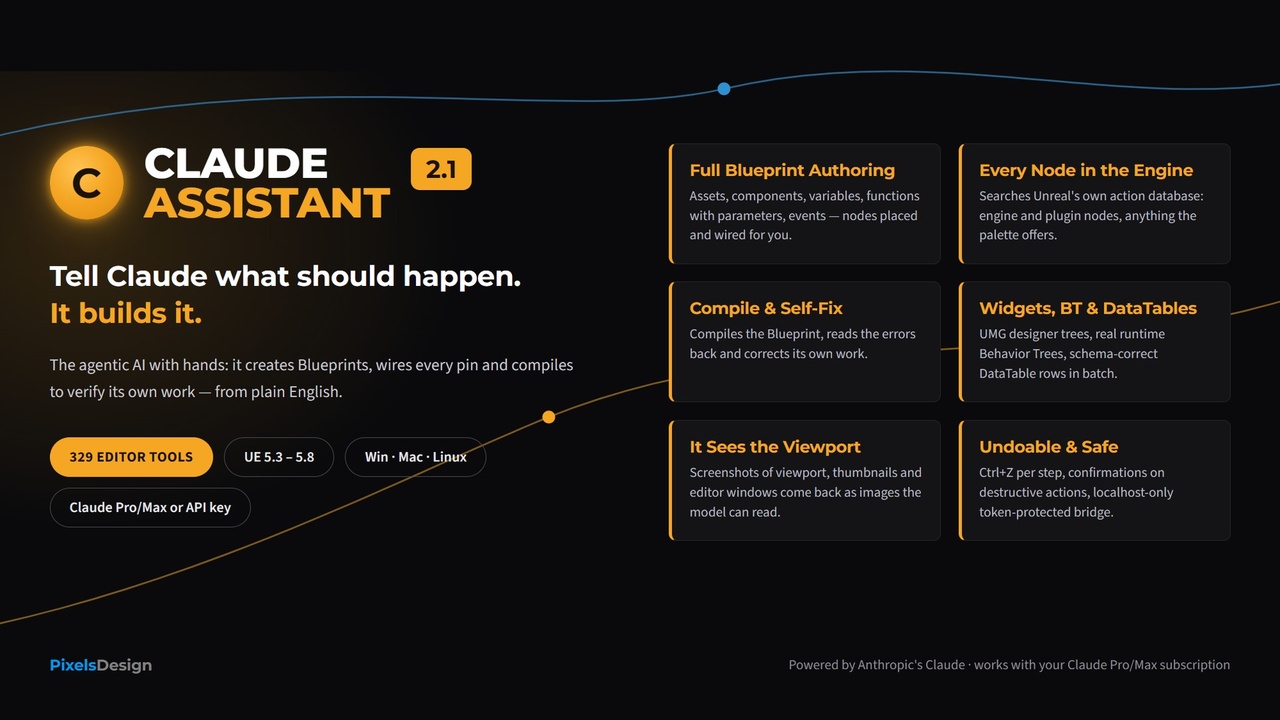
Claude Assistant 2.1 is not a chat window bolted onto Unreal. It is an AI agent with hands and eyes: 351 editor tools in 26 categories that let Claude create and edit Blueprints, Widgets, Behavior Trees, DataTables, Materials and level actors, and drive the viewport, Sequencer, Niagara, Landscape, physics, audio, PCG, Control Rig, build and cook and source control directly inside the UE5 Editor, from a single plain English instruction. It then compiles the result, reads back the errors, takes a screenshot and fixes its own work.
Type: "Create an Actor Blueprint called Enemy with a StaticMesh component and a float Health = 100; on BeginPlay, if Health is above zero print 'alive'." Claude creates the asset, adds the component and the variable, places the event, the Branch and the comparison, wires every pin, sets the literals, compiles, and reports the result. One instruction, a working Blueprint.
WATCH IT IN ACTION
Agentic Blueprint generation, a full graph from one sentence: https://youtu.be/ptPu3jc32zc
Widgets, Materials and DataTables built by AI: https://youtu.be/mNA9igZCGlQ
Live demo, C++ Actor generated and compiled without leaving UE5: https://youtu.be/FvwfqMOuK_Y
HOW IT WORKS
The plugin ships a dockable chat panel and a local tool bridge. Claude plans the sequence of editor operations and executes it step by step through 351 purpose built tools (Model Context Protocol). Every operation runs inside the editor on a localhost only, token protected bridge: nothing is exposed to the network, and your project never leaves your machine except for the AI conversation with Anthropic.
Claude sees your editor context and, since 2.1, the viewport itself: screenshots come back as real images it can look at. It acts, compiles, reads errors back and iterates until the request is fulfilled. Every mutation is a real editor transaction: Ctrl+Z undoes each step, and destructive actions ask you first.
THE DISCOVERY LAYER
Advertising 351 tools on every request would burn tokens, so only the 12 core categories are listed up front. The other 14 stay fully callable: Claude calls search_tools with a few words, gets the matching tools with their schema, and uses them by name.
NEW IN 2.1: THE REST OF THE EDITOR
Viewport screenshots the model can see, plus camera, view modes and show flags.
Console and logs: commands, CVars, Output Log, FPS and memory, PIE pause and step, Live Coding.
Editor operations with undo: selection, copy, paste, duplicate, delete, undo and redo history, asset editors, plugins, Project Settings.
Level tools: attach and detach, teleport, traces and overlaps, batch spawn, components, world settings, levels.
Asset pipeline: import, reimport, move, search, dependencies, redirectors.
Build and cook: lighting, navigation, compile all Blueprints, validate assets, cook, package.
Source control: status, checkout, mark for add, revert, sync, submit.
Sequencer: bindings, tracks, keyframes, camera cuts, playback, render.
Animation state machines: states, transitions, conduits, blend nodes, montages, notifies.
AI at runtime: move to, blackboard, Behavior Tree control, perception.
Niagara, Landscape, physics, audio, PCG, Control Rig and Live Link, modeling and blockout.
FULL BLUEPRINT AUTHORING, EVERY NODE IN THE ENGINE
Creates Blueprints with any parent class, adds components, variables, functions with parameters, events and Blueprint Interfaces.
Works on your existing Blueprints too: renames and deletes functions, creates Event Dispatchers with Call and Bind nodes, macros, local variables and Timelines with their tracks.
Places any node the editor palette offers, engine and installed plugins, via Unreal's own Blueprint Action Database: if you can right click it, Claude can place it.
Dedicated fast tools for Branch, Sequence, loops, Cast, Make and Break Struct, variable Get and Set, function calls.
Wires pins, sets defaults, edits node properties, disconnects and deletes, in any graph.
Compile and self fix: compiles the Blueprint, reads back errors and warnings, corrects its own work.
BEYOND BLUEPRINTS
Widgets (UMG): builds the designer tree, sets texts, colors and properties.
Behavior Trees and Blackboards: the real runtime tree, not just visuals.
DataTables and Structs: creates structs and enums, generates schema correct rows, singly or in batch.
Materials: expression nodes, values, Base Color, Roughness and Emissive.
Asset creation: 9 asset types, plus find, duplicate, rename, delete.
Python fallback: a confirmation gated run_python tool for the long tail.
A CALMER CHAT
A real Stop: aborts the request or terminates the CLI subprocess. No zombie responses.
Streaming answers and a context counter (session usage, cost in API mode).
Image attachments and paste: PNG, JPG, GIF, WebP or BMP up to 5 MB.
UE5 native C++ generation with a closed auto fix loop: Live Coding is triggered, the compiler log is read back and the errors go to Claude for a fix.
YOUR SUBSCRIPTION IS ENOUGH
Use the Claude Pro or Max plan you already pay for, through the official Claude Code CLI. No separate API account, no per token bills. One time OAuth login, auto detected CLI path.
BUILT LIKE A TOOL FOR PROFESSIONALS
Everything is undoable: every mutation is an editor transaction, and Claude itself can call undo and redo.
Two separate confirmation gates: Confirm Destructive Actions (47 tools) and Confirm Before Running Python. Neither is bypassed by auto approve.
Per project curation: a Tool Curation panel with workflow presets, or disable whole categories from Project Settings.
Runtime verified: every tool is exercised by an automated in editor self test suite (19 domain suites) before release.
EXAMPLE PROMPTS
"Create BP_Enemy with a StaticMesh and 100 Health; on BeginPlay, if Health > 0 print 'alive', else 'dead'. Compile and tell me if there are errors."
"Take a screenshot of the viewport, then move the camera so BP_Enemy is centered and take another one."
EASY SETUP
1. Install the plugin in your project's Plugins folder
2. Install Claude Code from https://claude.com/download
3. In a terminal: claude /login (one time OAuth)
4. Project Settings > Plugins > Claude Assistant > Auth Mode = Subscription
5. Press Ctrl+Shift+C and tell Claude what to build
TECHNICAL SPECIFICATIONS
Engine Version: Unreal Engine 5.3 to 5.8 (verified BuildPlugin success on all six)
Module Type: Editor Plugin (ClaudeAssistantCore Runtime + ClaudeAssistantEditor)
351 editor tools in 26 categories via a local MCP server, with a discovery layer (search_tools, list_tool_categories)
Platforms: Windows, macOS, Linux (Editor only, nothing ships in packaged games)
Dependency: enables the built in Python Editor Script Plugin (ships with the engine). No third party binaries.
Subscription mode: official Claude Code CLI subprocess; agentic tools and image attachments are Subscription mode features
API mode: Anthropic Claude (Sonnet 5 default, Opus 5.5, Opus 5, Fable 5.1, Haiku 4.5, Opus 4.8 and 4.7, Sonnet 4.6, legacy)
Network: connects only to Anthropic; the in editor bridge is localhost only and token protected
Full C++ source code included
WHAT'S NEW IN v2.1.2 AND v2.1.3
22 new Blueprint tools (351 in total) for existing assets: rename and delete functions; Event Dispatchers with parameters and Call, Bind, Unbind nodes; macros with exec and data pins; local variables; Timelines with float, vector, color and event tracks. v2.1.3: stricter PCG value checks on UE 5.8.
SUPPORT
Documentation and support: https://www.pixelsdesign.it/claude-assistant.html
Suggest a feature: https://www.pixelsdesign.it/feature-request.html
Report a bug: https://www.pixelsdesign.it/bug-report.html
(c) 2026 PixelsDesign, Luca Tocco. All Rights Reserved.