Descrição
Unleash Creativity at Runtime: In-Game Visual Blueprint Programming for UE5
Document:Custom Blueprint SystemEN and Chinese
Discoed:Discord
Show:BiliBili
Custom Blueprint Runtime 0.5.14 — Update Notes
This update moves the system from the previous Blueprint-based implementation to a C++ runtime plugin, while retaining Blueprint support for integration, custom nodes, and UI customization.
Core Architecture
Rebuilt graph management, execution, and multiplayer synchronization around a C++ runtime.
Separated node definitions from execution logic for easier extension and maintenance.
Added Data Asset–based node definitions and Blueprint-customizable node executors.
Introduced typed pin values and stable identifiers for graph elements.
Editor UI
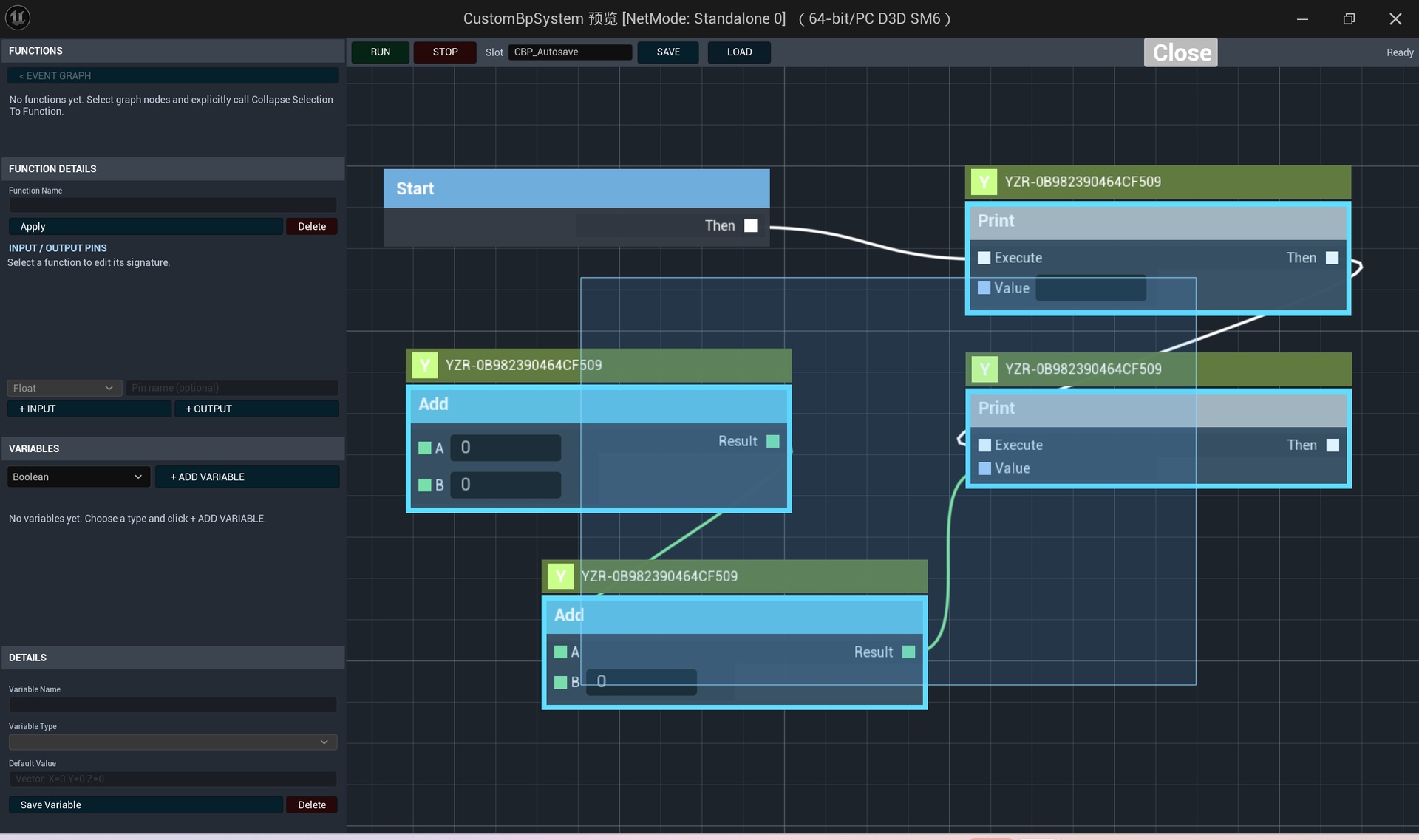
Added independent graph, node creation, variable, function, and toolbar panels.
Panels can be arranged independently and styled to match your project.
Added searchable, categorized node creation menus.
Variable Get and Set entries are generated from the graph’s available variables.
Added a unified right-click context event that distinguishes the canvas, nodes, and pins.
Context menus can be opened explicitly through Blueprint, with callbacks when an action is selected.
Right-mouse dragging remains available for canvas navigation.
Variables and Functions
Added variable creation, listing, editing, deletion, and default-value controls.
Added explicit selection-to-function collapsing.
Added function lists and detail panels with editable input and output signatures.
Added function graph navigation with entry and return nodes.
Added a button to return to the event graph.
Execution and Debugging
Added a toolbar with Run, Stop, Save, and Load controls.
Construction and Begin Play events execute when a run session starts; Tick events execute at a configurable interval.
Stop ends the run session and restores the pre-run variable snapshot.
Reworked connection visualization to use actual execution activity rather than animate every connection.
Added execution limits to help prevent runaway graphs.
Note: Stop does not automatically undo external side effects, such as actors spawned or world objects modified by custom nodes.
Multiplayer Collaboration
Added server-authoritative graph editing and execution.
Added synchronization for nodes, connections, variables, and function definitions.
Added collaboration indicators for selection, movement, connection editing, and variable editing.
Added a player-profile function for customizing display names, colors, and avatars.
Improved request routing when the shared graph actor is not owned by the editing player.
Save and Load
Added save-slot controls for saving and loading graph data.
Saved data includes graph structure, variables, and function definitions.
Loading is now available directly from the toolbar.
Migration note: Saves from the previous Blueprint implementation are not directly interchangeable with the new format and require conversion.
Compatibility and Distribution
Prepared version-specific Windows packages for Unreal Engine 5.3–5.7.
Added engine-version compatibility adjustments.
Added copyright and product information to source files.
Excluded project-specific demonstration assets from the release packages.
Built-in content may differ between engine-version packages. Build and asset-loading checks do not replace full project-level runtime testing.
Introduction:
This innovative plugin introduces a groundbreaking feature to Unreal Engine 5: Runtime Blueprint Programming. It empowers developers and players alike to create, modify, and execute logic in real-time, directly within the game environment, using a familiar visual node-based interface.
Key Features:
Real-Time, In-Game Scripting: Modify game logic on the fly without restarting the editor or the game. Players can approach an interactive object, press a key, and bring up the programming panel instantly.
Intuitive Visual Interface: Utilizing a node-connection workflow very similar to standard UE Blueprints, the system is easy to learn for anyone with blueprint experience. Drag, drop, connect nodes, and create variables with ease.
Highly Extensible & Customizable: Developers can effortlessly define their own node types and variable types, tailoring the system for specific gameplay mechanics—from simple puzzles to complex player-driven systems.
Powerful Execution Control: Supports standard sequential execution, pin-based flow control, and even includes multi-threading options for handling complex logic.
Demo Included: A complete demo map and sample character are provided for quick understanding and integration into your own projects.
Ideal for:
Gameplay Editors: Allow players to design their own abilities, traps, or game modes within your game.
Education & Simulation: Perfect for teaching programming concepts or building logic for simulations with immediate visual feedback.
Rapid Prototyping: Iterate and tweak gameplay logic quickly during testing phases without the need for repackaging.
Conclusion:
This system brings the power of UE's Blueprint editor directly into the runtime, opening new doors for interactive experiences, user-generated content, and rapid development. Explore the demo today and unlock endless creative potential for yourself and your players.