Opis
Documentation: wiki.teufel-engineering.com/en/BindGuard/documentation — the complete manual, readable in full before you buy: installation, API, settings, the demo map and a troubleshooting section.
Enhanced Input manages your bindings. It does not check them. BindGuard checks them — and it checks the one thing that decides whether a console submission comes back approved: is every action reachable on every device you ship to?
The failure this exists for
An action bound on the keyboard and on nothing else.
It is invisible in the editor, because the person building the level is holding a keyboard. It compiles. It has a Blueprint node. It works perfectly, right up until a certification reviewer picks up a controller — or a player does.
It is invisible because Enhanced Input spreads the truth over three places. The action is a UInputAction asset. Its keys live in one or more UInputMappingContext assets. Whether that context is ever active is a decision buried in Blueprint logic. Nobody holds three levels in their head across a real project, and no tool on Fab checks them.
Five questions, answered with names
1. Which action did nobody bind? An Input Action that appears in no mapping context at all. It exists, it compiles, it does nothing.
2. Which action exists only on one device? Bound on keyboard and mouse but not on the gamepad. The device is read off the FKey itself — IsGamepadKey, IsMouseButton, IsTouch — never off the name of the action. Renaming IA_Jump_Gamepad to IA_Jump does not change a line of the report. Analog sticks and triggers are correctly gamepad; an empty key row is correctly not a binding.
3. Which two actions are fighting over the same key? Same key, same context, same chord layer. And here BindGuard is honest where a naive checker cries wolf: two contexts are allowed to share a key — that is the entire point of contexts. Only a collision *inside* one context is an error. A key shared between contexts is reported as information, and its severity can never be raised to an error. Shift+E and E are two bindings, not a collision.
4. Which mapping context does nobody ever add?
5. Which action is unreachable because its only context is never active?
The honest part: what it cannot know
Questions 4 and 5 cannot be computed. Whether AddMappingContext gets called lives in Blueprint logic, and any tool that claims to work it out statically is guessing.
So BindGuard watches. It binds to Enhanced Input's own OnMappingContextAdded, from a module that loads before the first BeginPlay, and records what actually happened. The report is then split in two and labelled:
static — read from the assets, always true;
observed — what happened *in this session*, with the explicit note that a context missing here was not added *in this session*, and that this is not proof that nothing ever adds it.
And when nothing was watched — an editor scan, a build server — the two observed checks do not return clean. They do not run, and the report says so:
> contexts actually added at runtime: NOT CHECKED, no session was observed
A line that pretended to know more than it does would be worse than a missing line. The JSON carries the same flag, so a build script can refuse a report that was not allowed to check what it claims to.
The report
Drawn on UCanvas from an AHUD, so it survives a cooked Shipping build — which is the build where a verdict matters most. Actions and contexts by name, errors first, one plain-English sentence per finding that says what to do, not only what is wrong:
> *IA_Crouch is bound on keyboard and mouse (C in IMC_Default) and on no gamepad key. Map it to a gamepad > key in IMC_Default — this is the check a console submission fails first.*
When there is nothing to report it turns green and lists what it checked, so green can never be mistaken for "never ran". Any half-run check is printed in warning colour.
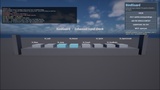
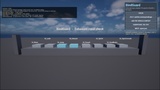
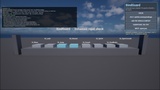
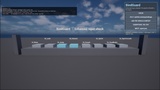
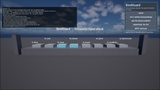
What that reads like in the demo map that ships with the plugin — eight actions and two mapping contexts, deliberately broken:
BindGuard FAIL — actions 8 | contexts 2 | errors 3 warnings 2 info 3 | 1 excluded by settings
with unbound IA_Sprint, keyboard only IA_Crouch in IMC_Default (C) and conflict IA_Interact vs IA_Jump in IMC_Default (SpaceBar) as the three errors. Press the demo's Fix It button and the same report reads errors 0 warnings 2 and the verdict turns to WARN — the two remaining warnings being the context nothing added this session and the action inside it.
Those are eight actions in a demo map on one machine, not a benchmark. The scan time it prints beside them is meaningless at this size and will be a different number in your project — which is exactly why it prints it rather than promising one.
The exemption list is a feature, not an afterthought
Every project has actions that are meant to be keyboard-only: the console key, the debug camera, the screenshot key. A tool that reports twenty errors on its first run is a tool that gets switched off in the first hour.
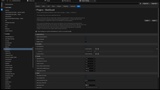
So exempt actions are named in Project Settings — and what was exempted is still counted and still shown — in the demo map's report that reads 1 excluded by settings — with the finding still in the report and still naming the action. An exemption list that could hide its own effect would be a way to turn a report green from a settings page. That is precisely what a gate exists to prevent, so it is not possible here.
BindGuard.Exempt 0 shows you the same project both ways, in one keystroke.
One command on the build server
BindGuard.Gate
Writes Saved/BindGuard/report.json and ends the process with 0 when clean, 1 when there are only warnings and 2 when there is an error.
Those are the same three return codes as LocaleGuard, AssetWarden, WidgetLedger, LoadLens and HeapCensus, and they mean the same three things. One convention, six tools — if your build automation already runs one of them, BindGuard needs nothing new learned.
Built to be trusted
The rules are static functions over plain structs — ClassifyKey, FindUnbound, FindDeviceGaps, FindConflicts, Judge — with no world, no subsystem, no player and no asset registry behind them. That is why they are covered by automation tests, and why you can call them from your own tooling.
Seven automation tests ship with the source, including the one that matters most: that the observed checks are skipped, not passed, when nothing was watched.
Two modules, and the dependency arrow only points one way. A runtime module observes, judges and draws. An editor module walks the asset registry so the static checks run with no game standing. The runtime never depends on the editor, which is why the report still works in the packaged build.
What it is not
It does not rebind anything behind your back, it does not replace Enhanced Input, it does not add a rebinding UI, and it never edits your input assets during a check. It reports what is missing, what collides and what is unreachable.