




Описание
Someone needs the crate in a different brown, so they duplicate M_Crate and change one constant. Repeat that for two years across four artists and a Datasmith pipeline. Every one of those duplicates is a separate shader — separate compile time, separate package size, separate memory, and a separate slot in every review.
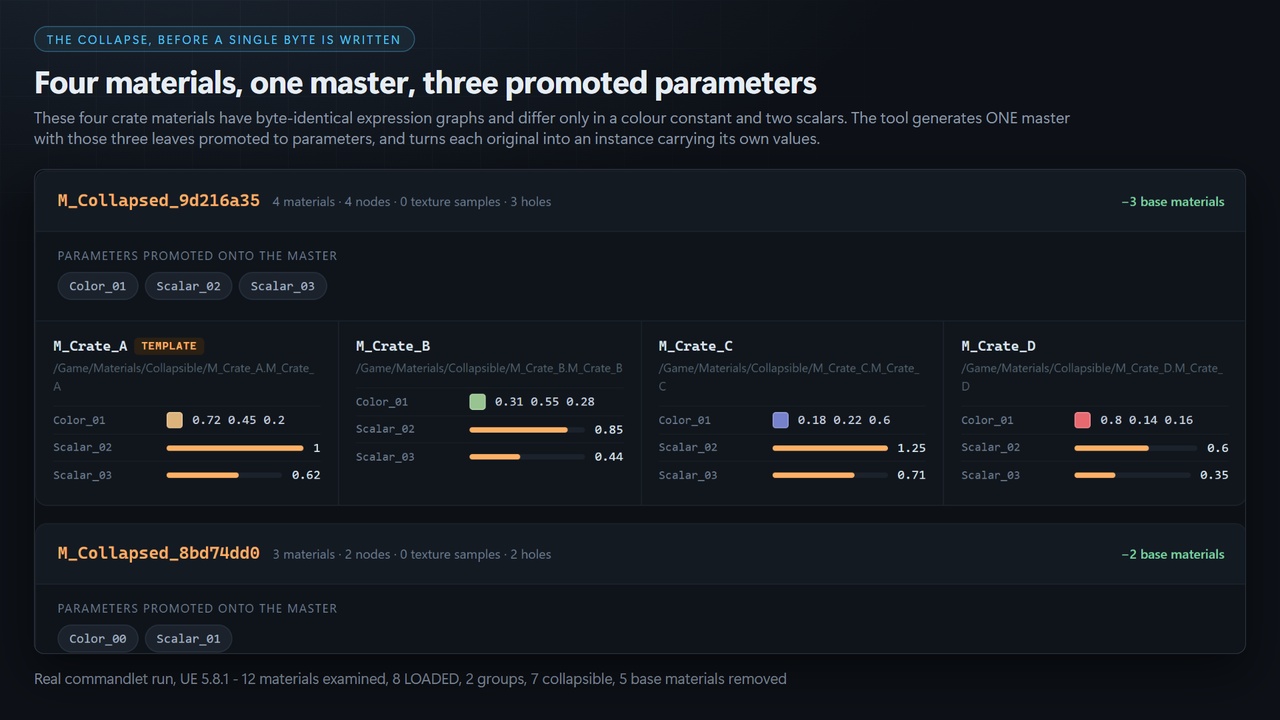
Material Sprawl Collapser finds base materials whose expression graphs are identical except for their textures and their scalar/vector constants, generates ONE master with those leaves promoted to parameters, converts every duplicate into a material instance carrying its own original values, and repoints every referencing slot.
Unreal ships nothing that finds thisMaterial Analyzer compares instances that already share a parent, and only their static parameters. Two separate base materials are never compared to each other at all, and a project with no instances yet produces no output whatsoever.
Size Map tells you what an asset costs, not which assets are the same shape.
Reference Viewer tells you what points at what.
This compares the expression graphs themselves.
Getting StartedThis plugin has no editor panel. It is a headless commandlet, so that the same command runs on a workstation and in CI. Here is the exact path from install to report:
Copy the MaterialCollapser folder into your project's Plugins folder (create Plugins if it does not exist), so you have YourProject/Plugins/MaterialCollapser/MaterialCollapser.uplugin.
Launch the editor once and confirm the plugin is enabled under Edit > Plugins > Editor, searching for "Material Sprawl Collapser". Close the editor.
Open a command prompt in your Unreal install's Engine\Binaries\Win64 folder.
Run the scan. It writes nothing to your project:
UnrealEditor-Cmd.exe C:\Path\To\YourProject.uproject -run=MaterialCollapser -Paths=/Game -unattended
Open the report it wrote at YourProject\Saved\MaterialCollapser\report.html in any browser. Every group, every near miss and every refusal is listed there with its reason.
When you are ready to apply, commit your project to source control first, then run:
UnrealEditor-Cmd.exe C:\Path\To\YourProject.uproject -run=MaterialCollapser -Apply -Execute -UsePlan=Saved\MaterialCollapser\plan.json -unattended
-Apply without -Execute is a full dry run: it loads every member, re-hashes it against the plan, resolves the parameters and inspects the referencers, then skips only the writes. Run -run=MaterialCollapser -help for the full switch list.
The safety property, stated first because it is the reason to trust itThe dangerous failure here is not a crash. It is a false merge: two materials that were not actually interchangeable get collapsed, and the game looks different on one prop, possibly unnoticed for weeks. So the predicate has one rule and no exceptions:
EVERY AMBIGUITY RESOLVES TOWARD NOT COLLAPSIBLE.
An expression class the walker will not hash withdraws the whole material — it is never hashed as "some node".
A property whose type the hasher cannot decompose withdraws the whole material.
A cycle in the graph withdraws the material, because a graph that cannot be linearised is a graph the tool cannot claim to have compared.
Anything that changes the shader permutation rather than a value — static switches, static bools, static component masks, material attribute layers — withdraws the material.
Floats are hashed by their exact IEEE-754 bits, never by decimal formatting. Formatting rounds, and two materials differing below the printed precision would otherwise hash equal and be merged.
The asymmetry is deliberate. Missing a legitimate collapse costs you a smaller report. Merging two materials that differed costs you a bug you will not find.
It tells you what it NEARLY collapsed, and why not"These 47 materials differ only in Node[7].Class" is actionable. Silence is not. The report names the closest pair that failed to merge and the exact field that split them, so a strict predicate never reads as "your project is fine".
It does not blanket-load your projectStage 1 buckets every material using asset registry tags alone — nothing is loaded. Stage 2 loads only the members of buckets with two or more entries. That is why the report says "examined 12,000, loaded 340" rather than "scanned 12,000": the gap between those two numbers is your evidence that a twenty-minute editor hang is not happening.
A budget, because sprawl grows back-Budget=N exits 1 when more than N materials are collapsible. Exit codes are deliberately distinct — 0 ok, 1 over budget, 2 the tool failed, 3 bad arguments — because "your project is over budget" and "the tool crashed" are different mornings and a CI job should be able to tell them apart.
Limits, stated plainlyBuilt and verified against Unreal Engine 5.8 only. That is the only version claimed, and the .uplugin declares it.
Version 1 walks material expression graphs. Material function calls are not walked, so a material that calls one is withdrawn rather than guessed at.
This build promotes 2D texture samples only. A group whose hole texture is not a UTexture2D is refused with that stated as the reason.
Editor-only. There is no runtime module and no runtime cost.
Features:
Two-stage scan — registry-tag bucketing, then graph hashing of candidates only
Canonical expression-graph hashing with exact IEEE-754 float bits
Automatic master generation with differing leaves promoted to scalar/vector/texture parameters
Per-member material instances carrying that member's original values
Referencing-slot repointing with a strict UMaterial-property guard
Near-miss reporting that names the exact field that split a bucket
Designed standalone HTML report — no editor needed to read it
Deterministic JSON plan file: scan once, review, apply later
Dry-run apply that proves the work and skips only the writes
CI budget gate with distinct exit codes
Code Modules:
MaterialCollapser (Editor)
Number of Blueprints: 0
Number of C++ Classes: 15 classes and 18 structs across 8 public headers
Network Replicated: No — editor-only plugin, no runtime module
Supported Development Platforms: Windows (Win64)
Supported Target Build Platforms: Windows (Win64) — editor-only; the plugin contributes no runtime code to a packaged build.
Documentation: https://github.com/onefreeman1337/csaf-releases/blob/main/docs/material-sprawl-collapser/README.md
Example Project: None. The plugin operates on your existing content and ships a worked example in the documentation linked above, including the fixture project layout used to verify the predicate (four crate materials that collapse, three panel materials that collapse separately, one near miss that is correctly refused, and four singletons that are never loaded).
Important / Additional Notes: This product's code and store imagery were generated with AI assistance. Sounds: none shipped. Text and dialog: none shipped.