


설명
Bring Gaussian Splats into Unreal Engine 🚀
WallGS is a native Gaussian Splat Renderer for Unreal Engine, built for bringing Gaussian splats into real-time Unreal projects — from large scanned environments and hybrid 3D scenes to 4D Gaussian Splat animations, PCVR, Android, and standalone VR.
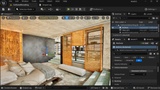
Import .SOG or .PLY splat assets directly into the Content Browser, place them naturally alongside Unreal Engine 3D content, and render them in the Editor and at runtime.
WallGS includes 4DGS playback, TSR, NVIDIA DLSS, Depth of Field, distance-based LOD, runtime optimization tools, collision generation, and dedicated VR/mobile rendering features.
Try the free demos
30 Million Splats Test – Windows Build
Interactive Gaussian Splats – Meta Quest APK
🌐 Website — Documentation — Join Discord
✨ Highlights
✅ Import .SOG v2 and binary little-endian .PLY Gaussian splats
✅ Import and play 4D Gaussian Splat sequences
✅ Render directly in the Unreal Editor viewport and at runtime
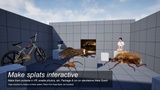
✅ Combine Gaussian splats and traditional 3D meshes in the same scene
✅ Support for TSR anti-aliasing
✅ Support for NVIDIA DLSS on compatible hardware
✅ Support for Depth of Field
✅ Build for Windows and Android Vulkan
✅ Create optimized PCVR and standalone OpenXR VR experiences
✅ Support Mobile Multi-View on compatible standalone VR devices
✅ Use intelligent distance-based LOD across desktop, VR, and mobile
✅ Visualize active LOD levels with LOD Coloring
✅ Toggle LOD Coloring in the Editor or control it at runtime through Blueprints
✅ Inspect live splat rendering statistics for performance optimization
✅ Use VR Edge Optimization and an optional VR Budget Override
✅ Select Spherical Harmonics quality from Degree 0 to Degree 3
✅ Move, rotate, and scale splat actors naturally
✅ Adjust appearance through details panel, or use Unreal Post Process Volumes for exposure, color grading and Depth of Field
✅ Generate Static Mesh collision directly from splat data
✅ Restrict collision generation using WallGS Collision Volumes
🎬 4D Gaussian Splat Support
WallGS brings animated Gaussian splats into Unreal Engine through 4DGS sequence support.
A sequence can contain individual .SOG or .PLY frames, which WallGS imports and plays as animated Gaussian Splat content inside Unreal Engine. Additional 4DGS formats and workflows are planned for future updates.
🎮 Gaussian Splats + Unreal Engine 3D Content
Gaussian splats do not have to exist in isolation.
WallGS is designed to let Gaussian splats, Static Meshes, characters, props, and other Unreal Engine content coexist in the same scene and produce a visually cohesive result.
With TSR support, splats can be integrated into modern Unreal rendering workflows while conventional 3D geometry retains high-quality anti-aliasing.
WallGS also supports NVIDIA DLSS and Depth of Field, making it easier to create hybrid scenes where traditional 3D assets and Gaussian Splat content feel like parts of the same environment.
⚡ Built for Optimization
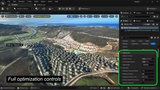
Large Gaussian Splat scenes can contain millions of splats, so WallGS includes dedicated tools for understanding and controlling rendering cost.
Distance-Based LOD
WallGS uses a unified distance-based LOD system across:
Unreal Editor
Windows runtime
PCVR
Android
Standalone VR
As regions move farther from the camera, their rendered splat count is progressively reduced while preserving overall visual coverage.
Nearby areas retain more detail, while distant areas require less rendering work.
LOD settings can be configured per splat actor, allowing different assets to use optimization settings appropriate for their size and importance.
LOD Coloring
Enable LOD Coloring to instantly visualize which LOD levels are active across a scene.
LOD Coloring can be:
Enabled directly inside the Editor viewport
Used during runtime
Controlled through Blueprints
This makes it much easier to tune LOD transitions while testing actual gameplay or VR experiences.
Live Rendering Statistics
WallGS includes a dedicated "stats wallgs" command for inspecting the renderer in real time.
It provides useful information such as:
Total splats in the scene
Splats currently being rendered
The effect of frustum culling
The effect of LOD optimization
This provides immediate feedback while profiling large scenes and helps you understand how effectively WallGS is reducing rendering workload.
📱 Android & VR
WallGS includes a dedicated Vulkan mobile rendering path for supported Android devices and standalone OpenXR headsets, including the Meta Quest family.
Android packaging has been successfully tested with Unreal Engine 5.5 and Unreal Engine 5.8. Other supported Unreal Engine versions are expected to work as well.
🧱 Turn Splat Scans into Interactive Environments
WallGS can automatically generate a Static Mesh with complex collision from Gaussian Splat data, allowing scanned environments to become functional parts of an Unreal project.
Generated collision can support:
Player movement
Line traces
Object placement
Physics queries
Scene interaction
Choose the preset that best matches your asset:
🏠 Indoor — rooms, corridors, and architectural interiors
🌍 Outdoor — large environments and landscape-scale captures
📦 Object — individual objects and smaller scans
For large environments, WallGS Collision Volumes let you generate collision only where interaction is actually required instead of processing the entire scan.
ℹ️ Important Information
WallGS is a renderer for existing Gaussian Splat assets. It does not generate or train Gaussian splats from photographs, videos, or Unreal Engine scenes.
Forward Shading is not supported on Win64. Desktop and PCVR projects must use Deferred Rendering. Android uses WallGS's dedicated Vulkan mobile rendering path.
Performance depends on target hardware, resolution, project configuration, and splat count. WallGS provides LOD, statistics, VR optimization, and budget controls to help tune projects, but testing on the intended target hardware is always recommended.
Generated collision is an automatic approximation of the visible scan rather than a hand-authored, watertight production mesh.
WallGS is currently released as a Beta. Test the plugin with your target project and hardware before production deployment.