Opis
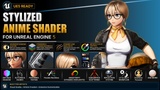
Stylized Anime Shader for Unreal Engine 5
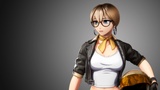
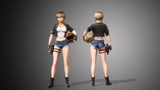
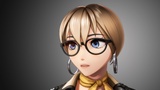
A flexible stylized rendering system for Unreal Engine 5, designed to give artists extensive control over anime-style lighting, materials, colors, shadows, highlights, and surface effects.
What started as a personal project for my own character work has grown into a much broader shading system through continuous development, experimentation, and user feedback.
The shader is not designed around reproducing one specific anime style. Instead, it provides a collection of tools that can be combined to create different stylized looks while keeping the artist in control of the final result.
Artistic Control
The shader is built around the idea that stylized rendering does not have to follow a single workflow.
Depending on your asset and project, you can combine traditional material inputs, layered materials, hand-painted masks, vertex colors, procedural controls, UV-based effects, SDF textures, and custom maps.
Use the systems individually for a simple anime look, or combine them to build more complex character and material shading.
Key Features
Stylized Anime Lighting
Create controlled anime-style lighting using SDF-based face shadows, painted shadows, adjustable shadow transitions, shadow bands, lighting steps, and custom shadow colors.
The SDF system provides controls for shadow positioning, texture blur, transition softness, and other aspects of the lighting response.
Advanced Shadow & Penumbra System
Add custom color to the soft transition between light and shadow.
Penumbra tinting can be used with material shadows, painted shadows, and SDF-based lighting. An optional World Penumbra system can also extend the effect to world lighting.
Stylized Highlights
Create custom highlights that move across the surface according to either the camera or directional light.
Use procedural shapes or custom textures, control their movement through UV space, mask them using textures or vertex colors, and pack multiple highlights into a single RGBA texture.
Chromatic aberration is also available for additional stylization.
Dynamic Anisotropic Highlights
Create directional highlights and reflections that respond dynamically to camera and lighting direction.
Originally developed with hair in mind, the anisotropic system can also be applied to other surfaces and can be driven by procedural patterns, custom textures, tangents, and flow-map-style directional data.
MatCap Highlights & Colors
Use MatCap-based effects to create stylized highlights and view-dependent color variations.
MatCaps can be created procedurally or from custom textures, tracked to the camera, masked to selected areas, and combined with existing material shading.
Flexible Material Workflows
The shader provides both:
Standard Materials
A more traditional material-per-ID workflow.
Layered Materials
Combine different material types through masks while maintaining independent controls over colors, textures, normals, and other material properties.
Advanced Detail Maps
The detail system supports both Lit and Unlit materials and provides extensive control over surface detail.
Features include:
Normal maps
Ambient occlusion
Opacity
Specular
Roughness
Adjustable normal strength
Second UV projection
Triplanar projection
Surface masking
RGBA zone masking
Multiple detail setups on a single material
Stylized Subsurface Scattering
The shader includes multiple approaches for stylized subsurface effects, including Unreal's Subsurface Profile workflow and a simulated backlit method.
These can be used to add controlled light transmission and softer character shading while maintaining a stylized appearance.
View-Based Opacity
Create camera-dependent opacity effects for situations such as fading hair bangs away from the face.
The system includes controls for masked and translucent workflows, screen-space positioning, softness, radius, and distance-based opacity.
Artistic Color Control
Combine diffuse tinting, gradient coloring, shadow tinting, masks, MatCap colors, Fresnel, and other controls to create custom color workflows.
RGBA-based masking allows different settings and colors to be assigned to different parts of the same material.
Lit & Unlit Workflows
The shader supports both Lit and Unlit material approaches, allowing you to choose between greater control over the final stylized appearance and more direct interaction with Unreal Engine's scene lighting.
Designed for Artists
The shader has been developed with a strong focus on usability and organization.
As the project grew, I repeatedly reorganized the material parameters and underlying shader structure to make the system easier to navigate, maintain, and expand.
Included
The package includes the Unreal Engine project, shader materials, example assets, textures and masks, documentation (only YouTube videos at the moment), a tool for penumbra patching, and additional project files used by the shader.
Where applicable, source files such as Blender files are also included.
Unreal Engine Compatibility
Primary Engine Version: Engine Compatibility: UE 5.4+ (Created in 5.4.7)
Primary Use: Rendering, character presentation, portfolios, and other creative projects
The shader is designed specifically for Unreal Engine 5 and is focused on creating stylized anime and character-focused visuals with extensive artistic control.
The shader itself is primarily content-based and may remain compatible with newer Unreal Engine versions without requiring a separate project download. Compatibility with newer engine versions will be tested and added to the Fab listing as they are verified.
World Penumbra Compatibility
The optional World Penumbra system uses an engine shader modification and is therefore more dependent on the Unreal Engine version.
The included patcher is provided to install and restore this modification. The patcher may require updates when Unreal Engine changes the relevant shader files or implementation.
Please check the supported engine version listed for the World Penumbra patch before enabling it.
Performance
The shader has been developed with visual quality, flexibility, and artistic control as the primary priorities rather than aggressive optimization.
It was primarily created with rendering, character presentation, portfolios, and creative work in mind. Some advanced features can have a higher performance cost depending on how they are used and combined, particularly SDF lighting, subsurface effects, layered materials, and other complex shading systems.
This makes the shader best suited to projects where the final visual result and artistic control are more important than minimizing every possible rendering cost.
Continuous Development
This shader is slowly but surely developed during my free time.
New features have been added over time based on my own work, technical experimentation, and feedback from users. Existing systems are also regularly refined and reorganized as the project grows.
The goal is to keep expanding the shader while maintaining a flexible workflow and keeping the controls understandable for artists.
About the Project
This shader started as a personal technical challenge.
I originally built it because I needed a stylized shader for my own models. As I continued working with it, I kept adding systems whenever I encountered a new artistic or technical problem.
Over time, the project grew from a personal tool into a much larger shading system, and I decided to make it available to other artists.
The main idea has remained the same throughout its development: give artists control over the look instead of forcing them into a single predefined rendering style.
Use of AI
AI was used in a limited and specific way during development.
It was used to assist with the creation of some custom shader custom nodes and to stylize a reflection cubemap to better match the project's anime aesthetic.
Support
If you encounter a bug or have trouble setting up the shader, please use the available support/community channels.
I regularly try to help users troubleshoot issues and provide guidance on how to use the shader effectively.
Discord: https://discord.gg/wx6RASWfyu
Shader guide and updates playlist: https://youtu.be/mmLk_pSW71c
The extra files (World Penumbra, Blender files, documentation...) can be found in the project files under the subfolder "Extras".