Beschreibung
Your Primary Asset type is configured. GetPrimaryAssetIdList returns an empty array. There is no error, no warning, and no log line.
ScanPrimaryAssetTypesFromConfig skips an invalid entry with a bare continue, and the validity flag behind it is reported through ensureMsgf — which is compiled out of a Shipping build entirely. The entry is dropped and nothing happens. The Project Settings page still renders it as complete.
Primary Asset Doctor identifies which of seventeen root causes is live, explains it against the line of engine source that produces it, and repairs it.
Attribution is differential, not advisory. It runs the engine's own UAssetManager::SearchAssetRegistryPaths under your configuration, then again with exactly one thing changed. So it reports "Directories To Exclude is eating this type: 34 assets hidden" rather than "your exclusion list looks suspicious". It is not modelling the Asset Manager; it is asking it.
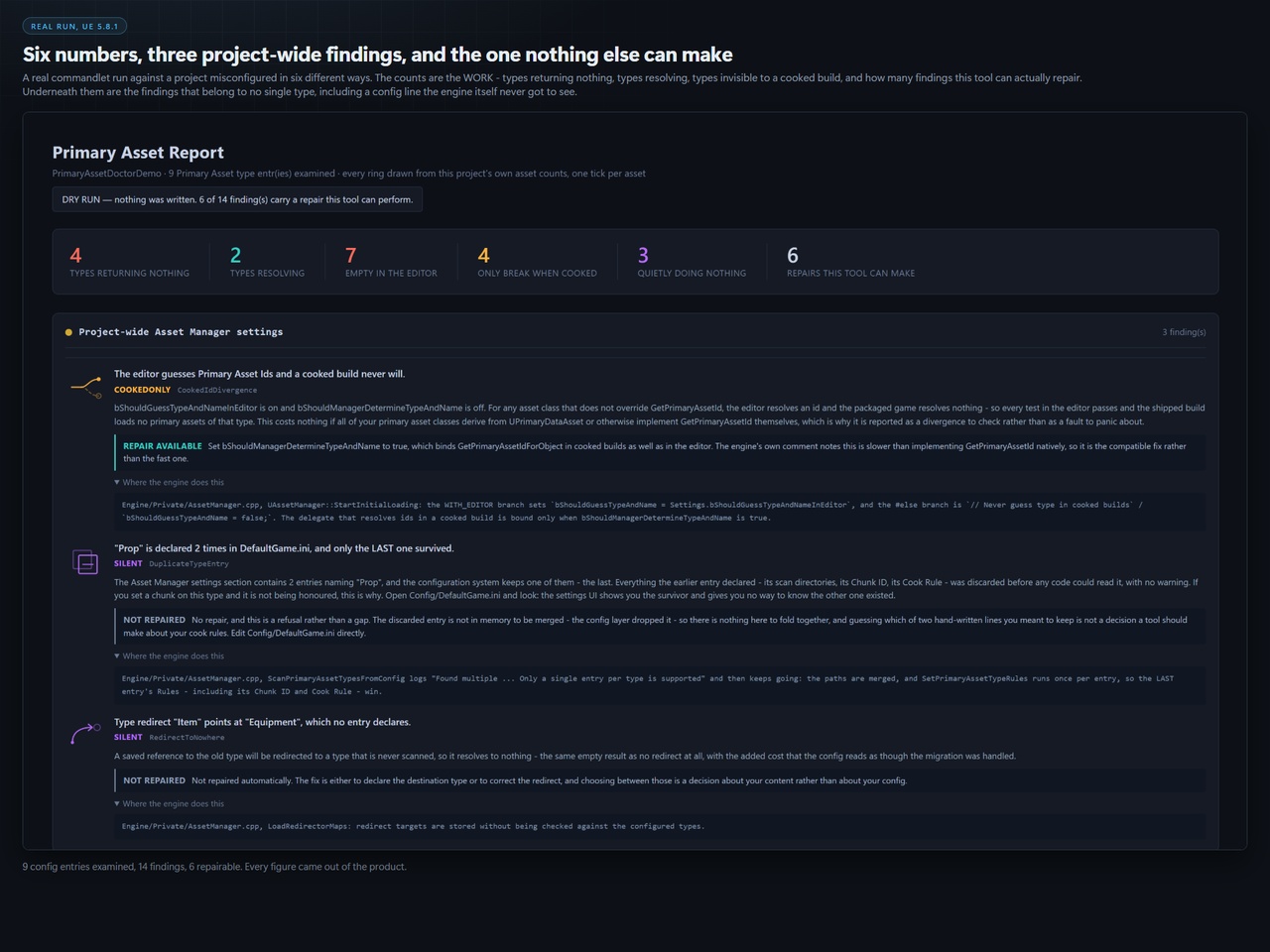
What it repairs, each previewed before you opt in with -Apply: a base class path a module rename broke; a Blueprint generated class where the native instance class belongs (the "_C" trap); Has Blueprint Classes set the wrong way; a scan directory that differs from a real one only in form; an exclusion entry provably suppressing a type; Should Manager Determine Type And Name; Is Editor Only; and config entries it has proven inert. It also reports — and deliberately does NOT repair — a type declared twice in DefaultGame.ini, where the config layer keeps only the last line and throws the earlier one's directories and Chunk ID away before anything can read them.
It backs up your whole DefaultGame.ini before the first byte changes, writes a JSON manifest of every change, and refuses to write at all if that backup fails. The default mode is a dry run.
It proves the repair rather than claiming it. After writing it reinitialises the Asset Manager and re-runs the entire diagnosis; the exit code comes from that second pass. If -Apply is given and no re-scan can be run, it fails rather than reporting an unchecked success.
Refusals are printed as prominently as fixes. It will not invent a type name, and it will not choose between two classes that share one — an ambiguous rewrite trades one silent failure for a harder-to-find one.
Nothing is loaded. The scan is asset-registry queries throughout. The only synchronous load is a single declared base class per configured type, which is what UAssetManager itself does at startup.
Ships full, readable C++ source and a commandlet for CI.
Getting StartedPrimary Asset Doctor has no toolbar button and no editor window — it is a commandlet, run from a terminal. That is deliberate: it is what makes it runnable from CI, and it is why nothing appears in the editor UI after you enable it.
Copy the PrimaryAssetDoctor folder into YourProject/Plugins/.
Restart the editor. Open Edit > Plugins, search for Primary Asset Doctor, and confirm it is enabled. (Nothing else will appear in the editor — see above.)
Close the editor and open a terminal in your project folder.
Run a dry run. It changes nothing:
"C:\Program Files\Epic Games\UE_5.8\Engine\Binaries\Win64\UnrealEditor-Cmd.exe" "%CD%\YourProject.uproject" -run=PrimaryAssetDoctor -Report="%CD%\Saved\PrimaryAssetReport.html" -Json="%CD%\Saved\pad.json" -unattended -nosplash -nopauseOpen Saved/PrimaryAssetReport.html in a browser. Every configured Primary Asset type is listed with its own ring, its findings, the repair for each one, and the line of engine source behind it.
When you are ready to let it write, add -Apply. It backs up your whole DefaultGame.ini first, writes an undo manifest beside it, and refuses to write at all if that backup fails. Afterwards it reinitialises the Asset Manager and re-runs the entire diagnosis, so the exit code is what the engine reports after the repair.
For CI, add -FailOn=fatal (or any / none) and read the exit code, or diff the JSON.
Full guide, with a worked run against a project broken in six different ways:
https://github.com/onefreeman1337/csaf-releases/blob/main/docs/primary-asset-doctor/README.md
Features:
Diagnoses the specific reason GetPrimaryAssetIdList returns an empty array and LoadPrimaryAsset fails with no error — a failure the engine reports through an ensureMsgf that is compiled out of Shipping entirely, so in a packaged build it is completely silent.
Seventeen root causes, each cited to the line of engine source where it happens: the "_C" generated-class trap, a Has Blueprint Classes mismatch, an unresolvable base class after a module rename, a scan directory the registry has never heard of, an exclusion entry whose SUBSTRING match swallows your content, an editor-only type that works in PIE and ships empty, and a duplicate declaration the config layer discards before any code can read it.
Attribution is DIFFERENTIAL, not advisory: it calls the engine's own SearchAssetRegistryPaths under your configuration, then again with exactly one thing changed.
Every finding carries its own repair, written into Config/DefaultGame.ini — backed up first, with an undo manifest, and nothing written at all unless you pass -Apply.
After writing it reinitialises the Asset Manager and re-runs the whole diagnosis, so the exit code is what the engine says afterwards rather than what the repair pass believes it did.
Refusals are printed as prominently as fixes, each declined by name with its reason.
A designed HTML report: every type drawn as a ring built from your own asset counts, beside sixteen authored cause marks. All generated in code — the plugin ships no image files.
Unmeasured is drawn differently from measured-zero. "We did not look" never renders as "there is nothing there".
CI-invocable commandlet with a -FailOn threshold and JSON output.
Nothing loads a content asset; the scan is asset-registry queries only.
Code Modules: PrimaryAssetDoctor — Type: Editor, LoadingPhase: Default. One module.
Number of Blueprints: 0
Number of C++ Classes: 13 — 5 classes, 5 structs and 3 enums, excluding two engine forward declarations. Exactly one is a reflected type (UPrimaryAssetDoctorCommandlet, a UCLASS).
Network Replicated: No. Editor-only tooling with no runtime or gameplay surface.
Supported Development Platforms: Windows (Yes), Mac (No), Linux (No).
Supported Target Build Platforms: Windows (Win64)
Documentation Link: https://github.com/onefreeman1337/csaf-releases/blob/main/docs/primary-asset-doctor/README.md
Example Project: Not included. The plugin is a commandlet with no scene, no actors and no content — it reads your Config/DefaultGame.ini and asset registry and writes a report, so an example project would be an empty level beside a broken config file. The documentation link carries the full worked run instead.
Important/Additional Notes:
Verified on Unreal Engine 5.8, Win64 — the only configuration our packaging gate has run against, and the only one claimed. The shipped PlatformAllowList is ["Win64"], so the declaration and this listing agree deliberately.
Third-party software: none. Dependencies are Epic engine modules only — Core, CoreUObject, Engine (public); AssetRegistry, Json (private), read off the shipped Build.cs.
Editor-only: the module Type is Editor, so it contributes nothing to a packaged title and adds no runtime cost.
Automation tests ship with the source: Automation RunTests CSAF.PrimaryAssetDoctor
Full source ships raw and readable. Nothing is minified or obfuscated.