Descripción
A photo mode is the cheapest advertising a small game will ever get. Every screenshot a player posts was made by your game, framed by someone who wanted it to look good. It is also one of the few features where the product is the beautiful picture.
Building one yourself is not hard because of the camera. It is hard because a photo mode reaches into five unrelated systems at once — view target, pause, mouse cursor, input routing and HUD visibility — and every hand-rolled version eventually forgets to put one of them back. The player leaves photo mode and the cursor is stuck, or the game stays paused, or the HUD never comes home.
ShutterMode writes down everything it is about to touch, before it touches it, and replays exactly that on the way out. Enter and leave as often as you like, across pawn deaths and level changes: the game comes back the way it was, or the step is skipped — never guessed at, never reset to a sensible default. Was the game already paused when the player opened photo mode? Then it is still paused afterwards. That is somebody else's pause.
Drop it in, call one function, wire four camera inputs. Done.
KEY FEATURES
The restore point. View target, pause state, mouse cursor, click and mouse-over events, input mode and HUD visibility are recorded on entry and replayed on exit. Weak references throughout, every step individually guarded against a dead pawn, a replaced controller or a changed level.
A leashed, collision-aware camera. Max Distance From Subject keeps the player from flying out of your level and photographing the back faces of the world, and a line trace stops the camera at walls. Both limits can be switched off. Free-fly or orbit-the-character.
It moves while the game is paused. Tick-when-paused on the camera and the camera manager pumped by hand — because a paused world stops updating the view, which is exactly why hand-built paused photo modes freeze.
Real cinematic depth of field. f/1.2 to f/22 with a configurable sensor width, manual focus, continuous auto focus, or a one-tap focus pull from the centre of frame.
Filters are data, not code. A Shutter Filter Asset holds the full grading channel set — saturation, contrast, gamma, gain, offset, white point — plus an optional post-process material. Your players' looks are authored in the Content Browser without touching C++, and the filter wheel can be swapped at runtime for unlockable filters.
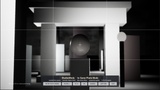
Composition guides on Canvas, not UMG. Rule of thirds, centre cross, golden ratio, safe frame, diagonals, letterbox bars at 2.39 / 1.85 / 16:9, plus a small read-out of filter, f-stop, focus distance and field of view. No UMG dependency, and they draw in the editor viewport too.
Capture that respects the frame. 1x / 2x / 4x resolution, PNG into Saved/Photos/, no HUD and no guides in the saved image — the overlays are hidden and a clean frame is allowed to draw before the shutter fires. Letterbox is burned in only if you ask for it. The finished path arrives through On Photo Captured.
IShutterModeAware — the plugin never touches your HUD. Anything that should be out of the picture implements the interface and hides itself. Actors are found automatically, widgets register once, and whoever was told photo mode started is told when it ends.
No input dependency. No Input Actions, no Input Mapping Context, no axis names in the plugin module — four Blueprint-callable functions you wire to whatever your game already uses. Nothing to collide with your project's input setup.
Console commands for QA and marketing capture: ShutterMode.Enter, .Exit, .Capture, .Filter, .Guides.
Project settings for every default: leash, speeds, pause, collision channel, output folder, resolution multiplier, filter list, guide flags.
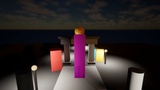
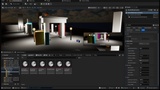
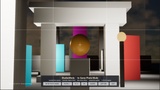
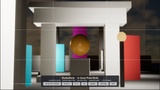
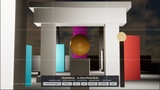
A demo map that actually demonstrates it. L_ShutterModeDemo is a plaza at last light, deliberately staggered in depth — subject at 6 m, archway at 27 m, skyline at 75 m — so f/1.4 and f/8 look like two different photographs. It ships with six ready-made filters (Neutral, Noir, Sepia, Cyberpunk, Warm Film, Bleach Bypass), a clickable demo HUD, and a demo Blueprint whose functions are one library call each, ready to copy into your own player controller.
WHO IT IS FOR
Solo developers and small teams shipping a single-player game who want the marketing feature for an afternoon of work instead of a sprint — and anyone who has already tried, and found out the hard way that the difficult part is putting the game back together afterwards.
HONEST LIMITS — PLEASE READ BEFORE BUYING
Still images only. There is no video or GIF recorder in here.
No character posing, no facial expressions, no emote control. That is a separate product and pretending otherwise would waste your money.
No sticker, frame or overlay-graphics library. Letterbox and composition guides, yes; an art pack, no.
No multiplayer photo pause. Pausing is local and single-player. In a networked game, turn the pause switch off and use the camera, filters, guides and capture without it.
Filters are colour grading plus an optional post-process material — not a shader construction kit.
Six filters ship, not a filter library. They are starting points, and they have to be added to the wheel once in the project settings — the plugin does not write to your project config.
Depth of field can only show what your scene gives it. If nothing in frame is at a different distance — or if the lens is very wide, which is what a 70° field of view is — no aperture value will look like anything. The documentation says so plainly and the demo map is built to prove it.
Photos are written as PNG. HDR .exr capture is not wired up.
Windows. Win64 is built and verified for this release. The plugin's PlatformAllowList is Win64 only; Mac and Linux are not supported.
Free UE5 snippet pack (10 C++ and Blueprint snippets): https://teufel-engineering.com/snippets