



Описание
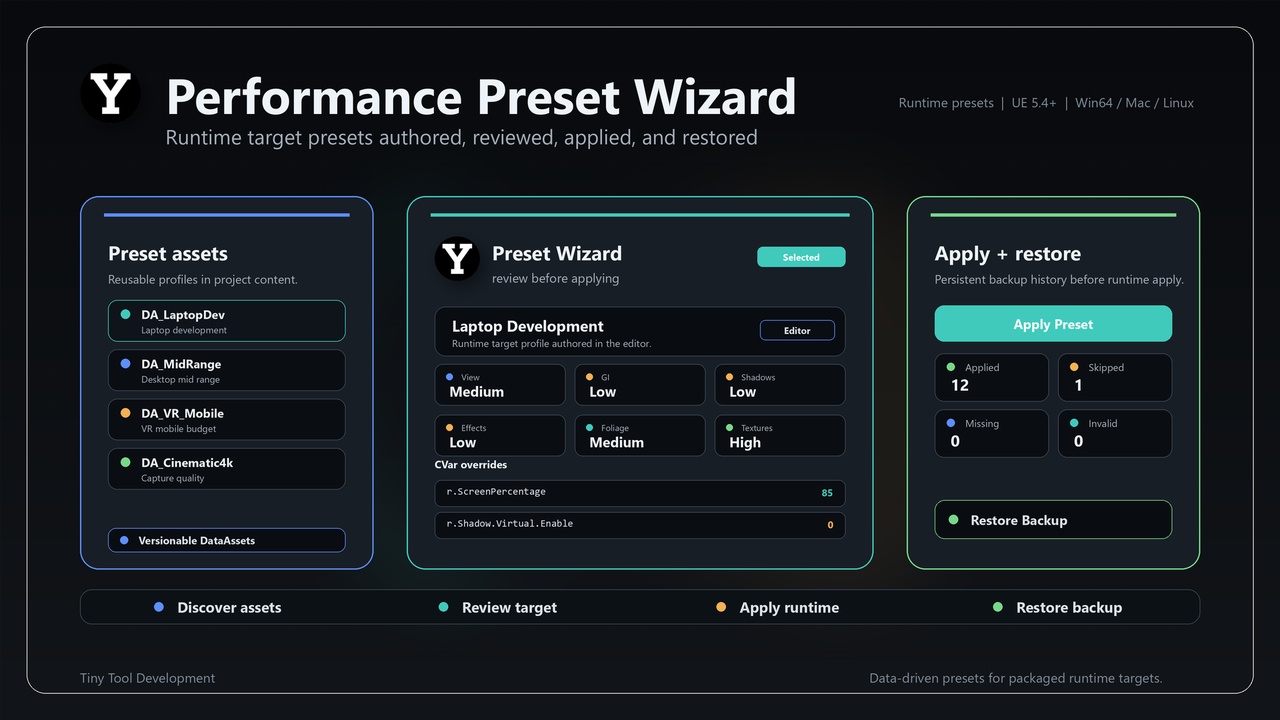
PerformancePresetWizard is a C++ Unreal Engine code plugin. Its current implementation is centered on this implementation scope: Author and review runtime target performance presets in the editor, then apply and restore them through C++ or Blueprint.
The plugin is implemented through 2 modules: PerformancePresetWizard, PerformancePresetWizardEditor. The source surface includes implementation concepts such as Sorted Preset Entry, Detail Layout Builder, Property Handle, Performance Preset Asset, S Multi Line Editable Text Box, Performance Preset Asset Customization, Performance Preset Wizard Editor Module, S Performance Preset Wizard Widget.
⭐ What You Get
🔹 Author and review runtime target performance presets in the editor, then apply and restore them through C++ or Blueprint.
🔹 Module layout: PerformancePresetWizard (Runtime, Default, platforms: Win64, Linux, Mac); PerformancePresetWizardEditor (Editor, Default, platforms: Win64, Linux, Mac).
🔹 Implementation footprint: 27 C++/Build.cs files inspected under Source.
🔹 Version: 1.1.2
⭐ Key Features
🔹 Implementation-derived scope: Author and review runtime target performance presets in the editor, then apply and restore them through C++ or Blueprint.
🔹 Module layout: PerformancePresetWizard (Runtime, Default, platforms: Win64, Linux, Mac); PerformancePresetWizardEditor (Editor, Default, platforms: Win64, Linux, Mac).
🔹 Implementation footprint: 27 C++/Build.cs files inspected under Source.
🔹 Source-backed concepts include: Sorted Preset Entry, Detail Layout Builder, Property Handle, Performance Preset Asset, S Multi Line Editable Text Box, Performance Preset Asset Customization, Performance Preset Wizard Editor Module, S Performance Preset Wizard Widget, Performance Preset Runtime Widget Entry, MCP Job Rec
🔹 Configurable data/settings fields include: bAppliedScalability, AppliedCVarCount, SkippedEditorOnlyCVarCount, MissingCVarCount, InvalidCVarCount, DisplayName, Description, TargetPlatform, ViewDistanceQuality, AntiAliasingQuality, ShadowQuality, GlobalIlluminationQuality, ReflectionQuality, PostProcessQuality, TextureQu
⭐ Typical Use Cases
🔹 Author runtime target performance presets and review them in the editor.
🔹 Apply and restore preset values through C++ or Blueprint-facing surfaces.
🔹 Keep performance configuration explicit and repeatable across project targets.
⭐ Included Content
🔹 Version: 1.1.2
🔹 Category: Editor Tools
🔹 Can contain content: Yes
🔹 Module: PerformancePresetWizard (Runtime, Default, platforms: Win64, Linux, Mac)
🔹 Module: PerformancePresetWizardEditor (Editor, Default, platforms: Win64, Linux, Mac)
🔹 Representative source types: FSortedPresetEntry, IDetailLayoutBuilder, IPropertyHandle, UPerformancePresetAsset, SMultiLineEditableTextBox, FPerformancePresetAssetCustomization, FPerformancePresetWizardEditorModule, SPerformancePresetWizardWidget, FPerformancePresetRuntimeWidgetE
⭐ Requirements & Compatibility
🔹 Distribution method: Unreal Engine code plugin
🔹 Engine target from descriptor: 5.4.0
🔹 Platform allow list from descriptor: Win64, Linux, Mac
🔹 Network replication: no explicit replication surface was detected in the inspected source
🔹 Third-party source folder: none detected under Source/ThirdParty
⭐ Notes
🔹 Network replication: no explicit replication surface was detected in the inspected source
🔹 Third-party source folder: none detected under Source/ThirdParty
🔹 Binaries folder in current package tree: not present
⭐ Support
🔹 Support URL from descriptor: mailto:[email protected]
🔹 Discord Channel: #performance-preset-wizard (https://discord.gg/7hVW5cqUvw)