


Description
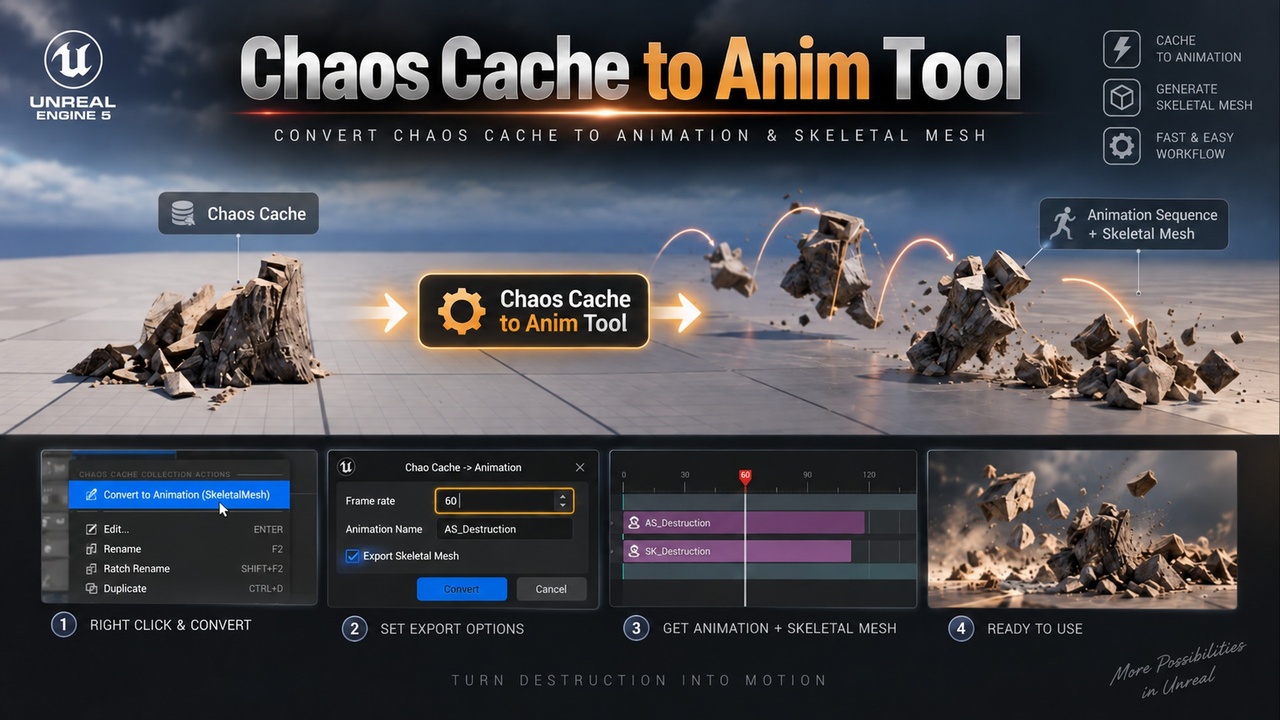
Chaos Cache to Animation bakes a recorded Chaos Cache (Geometry Collection destruction) into a standard Animation Sequence on the Skeletal Mesh created by Unreal's built-in "Export to SkeletalMesh". Right-click your Chaos Cache Collection, press Convert, and your destruction becomes a regular animation asset you can use anywhere - no Cache Manager or heavy cache playback needed in your shots.
FeaturesOne click - right-click a Chaos Cache Collection and choose Convert to Animation (SkeletalMesh).
Automatic Skeletal Mesh - SK_ / SKEL_ are exported from the Geometry Collection if they don't exist yet (one bone per fractured piece).
Re-fracture safe - if the Geometry Collection was fractured again, a new versioned skeleton (SK_Name_01, _02...) is exported automatically; older animations keep their original skeleton.
Custom frame rate - bake at 24, 30, 60 fps or anything from 1 to 240.
Keep every take - name each bake; nothing is overwritten by default (_01, _02...), so you can re-simulate and collect variations.
Accurate - follows the same cluster-breaking logic as Chaos cache playback.
Works everywhere - Sequencer Skeletal Animation track, Animation Blueprint, Control Rig, FX, FBX export to Maya or Blender.
Scriptable - callable from Blueprint and Python for batch pipelines.
Fracture your mesh into a Geometry Collection.
Record the simulation with a Chaos Cache Manager.
Right-click the Chaos Cache Collection and choose Convert to Animation (SkeletalMesh).
Set frame rate, name and overwrite option, then Convert.
A baked skeletal animation stores one transform per piece per frame, so it is lightweight, portable across levels and projects, and easy to retime, blend and layer with Control Rig or FX - just like any other animation.
Technical detailsEditor-only C++ plugin, one module (ChaosCacheToAnim), full source included.
Depends on the engine plugins Chaos Caching and Geometry Collection.
Supported platform: Windows (Win64). Unreal Engine 5.8.
The full recorded cache is baked; Sequencer section offsets / play rate are not applied - edit those on the resulting animation.
Scaled Geometry Collection components are not fully supported (a warning is logged).
After re-fracturing, record the cache again before converting.