Descrição
Base Protection – Verse system for UEFN
Protect a base for a set time with barriers that turn on, count down, then turn off. Perfect for tycoon, "steal", raid and base-defense maps where players need a safe window.
Everything runs from a single Verse device. Add your bases to the list, assign their barriers and a button, and play.
FEATURES
- One or several barriers per base (doors, walls, force fields)
- Activate with a Button, a Trigger device, or from Verse
- Global duration, with an optional different duration per base
- Optional cooldown before the protection can be used again
- Choose what happens when activated again: ignore, restart the timer, or add time (with an optional cap)
- Status billboard per base: "PROTECTED 15s", "Ready in 10s", "Protection ready"
- On-screen countdown for the player who activated it
- Cooldown message when a player presses too early
- Stops automatically when the player who activated it leaves
- Optional stop trigger to end the protection immediately
- Multiplayer ready, any number of bases
HOOKS FOR YOUR OWN SYSTEMS
- No code: a Trigger device fires when the protection starts and another when it ends. Wire them to sounds, VFX, HUD messages...
- Verse: ProtectionStartedEvent and ProtectionEndedEvent give you the base and the player
- Verse: public functions ActivateProtection, StopProtection, IsProtected, GetRemainingTime, GetCooldownRemaining. For example, block stealing while a base is protected.
WORKS WITH PLAYER BASE MANAGER
Also own Player Base Manager? Connect both without code or wiring, just by sharing a Trigger device:
- Base protected automatically as soon as a player gets it
- Protection button that only the base owner can use
- Protection stopped when the base is freed
Base Protection also works perfectly on its own.
WHAT'S INCLUDED
- base_protection_device.verse (single file, no dependencies)
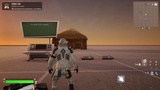
- Demo level with 2 bases (different durations, cooldown, status billboards)
- Setup guide
SETUP (5 minutes)
1. Place Barrier devices on the entrances of each base
2. Place a Button and an optional Billboard in front of each base
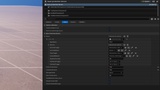
3. Place the device and add one entry per base in the Bases list
4. Set the duration, cooldown and retrigger mode
NOTES
- This product uses only content created by the author and Fortnite assets available in UEFN. It does not include, use, depend on or distribute any third-party software.