Opis
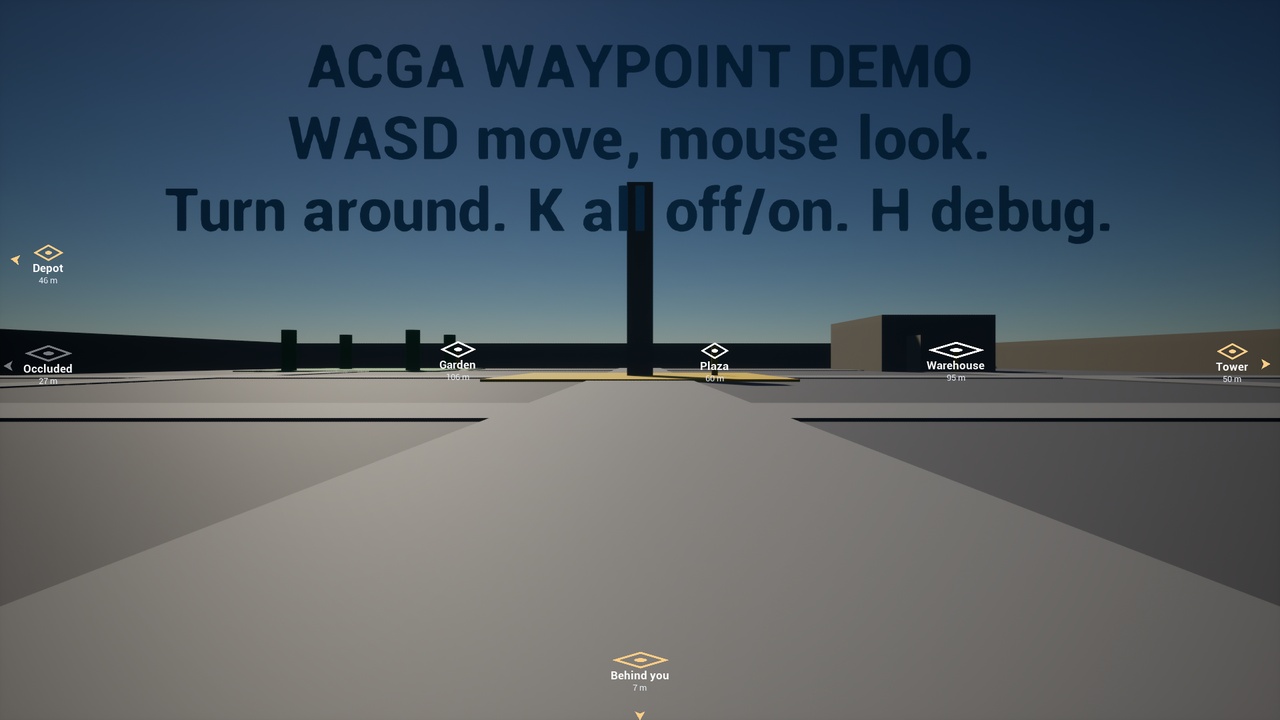
Screen Waypoint Markers puts a marker on screen over any actor and, when the actor leaves the view, pins it to the edge of the screen with an arrow pointing at it. It is for any game where the player has to find something in a 3D world: objectives, extraction points, teammates, quest targets.
It keeps working when the target is behind the camera. That is the case most off-screen indicators get wrong: the marker vanishes, or jumps to the wrong side. Here a target directly behind the player gives a steady marker on the bottom edge that follows smoothly as they turn.
Drop-in and deletable. Add one component to an actor you already have. It works on your existing character, GameMode and HUD without reparenting or changing them. It is the engine's own Widget Component, so there is no new API to learn, and Get User Widget Object keeps working because the plugin never wraps your widget. Delete the component and disable the plugin, and your project is exactly as it was.
Features
Works on any actor: add the ACGA Screen Waypoint component or drag in the ready-made BP_ACGA_Waypoint. It draws a marker right away, with nothing to author first.
Clamps to the screen edge, in a rectangle or an ellipse, with a margin you set.
Stays correct behind the camera, resolved in view space rather than guessed.
Shows the distance and a label, with fade and hide distances you set per marker.
Optional occlusion check, with a shared trace budget so a hundred markers do not cost a hundred traces a frame.
On-screen cap with priorities: when too many compete, the most important and the nearest win.
Change the look without UMG: style and icon-set Data Assets for tints, arrow, fonts and icons. Or use your own widget: derive from the included base class and the state is already bound.
Blueprint events for every change (clamped, occluded, shown, hidden), so you react instead of polling.
A debug view (ACGA.Waypoint.DebugDraw 1) that lists every marker's state, widget and icon.
Updated by one subsystem on a fixed rate rather than one tick per marker.
What is not included
No minimap, compass or full-screen map.
No navmesh path drawing.
No quest or objective system. The plugin tracks actors; your game decides what is an objective.
No replication. Markers are local and cosmetic. Drive them from state your game already replicates.
No world-space (3D billboard) mode, and no VR support.
Art is simple placeholder icons and arrows, made to be replaced with your own.
Markers pinned to the same screen edge are not spread apart yet: with several targets off-screen in the same direction, their labels can overlap. Planned for v1.1.
Demo map included. DemoMap_ACGA_Waypoint plays as soon as you open it. It has its own character and controls, and a waypoint right behind where you start.
Documentation ships inside the plugin: a user guide PDF for designers and artists, and a technical README covering every setting and the Blueprint API. Questions and support go through this listing's Comments, which open its Epic Developer Community thread.