الوصف
Run any system command from Blueprints with live line-by-line output, exit codes, timeout, cancel and stdin — plus process kill/list, PowerShell & Bash, env vars and launch-arg parsing. Win · Mac · Linux. Zero C++.
DOCUMENTATION
Your game lives inside an operating system — launch tools, check installs, kill stuck helpers, read launch arguments. Unreal gives Blueprint almost no way to do it. Pro CMD gives you all of it.
28 hand-crafted Blueprint nodes. One node per job. Zero C++.
Watch your commands run — live
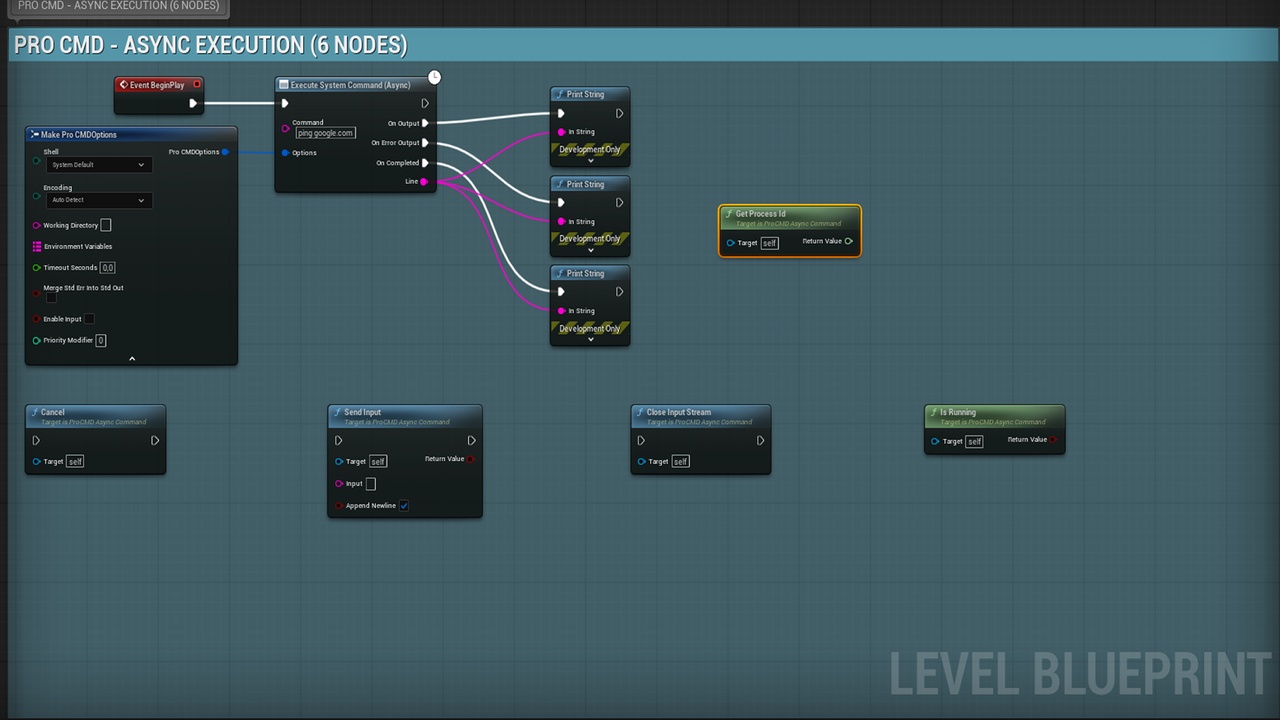
On Output fires on the game thread for every line the moment the process prints it. Progress bars, in-game consoles, FFmpeg progress — real time, zero hitching. The game thread is never blocked.
Stay in control
Cancel kills the process AND its whole child tree. Timeout auto-kills stuck tools. Send Input types into interactive CLIs (y/n prompts, REPLs). You always have the PID.
Know exactly what happened
Real exit codes, separate stdout/stderr, duration, timeout/cancel flags. bSuccess means one thing everywhere: launched, finished, returned 0.
Four shells, three platforms
CMD, PowerShell, Bash, Zsh — or the platform default. The same graph runs on Windows, macOS and Linux.
Output that reads correctly
Automatic encoding detection (UTF-8 ↔ Windows code pages): Turkish, CJK and Cyrillic console output decodes cleanly. No more ���� in your UMG.
The whole OS toolbox
Find / list / kill processes by id or name · open any file with its default app · open URLs · reveal in Explorer/Finder · get & set environment variables · Does Command Exist PATH checks · read -Flag and -Key=Value launch arguments.
Built for shipping
Pure C++ runtime module using only public engine APIs — no editor dependencies, no third-party libraries. UE 5.1 – 5.7 from a single source. Full C++ API (FProCMDRunner) included for programmers.
Stop alt-tabbing your players. Drop in Pro CMD and wire the OS into your game.