


Açıklama
Powerful Unreal Engine Editor plugin that analyzes Blueprint graphs, structs, and enums to convert them into clean, readable, and production-ready C++ code. Accelerate your migration pipeline, eliminate runtime Blueprint overhead, and streamline your workflow with real-time code generation, side-by-side verification, and one-click batch exporting.
Important Notice: This plugin generates high-fidelity C++ code as a starting foundation, but complex graph logic may require manual adjustments to compile or run as expected. A basic to intermediate understanding of Unreal Engine C++ is strongly recommended—if you have no C++ background, troubleshooting generated code will be difficult.
Developer Assistance
Join our DISCORD for support and updates.
Read our detailed DOCUMENTATION to get started with setup and integration.
DEMO VIDEO: See Blueprint to C++ Converter in real Unreal Engine workflows.
Note: If this plugin is not available in your region, contact Cyronic Studio on Discord.
Core Features
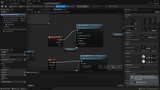
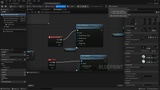
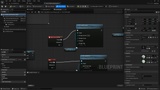
Graph-to-Code Conversion: Automatically translates complete Blueprint event graphs, functions, macros, and construction scripts into clean, idiomatic C++.
Struct & Enum Decompilation: Full conversion of User Defined Structs into USTRUCT(BlueprintType) with default member initializers, and User Defined Enums into enum class : uint8 with sanitized display names.
Batch Folder Exporting: Right-click folders or multi-select assets to batch export entire asset trees with a real-time progress bar, cancellation support, and summary reports.
Configurable Project Settings: Customize export directories (Public/Private), toggle directory picker prompts, preserve subfolder hierarchies, and configure compact toolbar labels via Project Settings -> Plugins -> Blueprint to C++.
Input Translation: Full translation support for both Enhanced Input actions and legacy input systems.
Metadata & Replication: Preserves replication rules (Replicated, ReplicatedUsing), category tags, and UPROPERTY specifiers automatically.
Smart UHT Resolution: Automatically handles #include dependencies, module API export macros (<PROJECT>_API), parent class resolution, and cross-engine pointer standards (TObjectPtr on UE 5.x vs raw pointers on UE 4.27).
High-Fidelity Migration: Built as a reference tool for refactoring and native optimization without manual boilerplate.
Code Viewer & Diagnostics
Open via Toolbar → C++ (or Export C++), the Asset menu, or right-click any supported asset in the Content Browser.
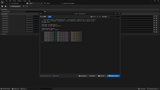
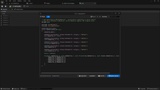
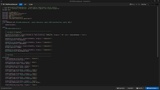
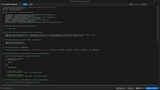
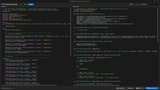
Side-by-Side Viewer: Inspect generated .h and .cpp files simultaneously in clean split panels.
Syntax Highlighting: Authentic C++ code styling for types, functions, macros, and keywords.
Search & Navigation: Built-in keyword search, match navigation, and word wrapping.
Instant Export to Source: One-click write to your project source tree with dynamic status feedback, automatic OS folder opening, and direct configuration shortcuts.
Asset Editor Integration: Dedicated toolbar buttons and menus across Blueprint, Struct, and Enum asset editors.
Standard Workflow
Step 1: Select any Blueprint, User Defined Struct, User Defined Enum, or entire folder in the Content Browser.
Step 2: Analyze nodes, variables, type lowering, and component dependencies automatically.
Step 3: Generate formatted .h header and .cpp implementation files with automated #include tracking and proper UHT macros.
Step 4: Review side-by-side with syntax highlighting or preview directly.
Step 5: Export directly into your project's Public/ and Private/ C++ source directories.
Supported Asset Types
Actors & Characters: Standard actors, playable characters, and pawns.
Custom Structs: User-defined structs converted directly to C++ structs.
Custom Enums: User-defined enums converted to C++ enum classes.
UI Widgets: Menus, HUDs, and user interface widgets.
Animation Blueprints: Character animation graphs and state machines.
Gameplay Abilities (GAS): Ability and gameplay effect blueprints.
Control Rigs: Character animation rigs and procedural controls.
Level Blueprints: Level scripts and map-specific logic.
Technical Requirements
Supported Versions: Unreal Engine 4.27 up to Unreal Engine 5.8+
Type: Unreal Engine Editor Plugin
Dependencies: Core, CoreUObject, Engine, Slate, SlateCore, UnrealEd, KismetCompiler, BlueprintGraph
Language Support: Blueprint (Yes), C++ (Yes)
Important Notice: Generated code is intended as a high-fidelity reference for migration and refactoring. Always verify generated code against the original Blueprint before production deployment.
Developer: Cyronic Studio.