描述
🎦Trailer | 🔴Youtube (Includes tutorials) | [email protected]
Quickly compress and optimize OpenVDB files and animated VDB sequences
Designed for Unreal Engine Sparse Volume Texture workflows
Supports individual VDB files and batch sequence compression
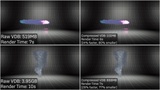
Choose a target file-size reduction of up to 95%
Includes simple profiles for higher quality, balanced results, or smaller files
Automatically detects and processes complete VDB sequences
Preserves grid types, metadata, transforms, frame names, and sequence structure
Automatically organizes batch-compressed sequences into separate named folders
Includes optional full-quality analysis and detailed JSON/CSV reports
Control worker threads and memory usage
Supports drag-and-drop operation, light and dark modes, and advanced compression settings
Works entirely offline with no internet connection required
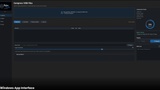
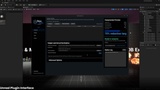
Available as a standalone Windows application (can be found in additional files section) and Unreal Engine editor plugin
since the final results are still .VDB they can be used on any software that supports VDB such as: Blender, C4D, Maya, Nuke and etc...
To see how the plugin works there is a Documentation pdf included but also by watching the trailer you can see how it works, no matter if you use the app version or the plugin version, you simply select your input file or folder, you select the compression rate, you select the output folder and then simply click on compress button and it compresses the VDB files to give you more performance friendly results while still havin high visual quality.
OTHER RELATED PACKS:
Cinematic Nuclear Explosion VDB Pack
Cinematic Tornado and Hurricane VDB Pack
Cinematic Nebula VDB Pack
Cinematic Meteors VDB Pack
Please dont forget to rate ;)
Email: [email protected]