Descrizione
Version 2.0 is out!!
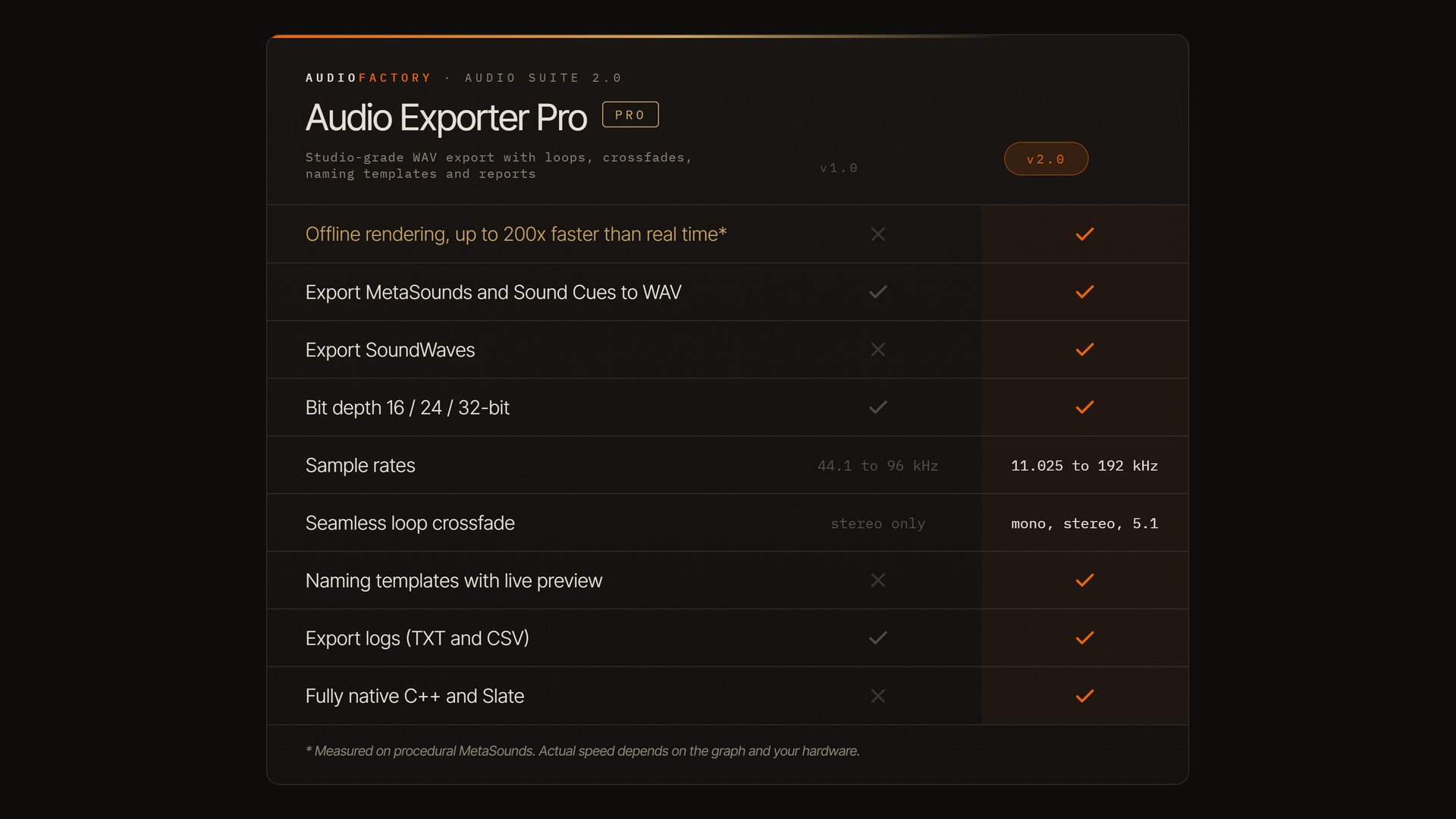
A new offline rendering engine up to 200x faster than real time, and rebuilt fully native in C++ and Slate. Details under New in 2.0.
Support
Free version: Audio Exporter on Fab
Render and export your entire project at blazing speed and studio quality.
Audio Exporter Pro exports MetaSounds, Sound Cues and Sound Waves to WAV with full control over quality, naming and loops. 2.0 moves it onto our brand-new offline rendering engine: the audio is computed directly instead of played back and captured, so a batch of one-minute loops finishes in seconds, not minutes.
Features
Batch export of MetaSounds, Sound Cues and Sound Waves to WAV
16-bit PCM, 24-bit PCM and 32-bit float
10 sample rates: 11.025, 16, 22.05, 32, 44.1, 48, 88.2, 96, 176.4 and 192 kHz
Offline rendering engine, up to 200x faster than real time
Up to 20 one-shot and 20 loop variations per asset
Loops up to 10 minutes with equal-power crossfades up to 10 seconds, on mono, stereo and surround
Seam scan for click-free loop points
Naming templates for files and folders (AssetName, Variation, SampleRate, BitDepth and more) with live preview; repeated exports never overwrite silently
Optional peak normalization to -1 dBFS
Text and CSV reports saved next to the audio in one timestamped session folder
Cancel at any point and keep the files already written
Blueprint batch API
Native Unreal window: Enter runs, Escape cancels
New in 2.0
Offline rendering, up to 200x faster than real time. The same engine that powers Audio Normalizer. Long loops and large batches stop being a coffee break or an overnight run.
Fully native C++ and Slate. Rebuilt on the engine's own code and widgets: instant startup, engine-native look, and fast moves to each new engine version.
Sound Wave export. Plain Sound Waves now export alongside procedural sources.
10 sample rates. Up from four.
Seamless loops on every channel layout. Crossfades now work on mono, stereo and surround sources, and the seam scan picks the quietest point around the loop for a click-free join.
Naming templates with live preview. See the exact output name before you render.
Clean starts. Every file begins on the source's first frame; the engine's own start-up silence is gone. Authored silence, delays, effect tails and reverb decays are kept.
Note: uninstall the free Audio Exporter before installing Pro.